
A worker falls from scaffold on a Sydney site. People reach for their phones, the supervisor tries to control the scene, and someone asks the question that determines the next seventy-two hours: who calls the regulator, and what gets recorded first?
An incident reporting policy template must answer that question under pressure. It should guide emergency response, scene preservation, statutory triage, subcontractor routing and evidence retention. A form that only captures the injured person's name and a short description may satisfy an internal filing habit, but it won't reliably support a WHS Act decision.
For Australian construction, manufacturing and industrial businesses, the policy should work as a decision-support tool during the first ten minutes, then remain useful through investigation, corrective action and record storage.
Table of Contents
- The First Ten Minutes After an Incident
- What AU Law Actually Requires in an Incident Report
- Required Fields in a Compliant Template
- Reporting Workflow and Escalation Logic
- Investigation Steps That Close the Loop
- Connecting the Template to a Digital H&S System
- Customising and Rolling Out the Template
The First Ten Minutes After an Incident
The first person at the scene shouldn't have to search a shared drive for the reporting process. Your policy needs a visible response sequence that tells the worker or supervisor what happens immediately.
Make the first actions unmistakable
The sequence should be short and ordered:
- Control immediate danger. Stop work, isolate plant or energy sources where safe, establish an exclusion zone and prevent further exposure.
- Call emergency services. First aid and emergency medical care take priority over documentation.
- Preserve the scene. Don't move plant, materials or other evidence unless needed to rescue someone, make the area safe or prevent another incident.
- Notify the operational chain. The supervisor alerts the site manager, principal contractor and relevant PCBU representative.
- Capture initial facts. Record the time, location, people involved, visible conditions, immediate actions and witnesses before recollections change.
The template should show these actions beside the first reporting screen. It should also identify the person responsible for each hand-off. A supervisor may control the area, while a senior officer decides whether the event requires regulator notification.
Practical rule: The form must support the response, not compete with it. Nobody should be completing a long narrative while an uncontrolled hazard remains active.
For vehicle events, a separate practical resource on steps after a truck accident can help teams think through immediate safety, evidence and communication issues. Your own procedure should then direct the worker to the relevant emergency, site and regulator contacts.
The policy should sit where frontline workers can reach it from a mobile device, noticeboard or site induction material. A clear incident reporting procedure can provide the operational structure, but the organisation still needs to insert its own sites, contacts, escalation roles and jurisdictional details.
What AU Law Actually Requires in an Incident Report
The legal threshold is narrower than many internal reporting categories. Under the model WHS laws, a notifiable incident is a death, a serious injury or illness, or a dangerous incident that exposes someone to a serious risk. Safe Work Australia's incident notification guidance explains the immediate notification duty for PCBUs and provides a national regulator map covering eight jurisdictions plus the Commonwealth.
A policy should use plain-English definitions. A serious injury or illness includes a case that would ordinarily require immediate inpatient hospital treatment. A dangerous incident can be notifiable even when nobody is injured, provided the event exposed someone to a serious risk.
The notification obligation starts when the PCBU becomes aware of the event. Your template therefore needs an awareness timestamp, not only an incident date and time. The policy should also state that regulator notification and workers compensation reporting are separate processes. One doesn't replace the other.
| Incident Type | Statutory Trigger | Notification Timeframe | Template Field Required |
|---|---|---|---|
| Death | A person dies from a work-related incident | Immediately after the PCBU becomes aware | Fatality flag, awareness time, regulator contact and notifier |
| Serious injury | The injury would ordinarily require immediate inpatient hospital treatment | Immediately after awareness | Injury details, treatment pathway, threshold decision and escalation record |
| Serious illness | The illness meets the model WHS serious injury or illness threshold | Immediately after awareness | Illness description, exposure details, treatment and decision authority |
| Dangerous incident | Someone faces a serious risk, even if no injury occurs | Immediately after awareness | Hazard, exposure, controls applied, scene status and regulator decision |
State and territory regulators use different contact channels and follow-up requirements. Build jurisdiction fields into the template rather than asking users to select from an unqualified national contact list. In Victoria, WorkSafe states that after an online notification form is submitted, the notifier receives a confirmation email and must retain a record of the form for at least five years.
A communication tool can support rapid updates between site teams, supervisors and management. For logistics operations, Pebb for logistics communication is one example of a channel that can sit alongside, but not replace, the formal incident record.
Required Fields in a Compliant Template
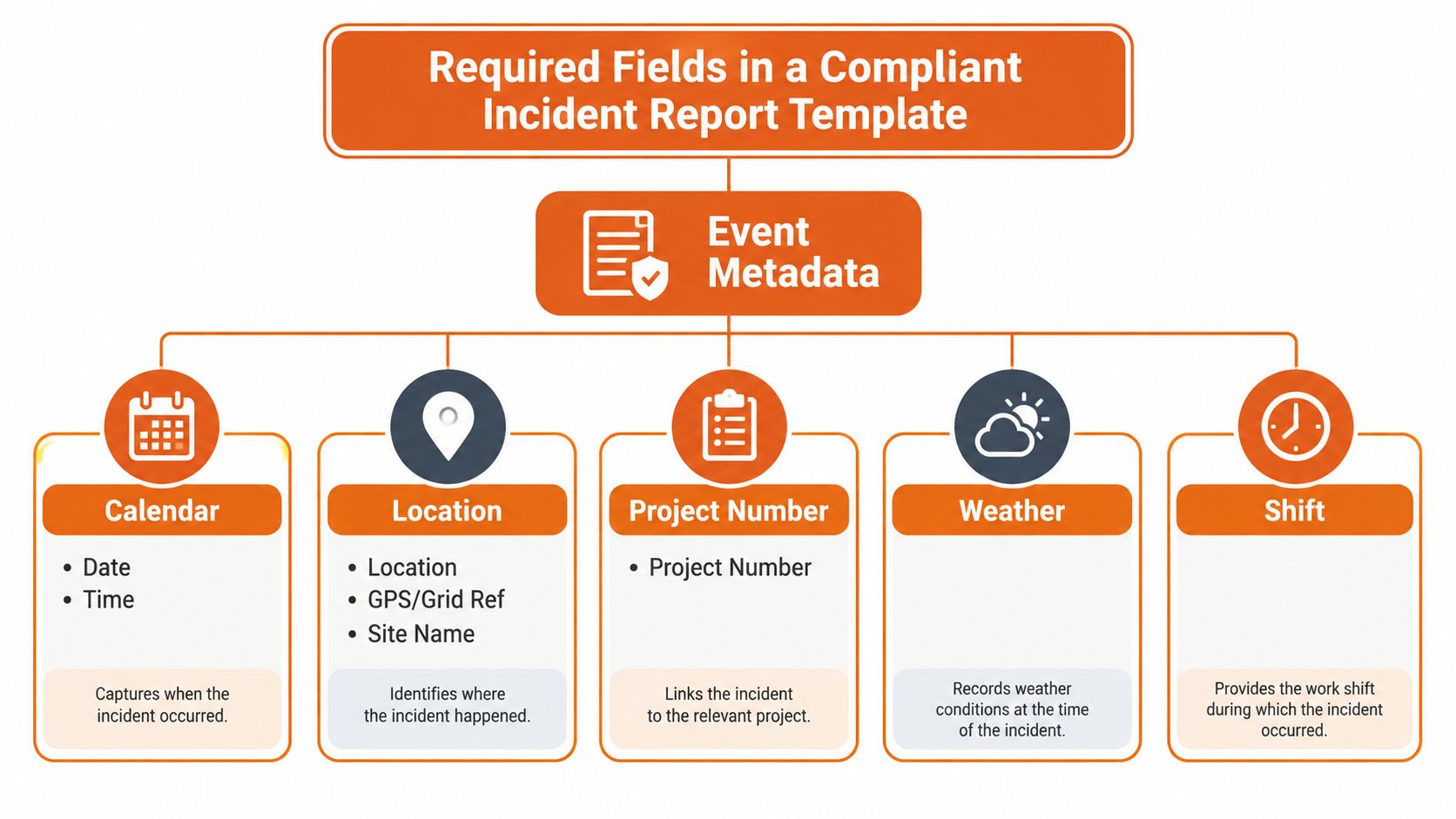
A usable template starts with event metadata. Capture the date, time, precise location, GPS or grid reference where relevant, site name, project number, weather and shift. These details establish the operating conditions and help investigators distinguish between events that occurred at different work fronts or during different handovers.
Identify the person and the exposure
The affected-person block should capture:
- Identity: Full name, role and contact details where appropriate.
- Employment status: Direct worker, subcontractor, visitor or member of the public.
- Employer chain: Contractor company and subcontractor tier.
- Work context: Task underway, work area, plant involved and relevant SWMS.
- Exposure status: Injured, exposed without injury, witness or responder.
These fields matter on mixed sites. A head contractor may need to investigate an event involving a lower-tier subcontractor, while the original PCBU may hold separate duties. If the form only asks for “employee name”, it loses the supply-chain information needed for follow-up.
Use structured classification
Use controlled categories for event type, such as slip, fall, struck-by, chemical exposure, psychosocial hazard or environmental event. Add a severity tier and a clear notifiable yes or no decision, supported by the statutory trigger selected by the reviewer.
The response section should record first aid, emergency services, isolation, shutdowns, scene changes and notifications. Add witness names and contact details, the supervisor on duty, photographs, documents and any initial statements. Keep a free-text chronology as well. Structured fields support trend analysis, while the narrative preserves what the first reporter observed.
A practical WHS incident report form should connect each field to a downstream use. Regulator evidence, workers compensation, root cause analysis and the retention record all depend on the report remaining complete, traceable and protected from casual overwriting.
Reporting Workflow and Escalation Logic
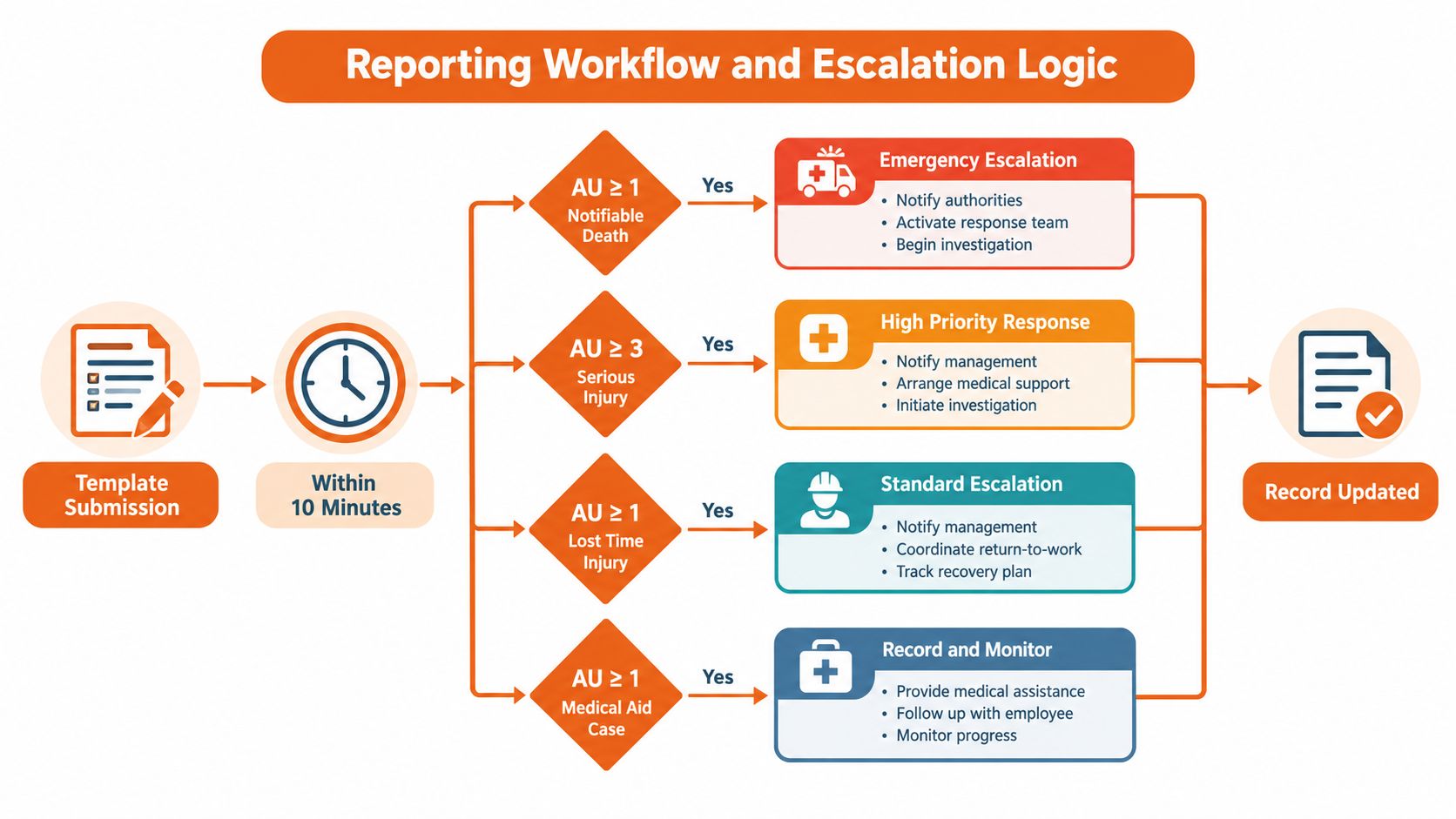
Treat the template as the first screen in a triage workflow, not as a standalone document. The submitter enters the initial facts, then the system or nominated reviewer routes the event according to the legal threshold, operational severity and site structure.
Set the decision path
The first review should ask three questions:
- Did someone die?
- Does the injury or illness meet the serious threshold?
- Did a dangerous incident expose someone to a serious risk?
If the answer may be yes, the reviewer escalates immediately to the named senior officer and starts the relevant regulator notification process. Don't wait for a completed investigation or a perfect narrative. The initial notification can be based on the facts known at the time, with supporting information added through the regulator's process.
If the event doesn't meet a notifiable threshold, route it according to internal severity. A first-aid case, near miss, plant damage event, psychosocial hazard or public-risk event may need different owners and controls. SafeWork SA's notification data illustrates why one undifferentiated incident bucket is weak. It recorded 844 notifiable incidents in 2024–25, compared with 1,224 in 2023–24, while triage complaints reached 2,532 in 2024–25, compared with 1,957 in 2023–24. The same report records serious injuries and fatalities falling from 464 to 356, dangerous incidents falling from 546 to 225, and prescribed-by-regulation notifications rising from 214 to 263. These figures support separate intake categories rather than a single severity label. (SafeWork SA notification data)
Assign ownership at every hand-off
The policy should identify the following roles:
- Submitter: The worker or supervisor on scene submits the initial report within the shift, using a contractor or visitor pathway where required.
- Initial reviewer: The area supervisor checks the classification, confirms immediate controls and preserves the scene.
- Investigator: The WHS manager assigns the investigation and tracks corrective actions.
- Authoriser: A named senior officer, usually a director or operations lead, authorises regulator notification. This person may delegate paperwork, but not the notification decision.
- Record-keeper: The WHS administrator maintains the final record, attachments, notifications and closure evidence.
Record a timestamp whenever the report moves between these roles. An unacknowledged hand-off should appear as an exception, not disappear into an inbox.
Route subcontractors through the same control
A subcontractor report must enter the same workflow as a direct-worker report. Tag it with the head contractor's project ID, the reporting company, the original PCBU details and the relevant site. This prevents a lower-tier contractor from keeping a serious event in a separate spreadsheet that the principal contractor never reviews.
Visitors and members of the public need an equivalent route. Give the supervisor authority to submit on another person's behalf, but preserve the affected person's status and the name of the person who entered the report. Frontline workers shouldn't have to understand the legal structure before they can raise a hazard or near miss.
The system should also include an after-hours route. The on-call contact, senior officer and regulator details should be visible from the form, with jurisdiction selected from the site record. Safe Work Australia's model framework requires PCBUs to notify the relevant regulator as soon as they become aware of a death, serious injury or illness, or dangerous incident. The process must therefore make the decision visible within minutes, not after the next business-day meeting.
SafeWork NSW's statutory reporting summary shows that the top five industries accounted for 60% of 8,206 notified incidents, reinforcing the case for industry-specific fields in construction, manufacturing and plant operations. (SafeWork NSW statutory reporting summary)
Use the same report ID for the original entry, regulator confirmation, photographs, witness statements, investigation, corrective actions and closure. That identifier is the thread that connects a rushed site report to the final audit record.
Investigation Steps That Close the Loop
An investigation should add facts and controls to the original record, not create a disconnected document that sits in another folder. The report number should appear on every photograph, statement, inspection note, action and approval.
Start with containment
First, isolate the scene, secure evidence and provide first aid. Record what changed and why. If equipment had to be moved to rescue a person or make the area safe, note the decision rather than allowing later reviewers to assume the scene was untouched.
Next, gather evidence while conditions remain clear. Link photographs, witness statements, plant inspection records, training records, SWMS and supervision information to the originating report. Use interviews to establish chronology, not to assign blame.
Test the causes and actions
Use a defined method such as ICAM or the Five Whys. The method matters less than the discipline of distinguishing immediate conditions from contributing factors and system weaknesses. An action such as “retrain workers” is incomplete unless the owner, due date, required evidence and verification method are recorded.
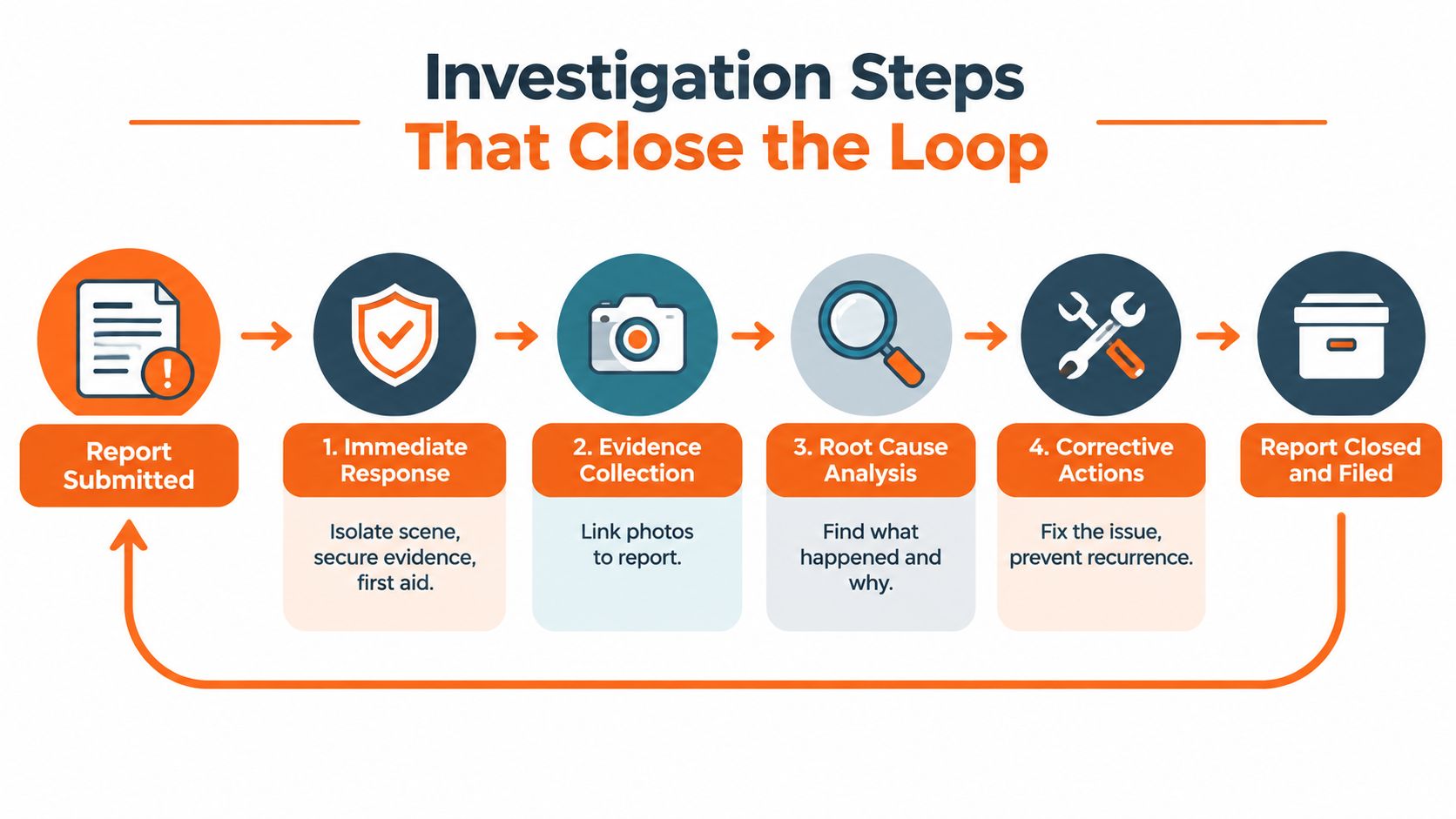
A practical ICAM investigation template can help investigators maintain a consistent structure. Close the report only after corrective actions have been verified, lessons have been shared with the affected work group and significant learnings have been considered across other sites.
Connecting the Template to a Digital H&S System
A digital form should change the workflow, not merely turn a paper page into a PDF. Login details can populate the reporter identity, while site records can supply the location and project information. Structured selections for injury type, severity and incident category reduce inconsistent wording and make triage easier to review.
Build the data path around decisions
A connected workflow can move the report through these stages:
- Submission: A worker or supervisor enters the initial facts from site.
- Validation: Required fields, location and person status are checked before submission.
- Triage: Severity and statutory trigger selections route the report to the correct reviewer.
- Escalation: Alerts go to the WHS manager and named senior officer when the threshold may be met.
- Investigation: A linked investigation record receives evidence, findings and actions.
- Reporting: Management can review open actions, overdue hand-offs and notification records.
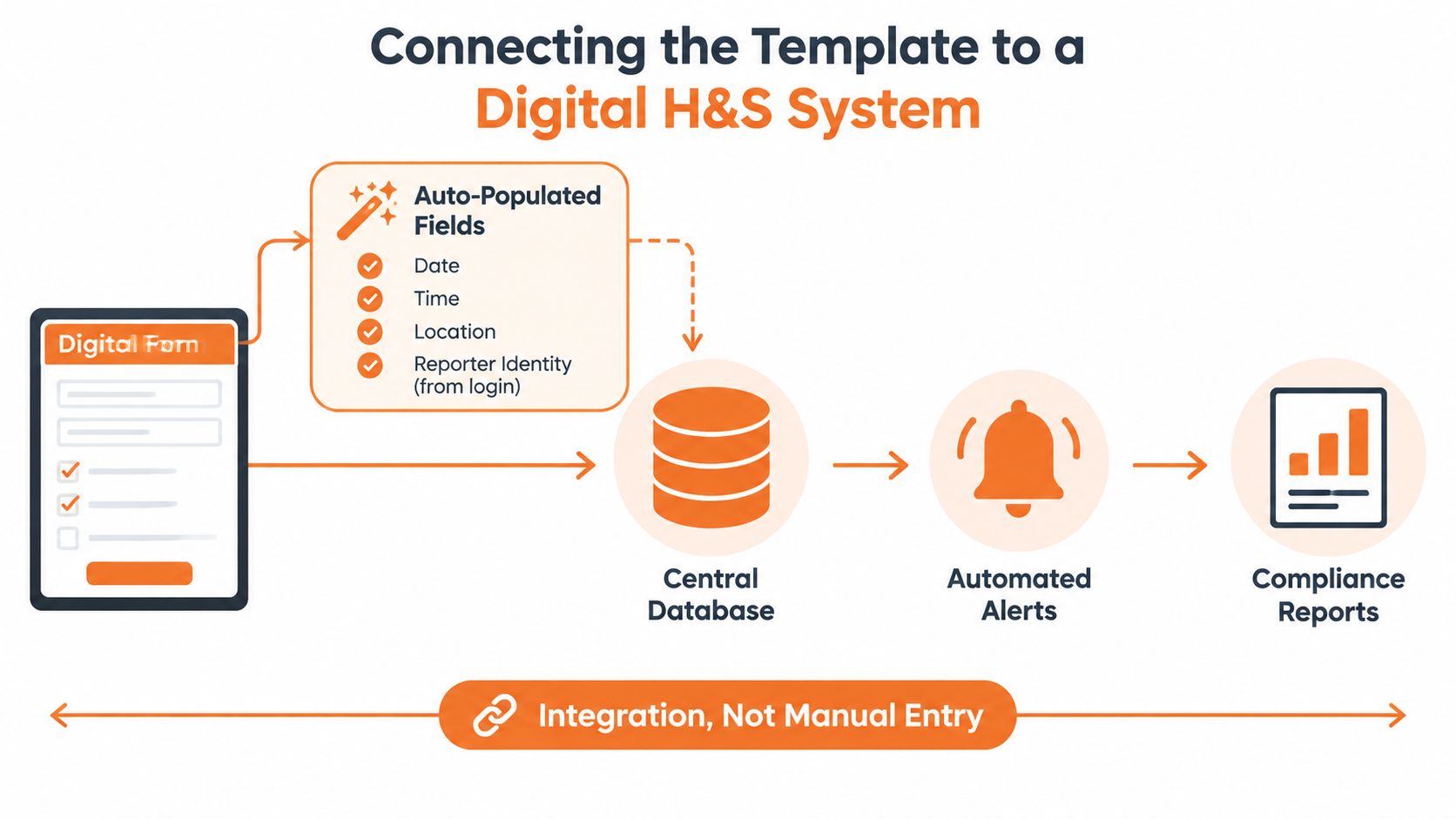
The advantage is structured continuity. A photo attached at submission remains connected to the investigation, and the regulator confirmation remains connected to the original decision. A scanned PDF or spreadsheet can store information, but it won't reliably enforce the sequence, ownership or escalation logic.
Choose the technology around the policy. SafetyCulture and other systems may suit organisations that already use them for inspections and corrective actions. Safety Space is another option that provides configurable H&S forms, multi-site and subcontractor oversight, incident records and linked accountability. The important test is whether the platform can preserve the audit trail, support jurisdictional routing and let authorised users see the status of each hand-off.
Don't automate the legal decision away. Automation can flag a possible notifiable event and notify the right people, but a named senior officer still needs a controlled process for confirming the decision and recording the reasoning.
Customising and Rolling Out the Template
A blank form fails because it leaves operational decisions unresolved. Before deployment, configure the form for each site, project and jurisdiction.
Use this checklist:
- Site data: Confirm site names, project numbers and cost codes.
- People data: Add worker, visitor, principal contractor and subcontractor fields.
- Contacts: Set the after-hours escalation contact and regulator details for each jurisdiction.
- Classification: Align severity categories with the regulator operating at the site.
- Timer: Set the notifiable-incident escalation timer at 30 minutes from submission as an internal control.
- Records: Define storage, permissions, attachments, version control and handover responsibilities.
- Training: Brief supervisors, PCBU representatives and subcontractors on decisions, not just field completion.
Run the first 30 days as a controlled rollout. Train the people who receive and classify reports before expecting frontline adoption.
| Week | Owner | Activity | Output |
|---|---|---|---|
| Week one | WHS manager and supervisors | Train teams on the form, thresholds, scene control and escalation roles | Supervisors can submit, review and escalate a report |
| Week two | WHS manager | Shadow the first three real reports from submission to closure | Friction points and missed hand-offs are recorded |
| Week three | System owner and operations lead | Update fields, routing and instructions based on observed use | Revised template and workflow |
| Week four | Senior officer and WHS administrator | Lock the version, publish the policy and brief subcontractors | Controlled release with named owners |
| Review point | WHS manager | Review completion time and notifiable-incident decision accuracy | Corrective changes for the next review cycle |
Set a 90-day review trigger. Examine whether reports are completed promptly, whether reviewers classify possible notifiable incidents consistently, whether subcontractor reports enter the same register and whether corrective actions close with evidence. Keep the policy short enough to use under pressure, but specific enough to make the legal and operational path obvious.
Safety Space provides configurable incident forms, linked investigations, corrective-action tracking and multi-site and subcontractor oversight for organisations replacing paper and spreadsheets. Visit Safety Space to review the platform and arrange a practical discussion about configuring your incident reporting policy template.
Ready to Transform Your Safety Management?
Discover how Safety Space can help you implement the strategies discussed in this article.
Explore Safety Space FeaturesRelated Topics
Safety Space Features
Explore all the AI-powered features that make Safety Space the complete workplace safety solution.
Articles & Resources
Explore our complete collection of workplace safety articles, tools, and resources.