
An audit trail is a chronological, tamper-resistant record of safety-related actions that proves who did what, when, and whether risks were addressed. In practice, that means the incident report, inspection, corrective action, approval and training record need to tell one coherent story, not sit in separate folders that no one can reconcile later.
A site manager knows the problem the moment an inspector asks for a recent incident file and the evidence is spread across email threads, paper forms and half-updated spreadsheets. The forms might exist, but the chain of action is missing. That is where compliance gets weak, because a stack of records is not the same thing as a defensible audit trail.

Table of Contents
- Why Audit Trails Matter for Workplace Safety
- What an Audit Trail Is and How It Works
- Key Features of a Compliant Digital Audit Trail
- Paper-Based Versus Digital Audit Trails
- Implementing an Audit Trail in Your Safety System
- Legal and Regulatory Audit-Trail Requirements
- Maintaining Audit-Trail Integrity Over Time
Why Audit Trails Matter for Workplace Safety
A supervisor can end up in front of an inspector after a fall, a near miss, or a chemical spill, and the first request is usually plain enough: show the record, show the corrective action, show the close-out. If the evidence sits in inboxes and loose folders, the explanation becomes harder than the incident itself.
That matters because Australian public-sector practice treats records as evidence of accountability, not just storage. The Archives Act 1983 requires agencies to create and keep records of performance, decisions, and actions, and the Australian National Audit Office says records support accountability to Parliament and the public, along with the integrity of public administration. In safety work, that logic applies directly to incidents, inspections, corrective actions, approvals, and training records, because those documents show what happened and who responded. The ANAO's records management guidance is a useful reminder that weak recordkeeping quickly becomes a governance issue.
What breaks first under scrutiny
The weak point is rarely the final form. It is the missing link between the first report, the risk assessment, the control, and the follow-up check. A signed inspection sheet proves very little if no one can show who reviewed it, when the fix was assigned, and whether the control stayed in place.
Practical rule: if the record cannot answer who, what, when, and what changed next, it will not hold up well under questioning.
The same pressure shows up in Australian audit activity. In ANAO's 2023 to 24 performance-audit data, governance or procurement issues appeared in 51% of the reports presented for tabling, and 7 of 8 procurement audits included recommendations about records management. Those figures show that traceability problems keep surfacing where formal scrutiny is strongest. For a WHS manager, the lesson is blunt. An audit trail is not an administrative extra. It is part of the evidence that risk was managed.
For a broader background on logging concepts, GoSafe Dark Web monitoring gives a plain-English description of data logging versus evidence trails.
What an Audit Trail Is and How It Works
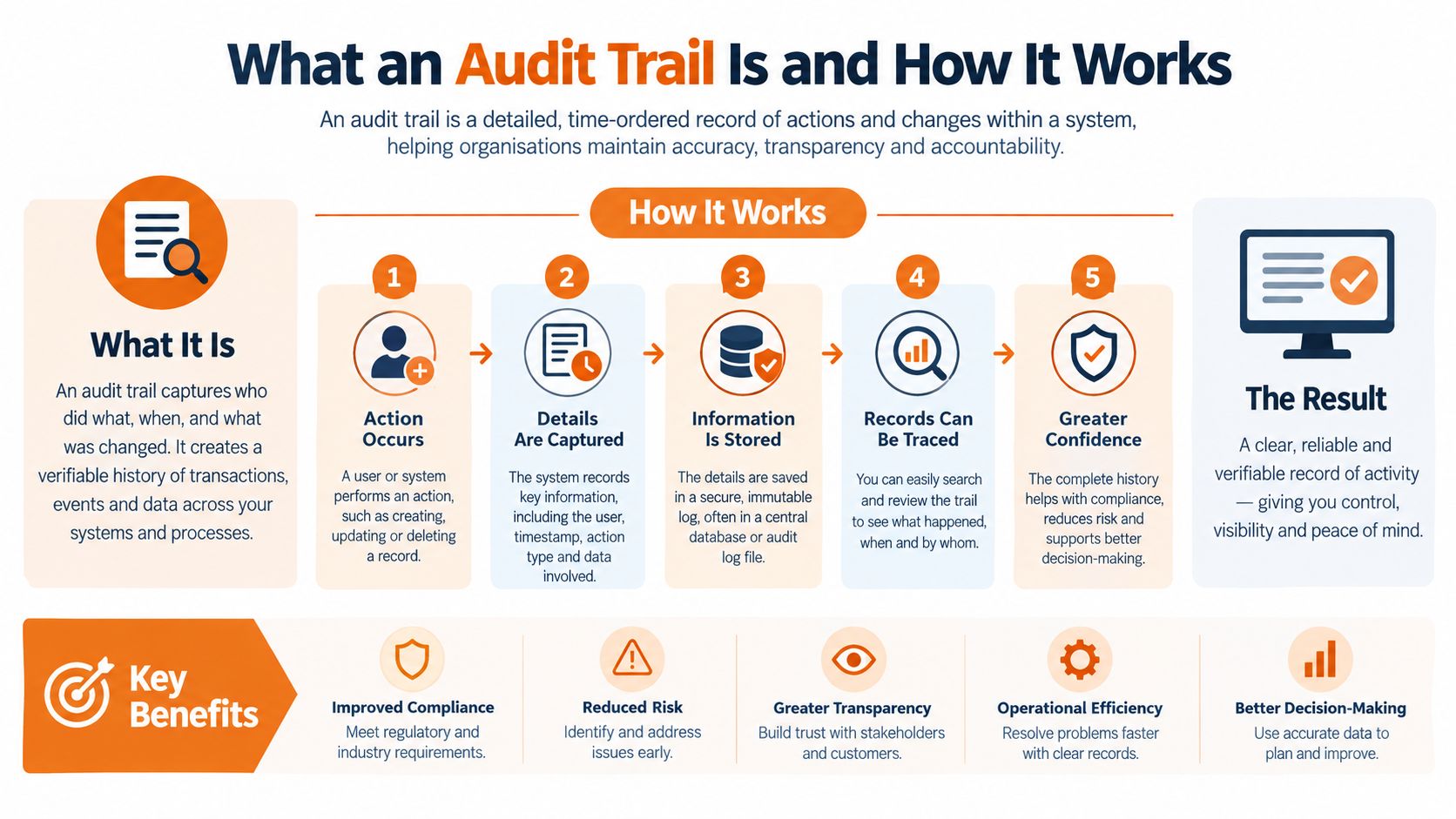
A real audit trail is more than a system log. It is a chronological record that lets someone reconstruct a safety event from start to finish, including who acted, what changed, when it changed and why the action was taken. In WHS terms, that means the trail should follow the path from hazard identification to control implementation and verification, not just capture a completed form.
From log entries to evidence chain
A useful trail starts with the smallest event and preserves the sequence. A hazard is raised. An inspector opens the record. A manager assigns a corrective action. A supervisor marks it complete. A reviewer confirms the control still works. Each of those steps should stay linked to the original record so the organisation can answer later questions without guessing.
That is why access, creation, modification, approval and corrective-action events matter. A trail that only stores the latest version hides the history. A trail that preserves the sequence shows the business logic behind the decision. For a site audit, that history matters as much as the final status.
A trail becomes defensible when it can be reconstructed without relying on memory.
For personal information and sensitive safety matters, the OAIC guidance is explicit that audit logs help detect and investigate unauthorised access, modification, disclosure or destruction of information under APP 11. It also points to the need for timestamps, user or service identity, the record accessed, the action performed, the outcome and, where relevant, the originating device or location. The OAIC's guidance is a practical benchmark for what a useful safety trail needs to capture.
What the reader should expect to see
A proper safety trail should show:
- Who acted, including ordinary users and administrators.
- What changed, including before-and-after values where possible.
- When it changed, with reliable timestamps.
- Why it changed, through approval notes or linked corrective actions.
- What happened next, so closure isn't just assumed.
That is also where the difference between passive logging and defensible evidence becomes obvious. Passive logging just records activity. Defensible evidence preserves the chain that proves the organisation made, checked and closed the decision properly.
Key Features of a Compliant Digital Audit Trail
A compliant digital trail has to do more than store events. It needs to prevent silent tampering, keep authority clear and make the history easy to verify later. In practice, that means designing the trail as an append-only record with controls around access, retention and review.
The technical features that matter
The core features are straightforward, even if the configuration isn't. Use server-generated timestamps so users can't backdate or forward-date actions. Give each event an immutable identifier so entries can be traced across systems. Restrict access through role-based permissions, and separate log storage administration from day-to-day user administration. Encrypt logs in transit and at rest so the trail doesn't become a security weakness of its own.
Integrity verification matters just as much. Chained hashes, write-once retention or another tamper-evident method gives the record evidentiary weight. Without that, a trail can be edited after an incident and still look clean on screen. In a dispute, that destroys confidence fast.
Why privileged activity needs tighter control
Administrators can usually see and change more than ordinary users, so their activity deserves separate oversight. The OAIC's assessment of the Australian Taxation Office noted logging of log-on, log-off, permission changes and password failures, with periodic review and timely analysis, plus proactive monitoring of sensitive system access. That assessment is a good model for how a workplace system should treat privileged activity, even if the safety context is different.
A practical setup should therefore:
- Log administrator actions separately from routine user actions.
- Flag bulk exports, after-hours access and repeated failed logins.
- Keep dashboard focus on unresolved anomalies, not just total event volume.
- Preserve metadata on exports so the export itself becomes part of the record.
If the dashboard only reports activity volume, it hides the real control issue, which is whether anything unusual was investigated and closed.
For a WHS platform, that means the trail should capture creation, amendment, approval, withdrawal and deletion events for incidents, hazards, inspections, corrective actions, SWMS, permits, training records and contractor documents. A searchable trail with event history is what turns later review into something factual instead of forensic guesswork.
Paper-Based Versus Digital Audit Trails
Paper still works for some low-frequency tasks, but it breaks down fast when records need to be searched, linked and defended. Digital trails are better when the organisation needs version history, access control and reliable retrieval under pressure. The trade-off is real, because digital systems need setup, permissions and training, while paper needs storage, filing discipline and luck.
Side-by-side differences
| Feature | Paper-Based | Digital Audit Trail |
|---|---|---|
| Retrieval | Slow, especially across sites | Searchable by site, date, user or record type |
| Version control | Easy to lose or overwrite | Keeps history of changes and approvals |
| Retention | Filing cabinets, archives, off-site boxes | Policy-based retention with searchable history |
| Forensic reliability | Signatures and corrections can be hard to trace | Event history shows who changed what and when |
| Review workflow | Manual follow-up, often missed | Automated prompts and logged action history |
Paper systems often fail in the same ways. A form gets signed but never filed. A correction is written in pen with no timestamp. A replacement form appears later, but the older version disappears. Once that happens, the record still exists, but the chain is gone.
Digital systems reduce those gaps when they're configured properly. They make it easier to prove what was known at the time, who approved the next step and whether the close-out was completed. They also help with multi-site work where the same process runs in different places and has to be compared later.
For organisations looking at document control as part of this move, the document management system software guide on Safety Space is useful for understanding how controlled records fit into the broader safety file, especially when version history and approvals need to be tied together.
The real caution
Digital doesn't automatically mean defensible. If permissions are sloppy, if the same person can alter and approve the trail, or if exports aren't logged, the system just produces cleaner-looking problems. The goal is not paper-free recordkeeping. The goal is a record that survives review.
Implementing an Audit Trail in Your Safety System
A usable audit trail starts with the records that would matter under scrutiny. Incident reports, hazards, inspections, corrective actions, SWMS, permits, training evidence, contractor documents, and any record a regulator may request after an event belong at the centre. Everything else can stay secondary.
Build it around the records that matter
Start by mapping the safety records that show work was controlled. Then set retention rules to match the longest relevant obligation, not the easiest filing habit. Australian government guidance says event logs should be kept in searchable form for at least 12 months under ISM-1988, while some records-management rules run longer, including 7 years for routine operational administrative records under AFDA Express class 62625 and some audit information retained for up to 10 years when configured that way. The Australian Government's audit logging guidance makes the point plainly, searchable history has to outlast the event itself.
Set the controls before the first event is logged
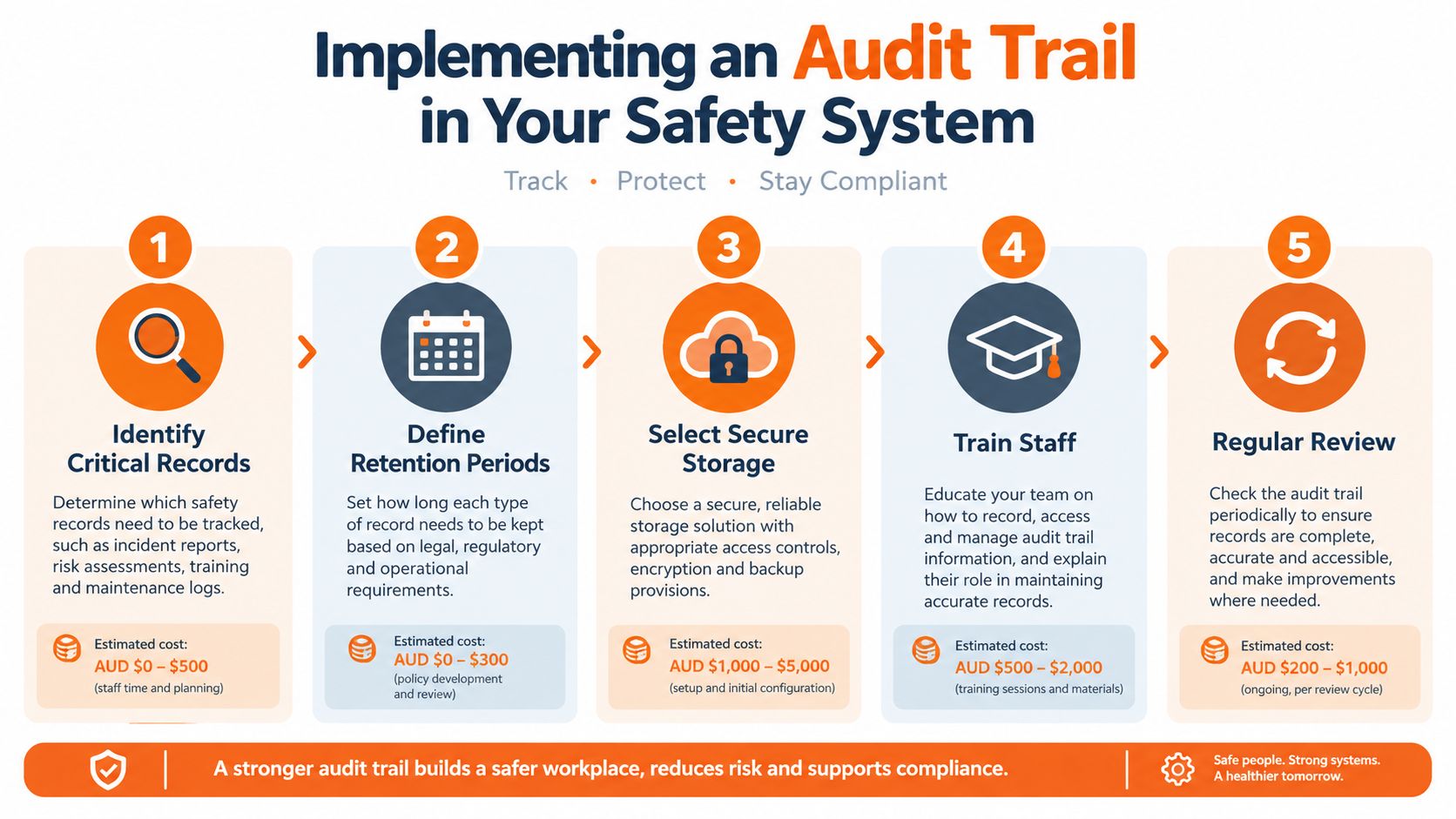
A workable setup usually rests on five controls:
- Identify critical records that need traceability.
- Set retention periods by record type and jurisdiction.
- Restrict permissions so ordinary users and administrators are not mixed together.
- Turn on automatic logging for create, edit, approve, withdraw, and delete actions.
- Review anomalies on a schedule, not only after incidents.
Where a software platform is being selected or configured, the audit management software should make the trail part of the workflow, not an optional afterthought. Safety Space does that by keeping timestamped, user-attributed records across its document control, incident, audit, and corrective-action modules, so the evidence sits with the safety record rather than outside it.
The usual failure is simple. Teams switch logging on, then nobody checks what it records. A trail that no one reviews becomes storage, not control.
For a broader audit and control workflow, the audits and compliance page on Safety Space shows how inspection, corrective action, and record control can sit in one process instead of three disconnected ones.
Legal and Regulatory Audit-Trail Requirements
Australian WHS practice expects a trail that can stand up to scrutiny, because the point isn't just to store records, it's to prove decisions were made and actions completed. New Zealand's Health and Safety at Work Act 2015 follows the same practical logic, even though the terminology differs. In both markets, the useful test is whether the organisation can show a real chain of control, not whether it has a neat folder structure.
For the United States, OSHA recordkeeping sets a more explicit retention structure for injury and illness logs. The employer must keep the OSHA Form 300 Log, any privacy-case list, Form 300A Annual Summary and Form 301 Incident Reports for five years after the end of the calendar year covered, and the Form 300 Log must be updated when a previously unrecorded case is discovered or when classification, description or outcome changes. OSHA's recordkeeping resources make clear that the record has to remain live over time, not frozen at first entry.
The point that gets missed
A paper or digital record that is never updated again is not enough if the status changes later. That's true in OSHA recordkeeping, and it's equally relevant to safety management more broadly. A trail needs to show the original entry and the later amendment, not overwrite the earlier story without disclosure.
For US businesses dealing with document signing or approvals, the legal basics of e-signatures are worth reviewing alongside the logging structure, because the signature trail and the audit trail often need to support the same decision history.
The practical takeaway for multi-jurisdiction operations is to map the record type to the rule that governs it. Injury logs, process records, permits, training files and contractor documents won't all sit under the same retention logic. A single policy can cover them only if it distinguishes between the record, the event history and the retention clock.
Maintaining Audit-Trail Integrity Over Time
A trail that starts clean can still fail later if nobody watches it. Administrator access drifts, bulk exports happen without review, and corrective-action history gets fractured across updates that no one links back together. The record then looks complete until someone asks a question that requires the chain, not the snapshot.
Keep the evidence live
The better approach is to maintain a smaller set of immutable, time-stamped records with owners, version history and linked corrective actions. That is stronger than hoarding duplicate forms in several places. More records can weaken defensibility if they conflict or can't be joined together cleanly.
For organisations with longer retention needs, a good reference point is data retention discipline. The strategies for data retention compliance resource is useful because it highlights the same operational pressure, keeping records usable, searchable and controlled over time.
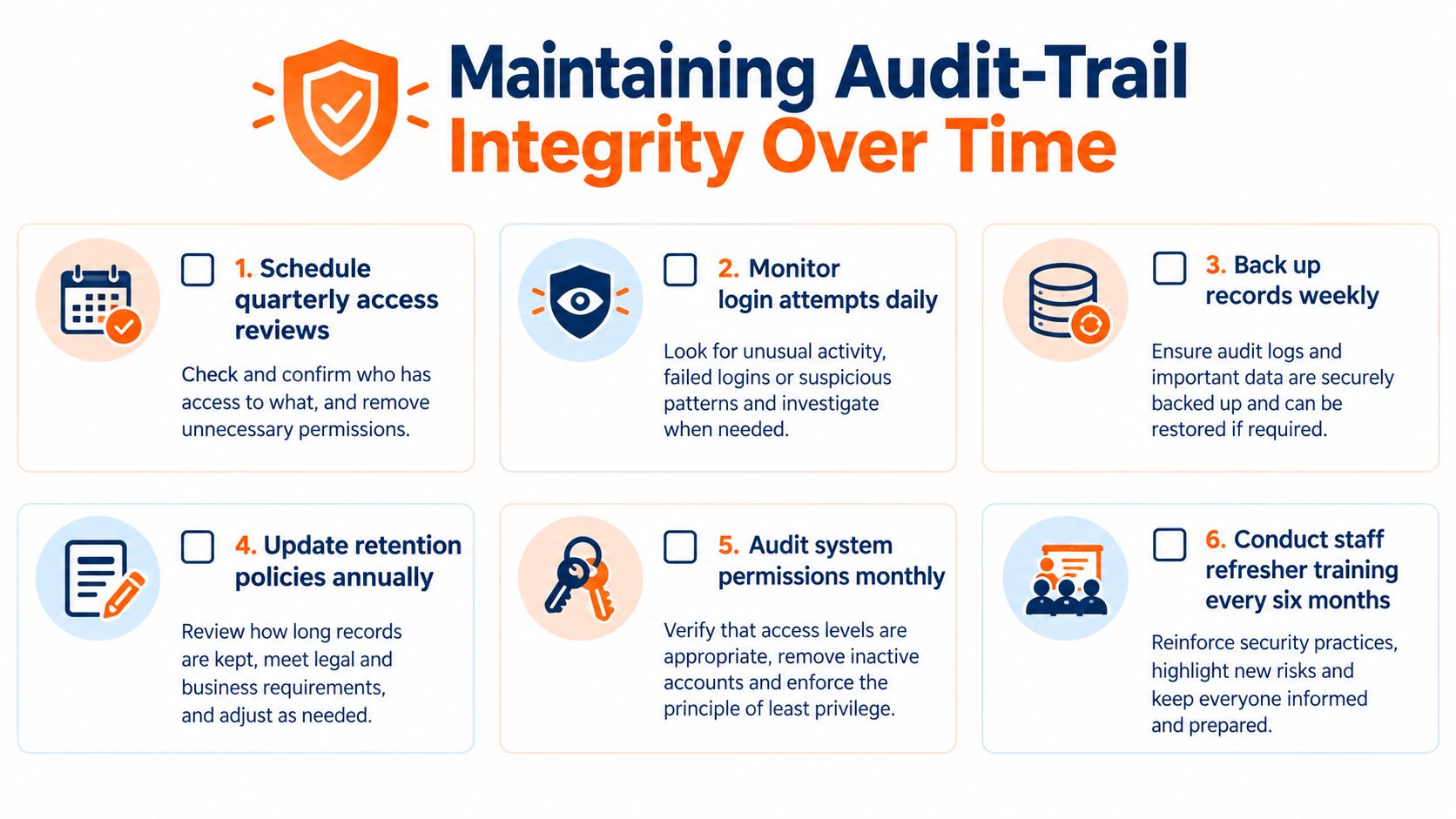
A maintenance routine should include:
- Daily review of failed access attempts and unusual admin activity.
- Regular checks on bulk exports to make sure they're logged and justified.
- Periodic permission audits so access doesn't outgrow role need.
- Retention reviews to confirm records are kept as long as the governing rule requires.
- Link checks on corrective actions so close-out evidence stays attached to the original event.
- Refresher training for people who create, approve or archive records.
A defensible trail is not the one with the most files. It's the one that still tells the same story after the site has moved on.
The maintenance question is always the same. Can the organisation still prove who acted, what changed, when it changed and whether the control held? If the answer takes a hunt through archives, the trail has already lost value.
Safety Space gives H&S teams a practical way to keep that history together, with timestamped records, user attribution and audit-ready document and corrective-action workflows across sites. For businesses that need incident, inspection, permit and training records to hold up under review, the system keeps the evidence in one place instead of scattered across forms and inboxes. Visit Safety Space to see how that works in a WHS setting.
Ready to Transform Your Safety Management?
Discover how Safety Space can help you implement the strategies discussed in this article.
Explore Safety Space FeaturesRelated Topics
Safety Space Features
Explore all the AI-powered features that make Safety Space the complete workplace safety solution.
Articles & Resources
Explore our complete collection of workplace safety articles, tools, and resources.