
Workflow automation delivers its strongest WHS value when it turns obligations into consistent, traceable actions: fewer reporting errors, faster close-out, stronger compliance evidence, clearer multi-site oversight, and lower administrative and injury-related costs. Australian businesses had a 17% intelligent automation deployment rate in 2025, compared with a 10% global average, which shows that this is no longer an experimental idea for operations teams.
The surprising part is that automation doesn't replace consultation, risk assessment or competent judgement. It gives those activities a dependable workflow, record and escalation path. That distinction matters on a construction site, in a manufacturing plant and across industrial-service crews, where the risk usually sits between the form, the handover and the overdue action.
Supervisors and managers still lose time chasing incident updates, contractor records, inspection forms and corrective actions across email, spreadsheets and paper folders. The practical test is whether a system improves control quality, response time, visibility, compliance evidence, staff capacity and financial return. The strongest benefits are ranked below by how directly they improve WHS control.
For broader context on how automation supports complex business processes, see this overview of AI workflow automation for B2B growth leaders.
Table of Contents
- 1. Reduced human error in hazard identification and incident reporting
- 2. Faster incident investigation and corrective action tracking
- 3. Improved compliance with audit requirements and regulatory inspections
- 4. Increased visibility of safety performance across multiple sites
- 5. Reduced administrative burden so safety staff focus on actual hazard control
- 6. Earlier detection of emerging hazards before they cause injuries
- 7. Better management of contractor and subcontractor WHS compliance
- 8. Reduced workers compensation claims and associated costs through systematic prevention
- 8-Point Comparison: Workflow Automation Safety Benefits
- Turn WHS Automation Into a Measurable Business Case
1. Reduced human error in hazard identification and incident reporting
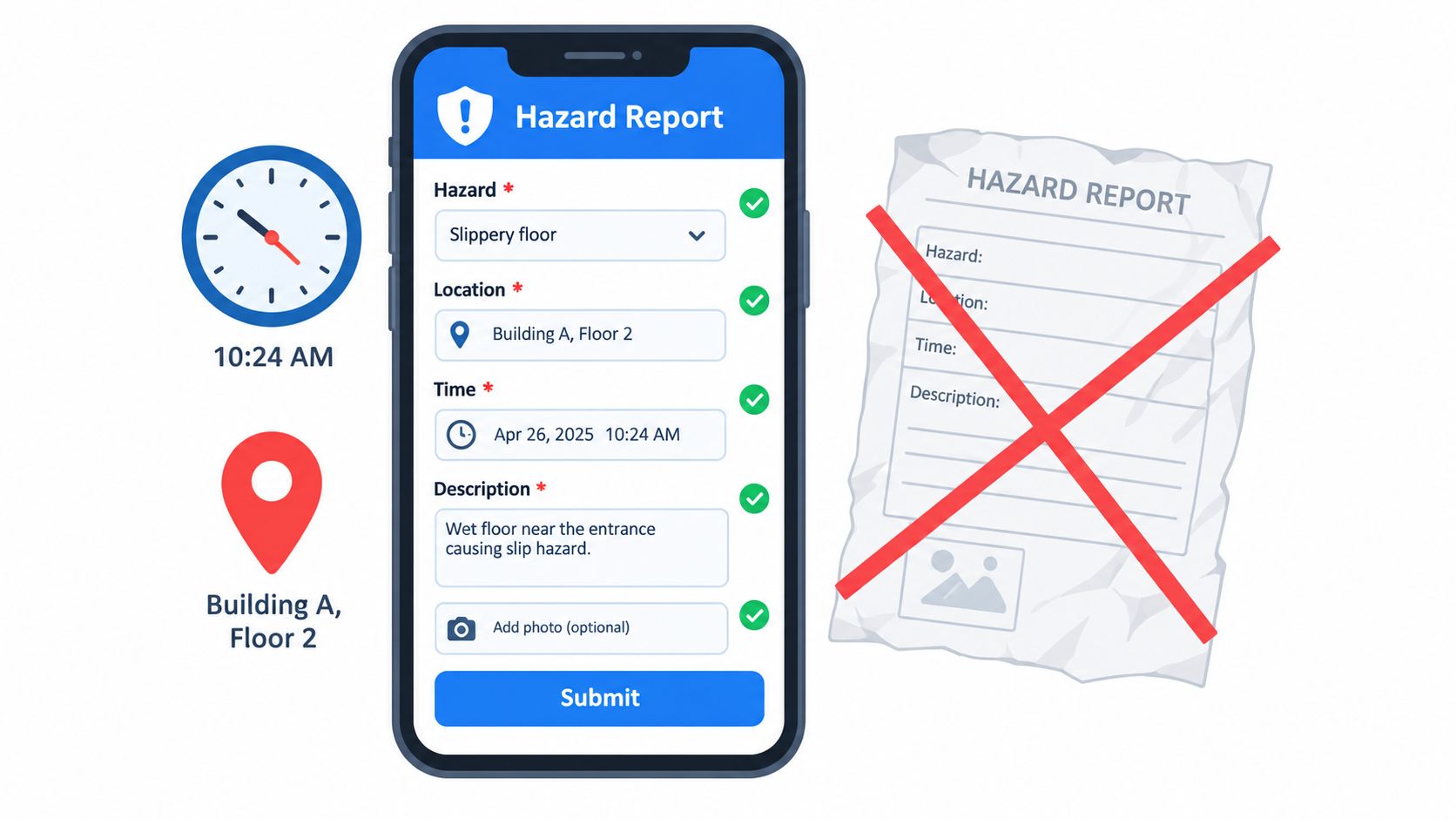
A hazard report is only useful if it contains enough information for someone to assess and control the risk. Paper forms and free-text emails make omissions easy. A mobile workflow can require the location, task, hazard, immediate control and responsible person before submission, while conditional questions keep the form relevant to the event.
That helps prevent two common failures. A worker doesn't have to remember details at the end of a shift, and an administrator doesn't have to retype field notes into a central register. The result is a cleaner record across shifts, sites and subcontractors. It also gives managers a more reliable basis for reviewing whether controls are working.
Use a hazard and incident reporting form that workers can complete at the point of work. Keep the form short, mobile-friendly and usable with gloves or limited connectivity where the job requires it.
Design the form around the decision
A form shouldn't collect information just because the software allows it. Ask what the supervisor needs to decide next. A plant incident may require equipment isolation and maintenance review. A manual-handling report may need a task assessment and worker consultation. Conditional logic can show only the questions relevant to that event.
Practical rule: A digital form that workers avoid is less effective than a well-designed paper form. Measure completion quality and review speed, not the number of fields available.
For construction, the workflow should route a site hazard to the relevant supervisor and project manager. In manufacturing, it should link the event to the plant, line or asset. In industrial services, it should retain the client site, crew and task context. The useful management outcome is fewer incomplete reports and less time spent reconciling inconsistent records.
Supervisors should review submissions promptly and return unclear reports for clarification. A monthly export can reveal whether some shifts report less often, whether one asset appears repeatedly, or whether workers identify hazards but managers fail to act. Automation improves the record, but supervisors still own the quality of the control response.
2. Faster incident investigation and corrective action tracking
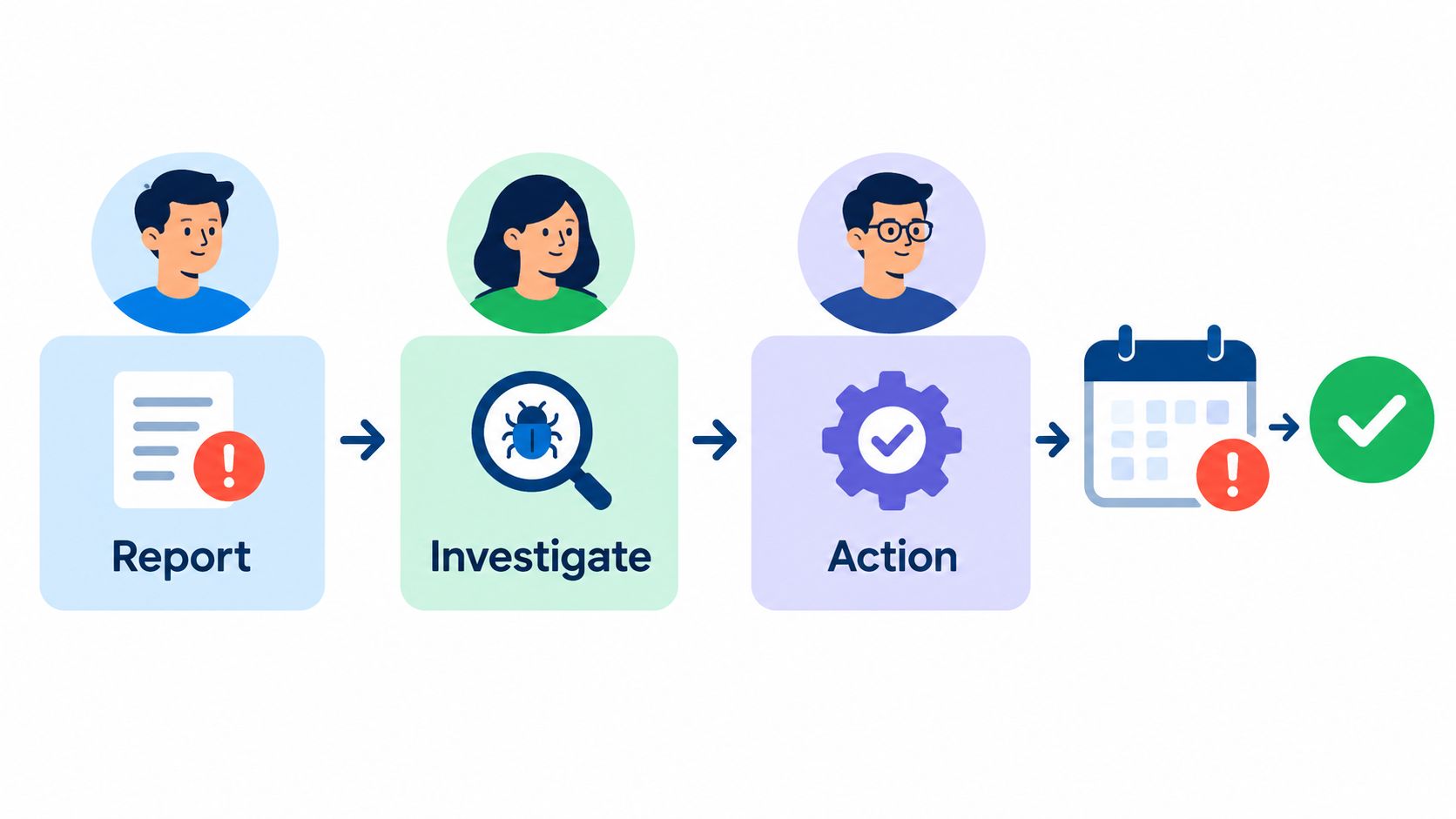
An incident record creates risk when it stops at notification. The manager knows something happened, but nobody has a clear owner for the investigation, the corrective action or the verification step. Workflow automation assigns each stage, records the due date and escalates overdue work instead of relying on memory or an email chain.
This is particularly valuable when the incident crosses functions. A construction event may involve the supervisor, project manager, principal contractor and plant owner. A manufacturing event may require production, maintenance and engineering input. An industrial-service incident may involve the employer, client and multiple subcontractors. One workflow can preserve the handover between those parties.
Use an ICAM investigation template where the investigation needs a structured method, evidence review and documented actions. The software should distinguish between an action being assigned and an action being completed and verified.
Close the loop with evidence
A sign-off isn't proof that a control exists. Ask the owner to attach a photograph, revised procedure, training record, inspection result or other suitable evidence. The investigator or delegated reviewer should then verify that the action addresses the cause rather than merely recording an administrative response.
A useful dashboard should show:
- Investigation timeliness: How long reports remain open before the investigation is accepted and started.
- Corrective action ageing: Which actions are overdue, by site, owner and risk priority.
- Verification status: Whether completed actions have evidence and independent review.
- Repeat hazards: Whether a similar event appears after the original action was closed.
The specific deadlines should reflect your risk framework and incident severity. A serious event needs immediate escalation and a clear investigation path. A minor event may follow a simpler process. What matters is that the rules are known before the next incident, and that managers can show why a deadline was selected.
The management outcome is faster close-out with better evidence. Don't judge the benefit only by the number of closed tasks. A system that closes weak actions quickly can make WHS performance look better while leaving the hazard unchanged.
3. Improved compliance with audit requirements and regulatory inspections
Audit readiness depends on evidence being accurate, accessible and connected to the work that occurred. A central workflow can retain incident reports, risk assessments, inspections, training records, corrective actions and approvals with timestamps and named owners. That doesn't make the underlying WHS system compliant by itself, but it makes gaps easier to identify and explain.
The practical benefit appears when a regulator, client or internal auditor asks a specific question. Managers can retrieve the relevant record and show what happened, who acted, what control was selected and whether the action was reviewed. They don't have to reconstruct the history from unrelated inboxes and spreadsheets.
A WHS audit management system should support the full path from finding to action, including ownership, due dates, evidence and review. It should also allow authorised users to export records in a usable format.
Treat every entry as a business record
For construction companies, Safe Work Australia states that a PCBU must prepare a SWMS, or ensure one has been prepared, before high risk construction work starts. The SWMS must describe the work, hazards, controls and how those controls will be implemented, monitored and reviewed, as explained in Safe Work Australia's SWMS information sheet.
Safe Work Australia also says a PCBU carrying out high risk construction work has duties to prepare, keep, comply with and review the SWMS, and provide it to the principal contractor. The SWMS should be kept at the workplace where the work occurs, according to Safe Work Australia's construction risk guidance.
Automation can assign the briefing, record attendance and prompt a review when the task or site conditions change. It can't confirm that workers understood the controls or that supervision was competent. Those decisions still require people at the workplace.
If a notifiable incident occurs, the PCBU must keep a copy of the relevant risk assessment, WHS management plan and SWMS for two years after the incident, according to Safe Work Australia's incident reporting duties. A system that preserves version history and retrieval access supports that obligation. It doesn't remove the need for a records policy, access controls or regular backups.
4. Increased visibility of safety performance across multiple sites
Centralised workflow data gives leaders a clearer view of WHS control across projects, plants and service crews. A head office report may appear healthy while one location has weak inspections, overdue corrective actions or limited hazard reporting. Comparing reporting activity, inspection completion, action status and incident trends helps managers identify where attention is required.
The ranking should follow control strength, not just the lowest incident count. A fabrication plant, construction project and warehouse face different exposures, so identical benchmarks can produce misleading results. Compare similar tasks, workforce arrangements and risk profiles. A low number of reports may indicate effective controls, or that workers do not understand the process, supervisors do not review submissions, or the workflow is difficult to use offline.
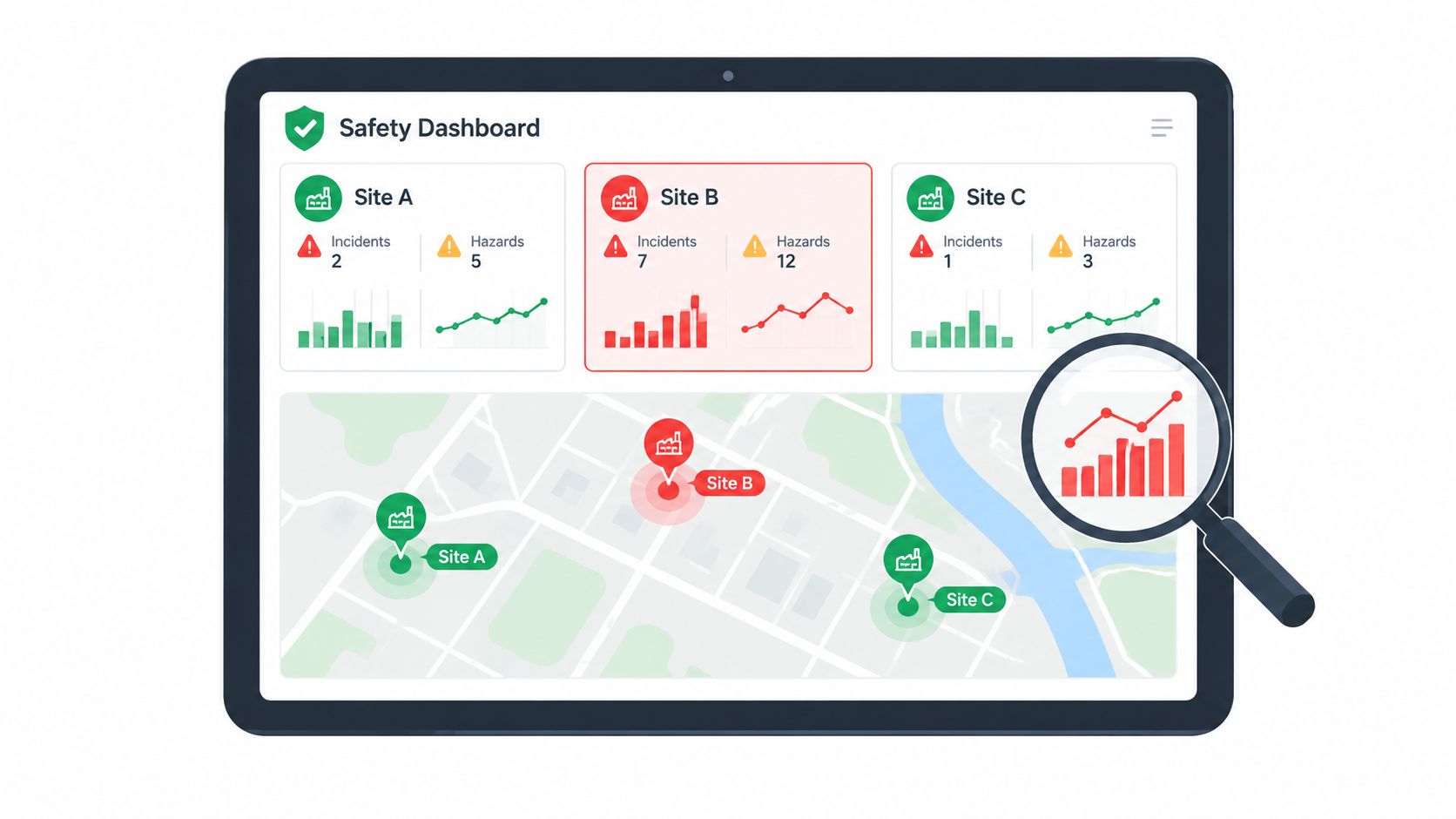
Use the dashboard to focus management conversations:
- Leading indicators: Completed inspections, hazard reports, SWMS briefings, corrective action verification and contractor induction status.
- Lagging indicators: Incidents, injuries, near-misses and recurring event types.
- Process indicators: Time to review, assign and close actions.
- Context indicators: Site, task, shift, asset, crew and subcontractor.
The same measures support different operational questions. On a construction project, fewer hazard reports than comparable sites should prompt checks on worker participation and supervisor review. In manufacturing, many reports with few completed actions may indicate a maintenance or engineering constraint. For industrial-service teams, filtering by crew, asset and client site can show whether controls fail during particular tasks or shifts.
Data only improves control when it is current, understood and acted on. Site managers should see both deteriorating performance and verified improvement. Recognising better inspection follow-through can reinforce reporting without turning sites into a competition.
For managers assessing Safety Space, practical ROI appears in earlier escalation, fewer stalled approvals and faster identification of recurring hazards. Those signals show whether visibility is changing decisions, rather than merely replacing a monthly spreadsheet.
5. Reduced administrative burden so safety staff focus on actual hazard control
Automation improves WHS control only when it returns time to field work. Routing forms, sending reminders, updating statuses and compiling routine reports can reduce the hours safety staff spend chasing records. The recovered capacity should support inspections, worker consultation, task observation and verification that controls work in practice.
Managers need to set that use before implementation. Removing administrative work without increasing field presence produces an efficiency gain, not necessarily a safety gain. The business case is stronger when the same team completes more meaningful control activity.
Start by choosing one record system. Running paper forms, spreadsheets and a new platform in parallel creates duplicate entries and reconciliation work. Set the platform as the system of record, train supervisors and nominate a retirement date for unnecessary processes. Retain documents required for legal or operational reasons, while removing avoidable duplication.
Track the change through time logs and direct observation during early implementation. Useful measures include:
- Administrative hours: Time spent distributing, entering, chasing and compiling WHS records.
- Field activity: Completed inspections, hazard walks and toolbox discussions.
- Response capacity: Time available to investigate repeat hazards and review controls.
- Data quality: Corrections, duplicate entries and missing fields.
The practical application varies by operation. In construction, recovered time can support more site visits and direct engagement with subcontractors. In manufacturing, it can fund closer checks of machine guarding or lockout controls. For industrial-service teams, it can give the WHS manager more time to observe higher-risk work instead of consolidating records from client locations.
A short implementation review should compare the time saved with the control work completed. Safety Space can support that review when managers configure workflows around actual responsibilities rather than reproducing every paper step. Signs of value include fewer repeated entries, faster assignment and more verified inspections.
Automation should move safety staff closer to the work, not merely make the office quieter. If the platform adds complex administration or leaves workers maintaining records in several places, the expected benefit is lost.
6. Earlier detection of emerging hazards before they cause injuries
Near-misses and minor events often provide the earliest warning that a control is weak. Workers may notice a pinch point, unstable access route, damaged tool or change in task conditions before anyone records an injury. A low-friction workflow makes those observations easier to capture and gives managers a way to look for patterns.
The workflow should not demand a full investigation for every close call. A quick report can trigger an initial review, with escalation when the same hazard appears again or the potential consequence is serious. This protects reporting culture while preserving management control.
Make reporting lead to visible action
Workers stop reporting when nothing changes. Review near-misses promptly, communicate the control decision and close the loop in toolbox talks. The response doesn't always need a major project. It may involve repairing lighting, changing an exclusion zone, replacing a damaged tool, revising a pre-start or clarifying a permit condition.
For a manufacturing line, repeated reports about hand placement near an operation may point to a guarding or tooling issue. On a construction project, several access-related close calls may indicate a lighting, housekeeping or traffic-management problem. In industrial services, a rise in compressed-air near-miss reports may show that the procedure is difficult to follow or that new workers haven't received adequate instruction.
Set pattern thresholds according to the operation's size, exposure and risk. A small team may need immediate attention when the same hazard appears twice. A large operation may need categorisation by asset, task and location before the pattern becomes clear. The number itself matters less than having a defined response rule.
The management outcome is earlier intervention. Track the time from report to review, the percentage of near-misses receiving a documented response and whether similar reports continue after the control changes. Don't use near-miss volume as a standalone safety score. A higher number can indicate stronger reporting rather than worse conditions.
7. Better management of contractor and subcontractor WHS compliance
Contractor control fails when the principal business can't see who has been inducted, which documents have expired, what site-specific hazards were communicated and whether contractor actions were closed. Email attachments and paper sign-in sheets create gaps, especially when a contractor works across several projects or client facilities.
An automated workflow can require a contractor to complete the relevant induction before access, record the completion and route exceptions to a named site representative. It can also separate generic information from site-specific requirements. That distinction matters. A contractor may understand general construction hazards but still need the project's traffic plan, exclusion zones, emergency arrangements and permit rules.
Connect access to evidence
The system should support a clear access decision. If the induction is incomplete, required evidence is missing or a competency has expired, the responsible person needs an alert before the worker starts. The site team still needs to verify identity, competency and actual behaviour. A digital completion record isn't proof that the person understood or followed the control.
For construction, link contractor records to the project and principal contractor. For manufacturing, link them to the plant, area and equipment access requirements. For industrial services, retain the client location, work package, permit status and responsible supervisor.
Review contractor incidents with the same seriousness as employee incidents. A contractor's action may require a change to the site's system of work, not just a warning to the individual. The workflow should preserve investigation findings, communications and corrective action evidence.
Useful management signals include induction completion before access, overdue document volume, contractor inspection participation, repeated non-conformance and action closure by contractor. These measures expose where procurement, supervision or site onboarding is failing. They also give operations managers a defensible record of how contractor risks were managed.
8. Reduced workers compensation claims and associated costs through systematic prevention
The strongest financial case for workflow automation is preventing repeat injuries, not producing polished reports after an incident. In construction, manufacturing and industrial services, a controlled workflow can connect hazard identification, assigned actions, verification and retained evidence. The management outcome is earlier intervention and a clearer basis for reducing claims administration, legal work, lost production, replacement labour and retraining.
Claims should be treated as an outcome measure, not proof that software caused improvement. Separate changes in the system from changes to plant, supervision, training, consultation and control design. Ask whether the workflow helped the organisation identify the risk sooner, assign ownership and confirm that the control worked.
The practical measures are:
- Claim trends: Frequency, severity, cost and work-related causes.
- Control performance: Whether actions were implemented, checked and linked to the identified risk.
- Early warnings: Near-misses and hazards that resemble later incidents.
- Operational disruption: Lost shifts, rework, investigation time and replacement training.
- Evidence quality: Whether managers can show what the organisation knew, decided and did.
A construction team might connect recurring manual-handling hazards to subcontractor activities, plant movements or work-stage changes. A manufacturer can compare incidents with machine safeguards, maintenance tasks and production areas. An industrial-service business can review whether client-site conditions, permits and supervisor checks were addressed before work began. These connections make prevention decisions more specific than a total claim count.
Australian employers using AI and automation reported productivity gains at 47%, better employee experience at 47%, revenue growth at 44% and cost reductions at 43%. Only 31% reportedly reached anticipated ROI targets in the first year, according to Robert Half's Australian productivity and automation overview. For WHS managers, the implication is practical: value may appear through fewer missed actions and faster decisions, while financial evidence can take longer than one reporting cycle.
The wider Australian productivity case also requires caution. A national report cited by CSIRO's discussion of Australia's automation opportunity estimated that automation could increase annual productivity growth by 50% to 150%, add $170 billion to $600 billion per year to GDP by 2030, and lift manufacturing output by 6% while reducing injuries by 11% by 2025. These are projections and sector-level estimates, not an individual business forecast.
For a platform such as Safety Space, the business test is whether managers can identify repeat risks, close actions and produce reliable evidence. That is a more useful ROI signal than subscription cost alone.
8-Point Comparison: Workflow Automation Safety Benefits
| Item | Implementation complexity 🔄 | Resource requirements ⚡ | Expected outcomes ⭐ / 📊 | Ideal use cases 💡 | Key advantages ⭐ |
|---|---|---|---|---|---|
| Reduced human error in hazard identification and incident reporting | 🔄 Medium, form design, validation, device deployment | ⚡ Low–Medium, mobile devices, initial training, integration | ⭐ Higher data quality; 📊 40–60% fewer reporting errors (example) | 💡 Multi-site construction & manufacturing; high manual reporting environments | ⭐ Consistent records, mandatory fields, audit trails |
| Faster incident investigation and corrective action tracking | 🔄 Medium–High, routing, templates, SLA rules | ⚡ Medium, investigator roles, notification systems, evidence capture | ⭐ Faster closures; 📊 example: 45→12 days to complete actions | 💡 Sites needing rapid investigations and closure verification | ⭐ Automated routing, deadline alerts, verified corrective actions |
| Improved compliance with audit requirements and regulatory inspections | 🔄 Medium, centralised storage, access controls, retention rules | ⚡ Medium, secure storage, export/report templates, admin upkeep | ⭐ Readily provable compliance; 📊 faster inspections and fewer notices | 💡 Organisations facing frequent regulatory audits or legal scrutiny | ⭐ Single source of truth, timestamped records, compliance checklists |
| Increased visibility of safety performance across multiple sites | 🔄 Medium, dashboarding, KPI standardisation | ⚡ Medium, data integration, analytics, alerting | ⭐ Better oversight; 📊 site comparisons reveal under-/over‑reporting | 💡 Multi-site groups where leadership needs real‑time visibility | ⭐ Real‑time dashboards, benchmarking, automated alerts |
| Reduced administrative burden so safety staff focus on hazard control | 🔄 Low–Medium, automate forms, templates, escalations | ⚡ Low, workflow tools, initial configuration, retire old processes | ⭐ More field time for safety staff; 📊 reclaimed hours (e.g., 12 hrs/week) | 💡 Small safety teams or high‑admin environments needing efficiency | ⭐ Saves time, reduces clerical errors, increases site engagement |
| Earlier detection of emerging hazards before they cause injuries | 🔄 Medium, near‑miss capture, pattern detection, thresholds | ⚡ Medium, reporting channels, analytics, skilled review | ⭐ Proactive hazard mitigation; 📊 fewer serious incidents long‑term | 💡 Operations that can capture near‑misses and act quickly | ⭐ Leading‑indicator focus, early pattern detection, preventative action |
| Better management of contractor and subcontractor WHS compliance | 🔄 Medium–High, contractor workflows, inductions, permits | ⚡ Medium, onboarding, digital SWMS, multi‑site tracking | ⭐ Improved contractor compliance; 📊 reduced time chasing paperwork (e.g., 80%) | 💡 Projects with many contractors or cross‑site contractor movement | ⭐ Induction tracking, digital permits, centralised contractor records |
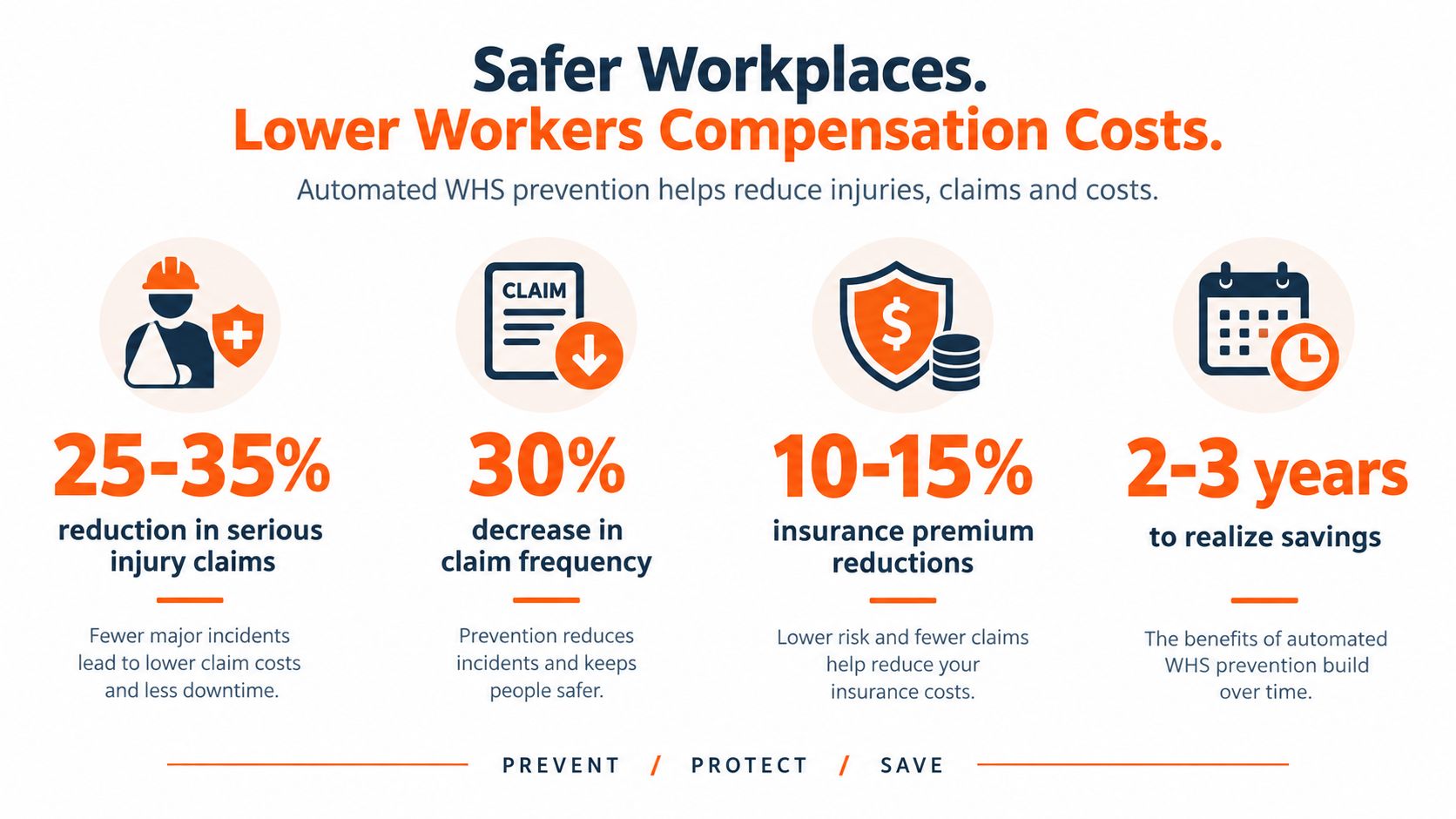
| Reduced workers compensation claims and associated costs through systematic prevention | 🔄 Medium–High, organisation‑wide processes and continuous improvement | ⚡ Medium–High, training, controls, long‑term data analysis | ⭐ Lower claim frequency/costs over years; 📊 examples: 25–35% reduction in serious claims | 💡 High‑risk industries seeking sustained cost reduction and insurer recognition | ⭐ Fewer injuries, better claim documentation, potential premium reductions |
Turn WHS Automation Into a Measurable Business Case
Assess a workflow by starting with the process that currently creates the most control risk. That might be incident close-out, contractor onboarding, pre-start inspections, corrective actions or SWMS briefing records. Avoid buying a broad platform before you know which handoffs fail, who owns them and what evidence is missing.
Baseline the current process before configuration. Record reporting time, overdue corrective actions, inspection completion, contractor documentation status and how long it takes to find records across sites. Also record where managers lack visibility. These measures give you something to compare after implementation.
Define the target in operational terms. You might want supervisors to review reports sooner, project managers to verify corrective actions more consistently or operations leaders to see site differences without requesting separate spreadsheets. Set a review period that allows workers to learn the system and managers to correct workflow design. Don't treat early resistance as proof that the platform failed, but don't dismiss it either. A form that adds work will be rejected for a reason.
Separate software effects from control improvements
A safer result may come from several changes at once. New guarding, better supervision, revised training and a digital workflow can all affect performance. Keep the analysis honest by recording the wider changes and avoiding claims that the software caused every improvement.
Compare implementation and subscription costs with measurable operating outcomes:
- Time: Hours removed from data entry, chasing and report preparation.
- Control: Overdue actions, repeat hazards and verified completion.
- Visibility: Sites, crews and contractors represented in current data.
- Compliance evidence: Time required to retrieve records and demonstrate activity.
- Capacity: Additional inspections, consultations and hazard reviews completed.
- Financial impact: Avoided disruption, claim-related work and rework, without assigning unsupported dollar values.
An Australian digital transformation report found a 73% adoption rate and 82% satisfaction score for digital workplace or transformation tools, as described in C9's account of Australian automation and integration. That supports a practical point. User acceptance matters because a system only improves WHS control when supervisors, workers and contractors use it consistently.
Safety Space can be considered where an organisation needs customisable workflows, real-time monitoring, AI-powered form completion, multi-site oversight and subcontractor management. Its digital checklists support pre-starts, plant inspections and site audits, while corrective actions can be assigned and tracked within the workflow. A free demo and H&S consultation can help managers test whether the process fits their operation before committing.
For another perspective on investment decisions, review this guide to the cost of enterprise automation. The next step is practical. Map one high-friction WHS process, name its owner and escalation points, then test whether automation improves completion and evidence without adding work for the people carrying out the task.
Safety Space provides customisable WHS workflows for inspections, hazards, incidents, corrective actions, contractors and multi-site oversight. Visit Safety Space to arrange a free demo or H&S consultation, and test one high-friction process against the measures that matter to your operation.
Ready to Transform Your Safety Management?
Discover how Safety Space can help you implement the strategies discussed in this article.
Explore Safety Space FeaturesRelated Topics
Safety Space Features
Explore all the AI-powered features that make Safety Space the complete workplace safety solution.
Articles & Resources
Explore our complete collection of workplace safety articles, tools, and resources.