
Construction accounted for 37 worker fatalities in 2024, or 20% of all traumatic workplace deaths nationally, according to Safe Work Australia's key WHS statistics. That makes contractor software a site-control decision, not just a better place to store insurance certificates.
The best contractor management software for property developers should show what the developer did to manage risk: who held responsibility, which controls were accepted, whether supervisors checked them and how deficiencies were resolved. A full contractor folder isn't enough if head office can't reconstruct what happened on a particular site.
Table of Contents
- Contractor Software Requirements by Developer Type
- Core Features Every Shortlist Must Cover
- Principal Contractor Duties Software Must Evidence
- How to Track Each SWMS From Receipt to Close-Out
- Scoring Vendors Against Weighted Criteria
- Questions to Put to Each Vendor
- Run a Two-Site Pilot Before You Sign
- Roll Out the Chosen Platform in Four Steps
Contractor Software Requirements by Developer Type
Must-have capabilities and demo tests by developer situation
| Developer situation | Must-have capability | Demo test |
|---|---|---|
| Single site, developer engages trades directly | Prequalification, insurance and licence expiry alerts, site inductions | Expire a test insurance certificate and check the reminder reaches a named owner |
| Multi-site portfolio with several builders | Project-level records and cross-project dashboards | Pull open corrective actions for two sites in one report |
| Developer is principal contractor on projects of A$250,000 or more, consistent with WorkSafe Queensland guidance | WHS management plan record, SWMS register, site contact display | Attach a sample plan and confirm SWMS version history and approval dates |
| Trade-only subcontractors on tight programs | Offline mobile sign-on, QR site sign-in, pre-start acknowledgement | Sign on with no connection and confirm the record syncs with the original timestamp |
A direct-trade developer needs a reliable gatekeeping process. Approval should relate to the actual work, not merely the contractor's company name. The practical starting point is a defined process for managing subcontractors in construction, with software configured around that process.
A portfolio developer needs separation as well as visibility. A builder's approval on one development shouldn't automatically demonstrate readiness for another development with different tasks, access arrangements and supervisors. Reports must preserve those distinctions while allowing management to compare unresolved issues.
Test the operating model
A developer acting as principal contractor needs project governance records alongside contractor records. A trade-heavy operation needs a field workflow workers can complete without returning to the office. A broad feature list won't reveal whether either workflow holds up in practice.
Consider a hypothetical buyer managing two projects and three builders. During the demonstration, the buyer expires a test insurance certificate belonging to a builder active on both projects, then checks the recipient, escalation route and affected project status. A reminder sent to a generic mailbox isn't the same as an assigned task.
Keep estimating separate from WHS approval. A roofing package priced through Exayard roofing estimating software still needs its own contractor assessment and site-control records; a priced scope isn't permission to start.
Shortlist rule: Drop any platform that fails the test matching the developer's operating model before comparing price or additional features.
Core Features Every Shortlist Must Cover
Test high-consequence work, not an easy document upload. Safe Work Australia's construction industry profile attributes 31% of construction fatalities to falls from height and 15% to falling objects. Those hazards provide useful demonstration scenarios.
The workflow should connect the gate check, the work on site and the unresolved records left at handover.
Follow a working-at-height task
Start with a contractor preparing to install roof components. The demonstration should connect insurance, licence and competency checks to the relevant induction, equipment register and planned work. An induction marked complete after arrival should remain distinguishable from one completed beforehand.
Next, test site execution. Supervisors need attendance information, a pre-start inspection with photographs and signatures, relevant permit approvals, and worker acknowledgment of the applicable SWMS or JSA. For dropped-object risks, the inspection should record whether exclusion zones and other specified controls are in place.
Finally, introduce a failed control. The system should let the supervisor record the finding, assign a corrective action, set a due date and escalate overdue work. Closing the action should require evidence appropriate to the finding, not just changing its status.
Measure execution, not file counts
Useful dashboard measures include:
- Current contractor records: The share of active contractors with current insurance and required competencies.
- Task readiness: SWMS acknowledgements completed before work starts.
- Inspection delivery: Checks completed by their due dates, with missed inspections visible.
- Action performance: High-risk actions closed within the agreed timeframe.
- Recurring problems: Repeat hazards grouped by contractor, project and work package.
Offline capture deserves a deliberate failure test. Disconnect the device, complete an inspection with photographs, reconnect it and inspect the resulting record for missing attachments, duplicates and altered timestamps.
A certificate repository can support administration. It can't establish that a worker acknowledged the current controls on the day unless the software links the worker, task, document revision and site record.
Principal Contractor Duties Software Must Evidence
Appointing a builder doesn't make the developer's own evidence requirements disappear. The starting question is who holds the principal contractor role on each project, supported by the appointment and signed contractual arrangements.
Safe Work Australia's demolition code guidance identifies construction work valued at A$250,000 or more as a construction project carrying additional principal-contractor duties. These include preparing and reviewing the WHS management plan, obtaining SWMS before high-risk construction work, managing specified site risks and displaying principal contractor contact details.
Build a project evidence record
The project page should make the following records retrievable:
- Responsibility: Principal contractor appointment, scope and current site contacts.
- Management arrangements: Current WHS management plan, previous versions, review dates and approval history.
- Site controls: Checks covering falls, first aid, emergency arrangements and traffic management.
- Communication: Evidence that site rules and relevant arrangements reached affected contractors.
- Site identification: Confirmation that the principal contractor's name and contact details are displayed.
The construction health and safety regulations guide provides useful context when mapping these records to the project workflow. Software should support the duty-holder's work, not substitute a generic compliance label for a considered assessment.
Insurance belongs in this record, but it answers a different question. Material on insurance proof for construction sites from ABS Insurance Brokers Pty Ltd can inform certificate checking; the certificate itself doesn't demonstrate that a traffic route or fall control was verified.
A complete folder shows that paperwork exists. Inspection findings and evidenced close-out show what supervisors actually checked and corrected.
Keep jurisdiction settings separate
Projects below the construction-project threshold still require attention to general WHS duties. Their records shouldn't disappear just because additional principal-contractor requirements don't apply.
For New Zealand work, the Health and Safety at Work Act 2015 and WorkSafe NZ guidance require a separate jurisdictional assessment. Australian thresholds and document labels shouldn't be copied into a New Zealand configuration without checking their applicability.
As a procurement test, require the appointment, current plan, latest site check and approval record to be accessible within a proposed two-click navigation target from the project page. That is a usability target, not a legal requirement.
How to Track Each SWMS From Receipt to Close-Out
A SWMS needs a controlled workflow, not an upload slot. Safe Work Australia's SWMS information sheet says the principal contractor must take all reasonable steps to obtain it before high-risk construction work starts and arrange preparation if the contractor hasn't prepared one.
The process below turns that obligation into a traceable job record.
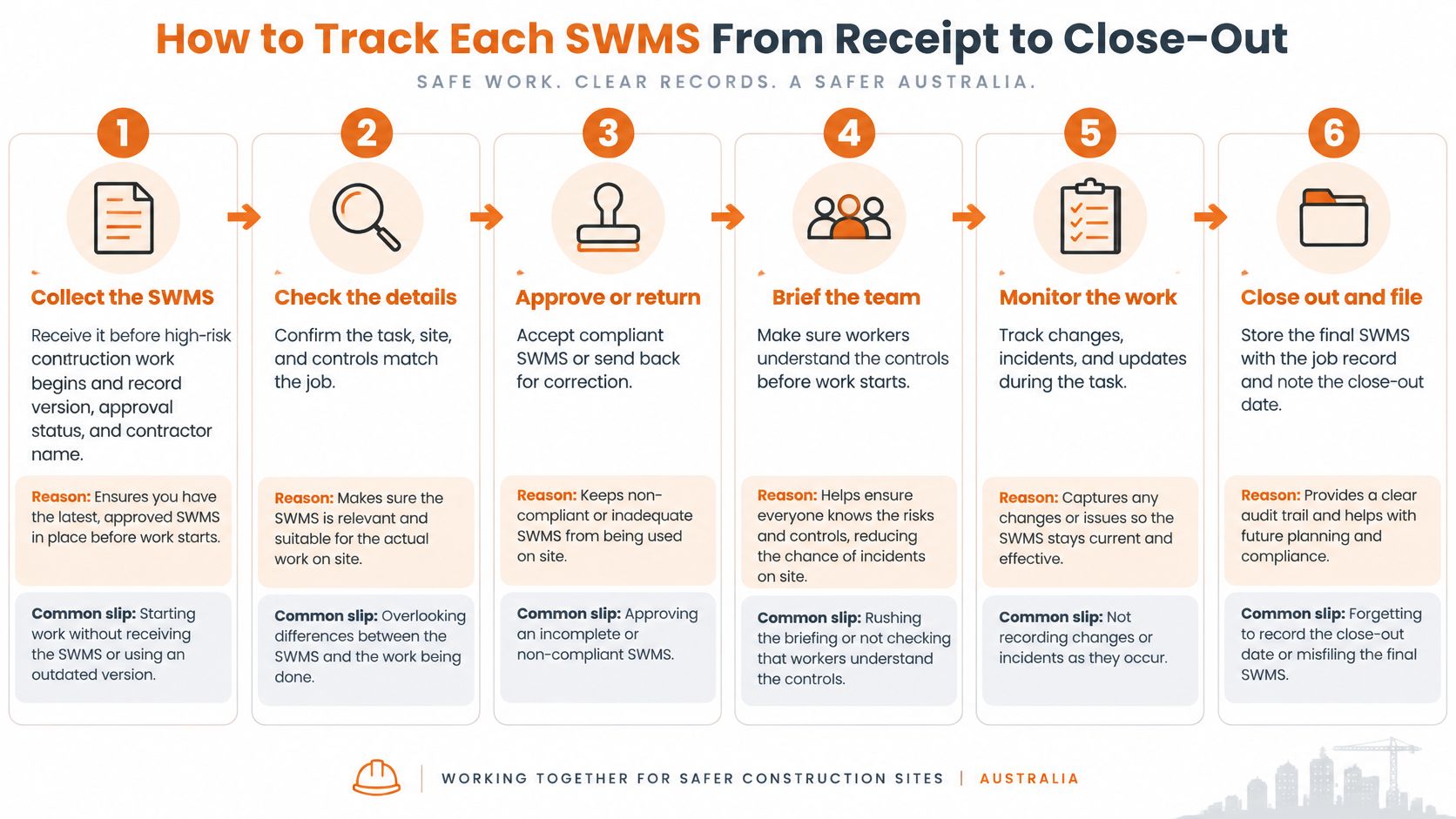
Control the document and the work
Collect before commencement. Record the responsible contractor, version, receipt date and review status. The common slip is accepting an attachment without establishing whether it is the current revision.
Assess the content. Confirm the high-risk work, hazards, risks, controls and arrangements for implementation, monitoring and review, as described in Safe Work Australia's excavation code. Generic wording that doesn't match the task should be returned for correction, with the reason recorded.
Record worker consultation. Identify who contributed and what changed following their input. The slip is treating a signature collected afterwards as evidence that consultation occurred during preparation.
Connect the job records. Link the SWMS to the work package, contractor, location and revision. A practical construction SWMS workflow should prevent an obsolete company-level file from being mistaken for the accepted site version.
Capture worker sign-on. In Safety Space, SWMS and JSAs support worker sign-on, while granular permissions can restrict contractor approvals, incident closure and master-template editing. A supervisor's acknowledgement shouldn't stand in for the workers carrying out the task.
Verify controls in the field. Record an inspection against the relevant task, including photographs and findings. The common slip is reviewing a convincing method statement without checking whether its controls are present.
Chase gaps deliberately. Automated follow-ups can chase missing documents and renewals, while contractors can complete inductions before arrival. An issued reminder isn't a resolved deficiency, so outstanding items still need an owner and a decision about affected work.
Review, resolve and retain. Review changes to work or site conditions and close corrective actions with evidence. Safe Work Australia's construction work code requires the SWMS to remain accessible until completion, or for at least two years after a notifiable incident.
A functioning cycle leaves every active high-risk task with a current signed SWMS, an appropriate site check and no overdue corrective action left unexplained.
Scoring Vendors Against Weighted Criteria
A useful scoring model rewards demonstrated capability rather than persuasive presentations. The following proposed procurement weights total 100%; they aren't industry benchmarks or claims about product performance.
Score each criterion from 1 to 5, multiply the score by its whole-number weight, then add the results for a maximum of 500 points. Require a live demonstration or trial using the developer's contractor records.
Apply the same scoring scale
- 5 means demonstrated: The workflow works with the developer's data and produces usable records.
- 4 means minor configuration: It works after a documented configuration change, without an operational workaround.
- 3 means workable with compromises: The capability exists but requires manual steps or separate tracking.
- 2 means materially incomplete: Only part of the required workflow is available.
- 1 means unavailable: The capability is absent or only on a roadmap.
Weighted scoring criteria for contractor management software
| Criterion | Suggested weight | Strong answer looks like |
|---|---|---|
| Compliance evidence and audit trail | 25% | Timestamped records, approval history and exportable compliance reports by project |
| Contractor document control and expiry alerts | 20% | Insurance and licence certificates stored automatically, with reminders sent to a named owner before expiry |
| Field use, including mobile, offline and photos | 15% | Forms completed offline with photos and signatures, syncing with the original timestamp |
| SWMS, permits and inductions workflow | 15% | Worker sign-on before task start, permit approvals and contractor inductions completed before arrival |
| Reporting and project dashboards | 10% | Open actions per form, site-level dashboards and exports for head office |
| Pricing transparency and contract terms | 10% | Written pricing against sites, users and modules, with clear cancellation terms |
| Integration and single sign-on | 5% | Single sign-on available and custom integrations possible with existing business software |
Test in operational order
Begin with evidence retrieval, then introduce an expired document. Move into the field workflow before testing SWMS approvals and portfolio reporting. Commercial terms and integrations come afterwards, because neither fixes missing evidence.
The Federal Safety Commissioner's reporting model covers project workers, including subcontractors, rather than only a company's direct employees, as outlined in the annual data report. That makes workforce coverage an important reporting acceptance test.
A developer coordinating direct trades could choose a 25% field-use weighting, reducing other weights to keep the total unchanged. Coordination also needs a regular review rhythm; HireArchitects' guidance on meeting cadence for design projects provides context for scheduling reviews, while the contractor system should record resulting decisions.
Exclusion rule: A vendor scoring below 3 on compliance evidence cannot win through low pricing or attractive integrations.
Questions to Put to Each Vendor
Written answers expose gaps that demonstrations can hide. Every vendor should receive the same questions and demonstrate the answers using the developer's contractor list, project structure and approval roles.
The scoring table assesses capability. These questions establish who configures it, who controls it and what the quoted implementation includes.
Resolve configuration and responsibility
Can each project record its principal contractor appointment and WHS management plan version? The answer should distinguish a structured project record from an attachment buried in a shared folder.
Who receives an insurance, licence or induction expiry reminder? Require the vendor to identify how a named owner is assigned, replaced during leave and retained in the history.
Can contractors complete inductions before arriving? Demonstrate the invitation, completion record and supervisor's view of an incomplete induction.
Can onboarding forms and inspection checklists match the organisation's requirements? Establish whether staff can revise them, whether vendor assistance is included and how changes affect existing records.
Can supervisors be prevented from closing incidents, approving contractors or editing master templates? Test a restricted account rather than accepting a permissions screenshot.
What setup, migration, training and support does the quote include? Clarify who cleans legacy records, maps projects and checks migrated attachments.
Which demonstrated features are live, and which remain on a roadmap? Record delivery promises separately from available functionality.
Record evidence beside the answer
For customised onboarding, Safety Space provides forms adapted to customer requirements and automatically collects and stores insurance certificates. Its due diligence outputs include audit trails, documentation and compliance reports for inspections; those outputs should be assessed against a realistic project enquiry.
The inspection builder also allows customers to create and revise checklists without developer help. That matters when site teams need to change a question or require photographic evidence without waiting for a software release.
Each answer should identify the matching scoring criterion, demonstration result, implementation owner and unresolved qualification. A roadmap item receives the proposed score of 1, even when a salesperson describes its release as imminent.
An unanswered question remains an implementation risk. It shouldn't become an assumption in the purchase approval.
Run a Two-Site Pilot Before You Sign
A proposed 30-day pilot across two sites gives the buying team a controlled way to test different contracting arrangements. Choose a direct-trade site and a site managed through a head builder, rather than selecting only the easiest project.
Load real contractor records, inductions, SWMS and inspections from the start. Agree on acceptance targets before the pilot begins, and record the existing administrative effort so comparisons have a baseline.
Measure results that affect the decision
| Pilot measure | Recording method |
|---|---|
| Time to make contractor documents current | Track elapsed days from the agreed starting register to verified completion |
| High-risk tasks with sign-on before commencement | Compare task start records with worker acknowledgement timestamps |
| Corrective actions closed by due date | Compare original due dates with evidenced closure records |
| Time to produce a portfolio report | Time the same defined reporting request for each vendor |
| Paper forms still in use | Keep a register of forms completed outside the trial system and the reason |
Separate software failures from implementation failures. A missing contractor invitation differs from an invitation that workers can't complete on their phones, but both affect the rollout decision.
Compare written cost with measured effort
Obtain a written quote showing sites, users, modules, setup and any integration work. Compare that cost with recorded hours spent on certificate chasing, paper transcription and report compilation, without assuming every saved minute becomes a cash saving.
Safety Space starts account setup through a contact enquiry or demo booking to establish organisation size, sites, required modules and whether Microsoft single sign-on is needed. Detailed pricing is available through a demo, so the pilot team should obtain a written proposal matching the tested scope.
- Unknown price: Record cost as unknown until the vendor supplies it in writing.
- Missing incident baseline: State that near-miss or injury data isn't available and leave incident savings out.
- Workaround burden: Record manual exports, duplicate entry and support intervention alongside task completion.
Finish with a one-page scorecard showing each vendor's weighted result, pilot outcomes, outstanding limitations and written cost. Only a vendor meeting the proposed minimum compliance-evidence score of 3 should proceed to contract approval.
Roll Out the Chosen Platform in Four Steps
A successful rollout transfers responsibility as carefully as it transfers files. Configuration should reflect signed arrangements and actual site practice, not just reproduce the old folder structure.
Establish the records before widening access
Load the live project register. Check the principal contractor appointment against the signed contract, then enter the current plan version and site contacts. Resolve conflicting names or responsibilities before supervisors rely on the system.
Migrate the active contractor master list. Bring across insurance, licence, competency and induction records, with a named owner for each expiry reminder. Remove inactive contractors from the operational list while preserving records that need retention.
Set permissions before issuing access. Assign contractor approval, incident closure and template-editing authority deliberately. Test restricted accounts so a supervisor can't accidentally exercise an administrator's authority.
Train supervisors on complete field tasks. Practise QR sign-in, pre-start inspections, SWMS acknowledgement and offline capture using actual site conditions. A proposed rollout sequence is to operate one site for two weeks before extending access across the portfolio.
Apply the go-live checks
- High-risk work: Every active high-risk task has a current signed SWMS.
- Project governance: Each applicable project has its appointment and current management plan recorded.
- Corrective actions: Every outstanding action has an owner and due date.
- Expiry management: Every reminder reaches a named responsible person.
- Pilot acceptance: Recorded results meet the targets agreed on the scorecard.
Keep the old folders until these checks pass and record how retained material will remain searchable. Archive superseded working documents clearly so staff don't continue using competing versions.
The rollout owner should approve the transition only after supervisors can retrieve the right record, complete the field task and resolve an exception without an administrator doing it for them.
Safety Space offers contractor document management, inductions, SWMS worker sign-on and project-based WHS records that support this evidence-led approach. Visit Safety Space to book a demo using a live project, test the approval and field workflows, and obtain pricing for the sites, users and modules required.
Ready to Transform Your Safety Management?
Discover how Safety Space can help you implement the strategies discussed in this article.
Explore Safety Space FeaturesRelated Topics
Safety Space Features
Explore all the AI-powered features that make Safety Space the complete workplace safety solution.
Articles & Resources
Explore our complete collection of workplace safety articles, tools, and resources.