
A site supervisor calls in an injury from a residential build. A near miss arrives at the office by text, while a maintenance incident sits in a spreadsheet waiting for someone to assign an action. The challenge isn't creating another form. It's making sure each report becomes a usable record, reaches the right person and stays open until follow-up is complete.
For Australian businesses, the best incident reporting software is the system that supports that whole chain across workers, contractors and sites. A digital form alone won't provide consistent classifications, jurisdiction-aware escalation or evidence that corrective actions were verified.
Table of Contents
- Why Incident Reporting Software Matters
- How to Evaluate Incident Reporting Systems
- Top Incident Reporting Software Options
- Detailed Feature Comparison
- Best Options for Common Workplaces
- Run a Practical Software Pilot
- Compare Pricing and Contract Options
- Recommended Pick and Buying Checklist
Why Incident Reporting Software Matters
Safe Work Australia recorded 200 traumatic workplace fatalities in 2023, compared with 195 in 2022. In 2022–23, workers made approximately 139,000 serious workers' compensation claims involving at least one week of working time lost. Six industries, including construction and manufacturing, accounted for 76% of traumatic-injury fatalities and 61% of serious claims. These figures make a practical point: incident software needs to support consistent reporting and useful trend analysis, not just replace paper forms. Safe Work Australia's key work health and safety statistics show why that matters across high-risk work.
Compensation claims also don't provide a complete incident register. Safe Work Australia found that 3.5% of people who had worked in the previous 12 months experienced a work-related injury or illness in the latest available 2021–22 data, but only 34.9% of those workers made a workers' compensation claim. A reporting process that records only claims will miss other harm, including hazards, near misses and first-aid events. Safe Work Australia's national WHS statistics analysis supports an approach that captures more than compensable injuries.
Make the record useful
A PCBU needs records that support investigation and decision-making. Each report should preserve what happened, where it happened, who was involved, what evidence was attached and what action followed. Categories should be consistent enough to compare sites without forcing workers to spend time navigating fields that don't fit the event.
A clear incident reporting procedure helps define who reports, who investigates and who verifies closure. Software can support that procedure, but it can't replace sound judgement or a supervisor's responsibility to escalate a serious event.
Useful reporting also connects to wider operational risks. For example, maintenance teams exploring AI use cases for automotive maintenance may find it helpful to consider how equipment issues and safety reports can inform decisions about recurring faults. The key is to keep incident evidence structured enough to use, rather than burying it in free-text notes.
How to Evaluate Incident Reporting Systems
Evaluate the whole incident chain, not the number of forms in a product demonstration. A worker should be able to submit a report quickly, then a supervisor should be able to classify it, escalate it where needed, investigate it, assign corrective actions and record how each action was verified.
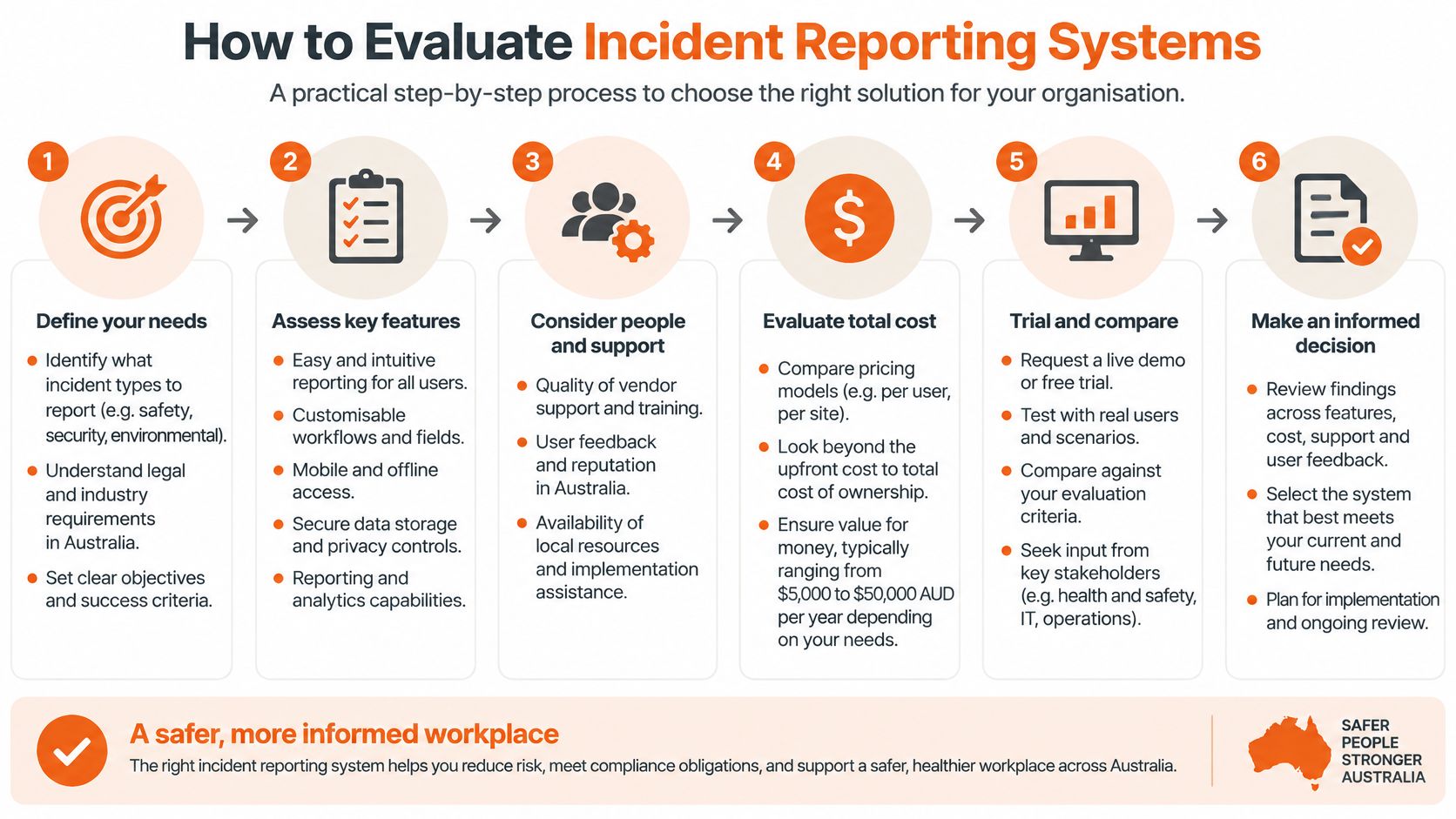
Check escalation and jurisdictional fit
Under the model Australian WHS Act, a PCBU must notify the WHS regulator immediately when a notifiable incident occurs. That includes a death, serious injury or illness, dangerous incident, or violent incident arising from the conduct of the business or undertaking. The system should make it possible to escalate a potential notifiable event promptly, capture key facts and preserve the notification record. It shouldn't make the statutory decision on behalf of the PCBU.
WHS laws are harmonised but administered by separate state and territory regulators. Notification processes and contacts can differ, so check whether workflows can be configured for the jurisdictions where the organisation operates. Sensitive injury and witness information also needs suitable access controls and an audit history showing who changed or approved a record.
New Zealand organisations should check the equivalent requirements under the Health and Safety at Work Act 2015 and guidance from WorkSafe New Zealand. The legal framework differs, so Australian notification settings should not be copied across the Tasman.
Demand evidence of closure
Hazards, near misses, injuries, property damage and environmental events may each need different fields and routing. A worker should be able to report from the field, including where reception is unreliable, while investigators need searchable evidence, clear ownership and a record of decisions.
Practical rule: A report isn't complete when someone submits it. It's complete when the right person has reviewed the event, corrective actions have been verified and the record shows how the issue was closed.
Ask to see exports and dashboards using the organisation's own categories. Managers should be able to compare sites and event types without mixing inconsistent definitions, while investigators should be able to reconstruct the report history.
Top Incident Reporting Software Options
The shortlist should reflect the work, not a universal ranking. A construction business with multiple subcontractors may need strong site and contractor controls, while a manufacturer may put more weight on investigation records and trend reporting. Since public product descriptions don't always confirm every capability, treat unknowns as questions for the vendor, not as proof that a feature is absent.
Match the system to the reporting chain
For a focused reporting tool, examine whether workers can submit hazards and incidents without navigating unrelated administration. Ask how reports move to an investigator and whether actions remain linked to the original event through verification and closure. A simpler system may suit a smaller operation, but it may not provide the wider records or reporting controls a growing, multi-site business needs.
A broader WHS platform can connect incidents with inspections, corrective actions, training or contractor processes. That can reduce repeated data entry, but only if the organisation will use those connected modules. A large feature set doesn't help if the reporting path takes too long for a worker to complete on site.
For contractor-heavy work, find out whether contractors can report directly, what information they can see and whether their records remain distinguishable from employee reports. A QR code or public form may make access easier, but it doesn't answer questions about identity, permissions, evidence retention or who owns the follow-up.
Treat unconfirmed capabilities as pilot questions
Ask each provider to demonstrate the same representative event on a device used by field workers. Include a near miss, an injury, a contractor report and an event that may require regulator notification. Confirm how the system handles offline capture, attachments, escalation, investigations, action ownership and audit history.
Avoid choosing from a feature list alone. Vendor pages may describe mobile reporting without confirming offline use, or mention analytics without showing whether managers can filter by site, contractor, event type or severity. Ask for a live demonstration and written confirmation of anything essential to the organisation's workflow.
Detailed Feature Comparison
Use a consistent set of criteria when comparing systems. The table below is deliberately vendor-neutral: specific product claims should be checked against current vendor documentation and tested in a pilot rather than assumed.
| Product | Incident capture | Custom forms and AI | Multi-site and contractors | Analytics | Mobile and offline | Public pricing |
|---|---|---|---|---|---|---|
| Shortlisted platform A | Confirm worker, supervisor and contractor reporting routes | Confirm form changes and any AI features | Confirm site and contractor records | Request a live dashboard demonstration | Test browser or app use, then confirm offline behaviour | Check the current public offer |
| Shortlisted platform B | Test the reporting path for each event type | Ask how fields and workflows are configured | Check permissions and site segmentation | Confirm export fields and filters | Test on field devices and in a controlled offline scenario | Request a written quote |
| Shortlisted platform C | Verify attachments and escalation | Confirm whether AI is available and what it does | Test contractor access and record separation | Review audit history as well as trend views | Confirm how records sync after connection returns | Confirm what the quoted plan includes |
The practical difference between browser and app access matters when a supervisor is working away from a desk. Offline reporting needs a deliberate test: enter a report without connectivity, attach evidence if required and confirm what happens when the device reconnects. For multi-site teams, check whether records can be filtered by site, project and contractor without losing the event's audit history.
Evidence quality also depends on what the system retains. For example, a property-damage report involving storage equipment may need clear photographs and a record of the affected area; Material Handling USA's rack damage photo guidance can help teams think through what visual evidence may be useful. A near-miss reporting process should likewise make it clear what details workers need to capture.
A polished interface doesn't prove that an action was verified. Ask to see the record linking the report, investigation finding, action owner, evidence and closure decision.
Best Options for Common Workplaces
The right system depends on how reports reach the office and who needs to act on them. A construction supervisor, a factory investigator and a facilities coordinator don't need identical workflows, even when each organisation wants consistent records and reliable follow-up.
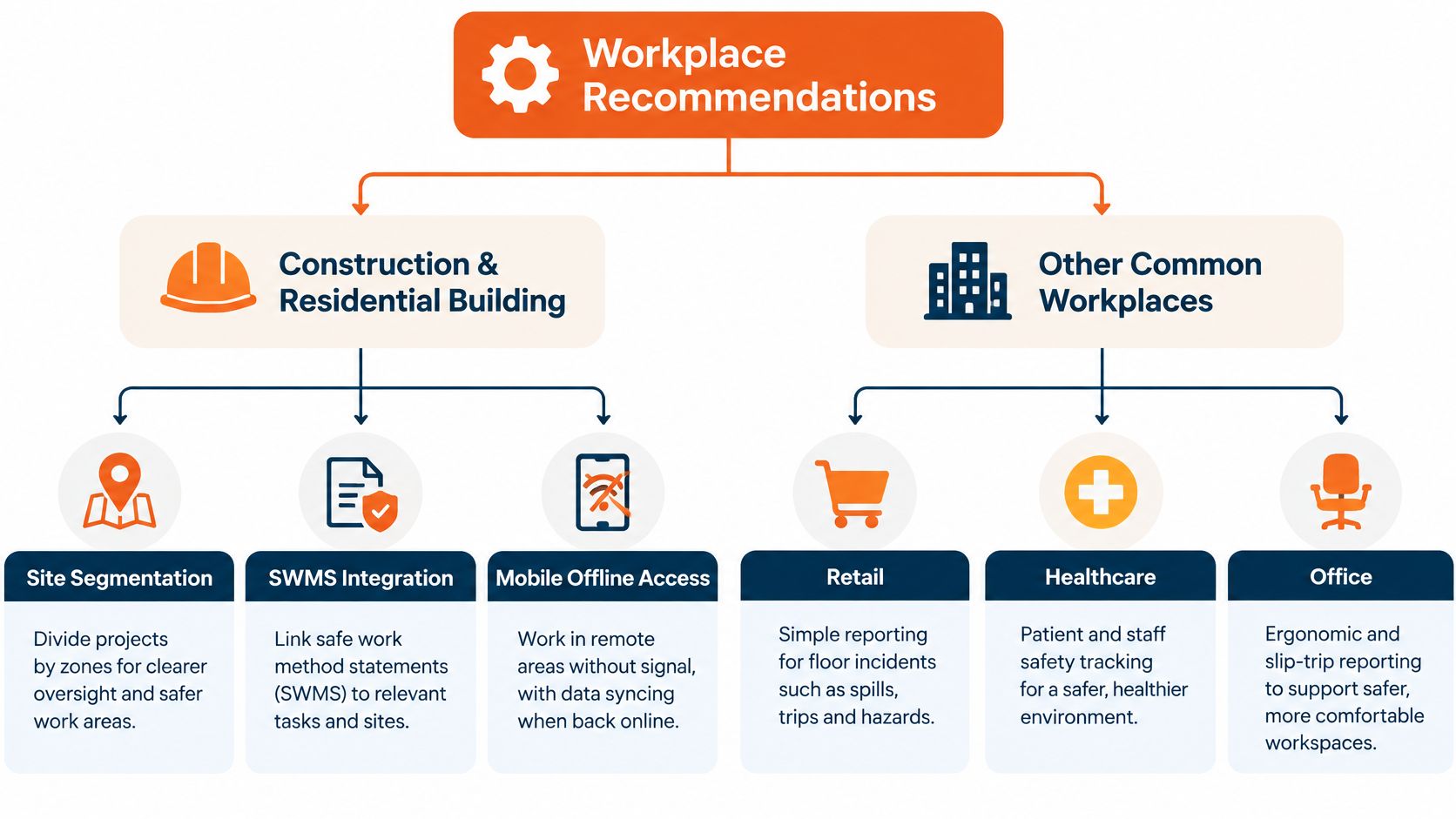
Construction and residential building
Prioritise site or project segmentation, mobile field access and clear corrective-action ownership. Reports should connect to relevant work context, such as the task, location, contractor and applicable SWMS, without making the reporting form cumbersome. Test how a subcontractor reports an event and how the principal contractor sees, assigns and verifies follow-up.
Construction and residential building businesses should also check whether workers can report in areas with limited reception. If the system relies on a stable connection for every step, a supervisor may end up recording details later from memory.
Manufacturing and industrial operations
A manufacturer needs reliable event categories and investigation records that support useful trend analysis across production areas or facilities. Check whether managers can compare event types, locations, contributing factors and action status using consistent definitions. For construction and manufacturing organisations, the Safe Work Australia figures cited earlier make structured reporting especially relevant.
For cleaning, facilities and waste services, workers may move between client sites or dispersed locations. A desktop-only reporting process can make timely capture difficult, so test mobile access with the devices and connectivity those workers use.
For a small or mid-sized organisation, weigh ease of rollout against what the team may need later. A focused incident tool may be easier to administer; a wider safety system may suit a business that wants connected inspections, actions and site records. The best fit is the one the workforce can use and managers can govern.
Run a Practical Software Pilot
A vendor demonstration shows what a system can do under ideal conditions. A pilot shows whether it holds up across the full incident chain: capture in the field, investigation, action closure and the reporting managers rely on. Use representative reports and roles, then run the same workflow through each shortlisted system.
Map the reporting path. Have a worker, a supervisor, an investigator and a contractor each submit or review a report, then show you exactly what they can see. If a contractor can open another company's records, permissions need work before go-live.
Test the fields and evidence. Run a near miss, an injury and a property-damage event through the form. Check required fields, attachments, severity rules and escalation. Where the severity options cannot be adjusted to match your risk matrix, ask whether the workaround adds admin time to every report.
Follow actions to closure. Assign owners and due dates, then record verification evidence and closure approval. If an action can be closed without attaching evidence, that is a gap to raise with the vendor before you sign.
Use field devices. Test browser and mobile behaviour on the devices workers already carry. Run a controlled offline test, then check how records and attachments sync once the device reconnects.
Export the data. Confirm that site, contractor, event mechanism, severity and lost-time fields remain usable outside the system. Review whether the export supports the organisation's management reporting and incident management metrics.
Score the pilot on report completion and evidence quality rather than the appearance of the form. For multi-site operations, include workers in different roles and locations so results do not reflect only head-office conditions. Where your jurisdiction requires notification to a WHS regulator, walk through that process too and check how quickly the system produces the incident record an inspector or insurer would request.
Compare Pricing and Contract Options
A low entry price doesn't necessarily include the workflows an organisation needs. Ask whether pricing is based on users, sites, modules, records, storage or integrations, and check separately for implementation or configuration charges. If a provider offers a broader safety platform, confirm whether incident reporting includes corrective actions, contractor records, inspections and dashboards or whether those sit in separate modules.
Count the people who need access, including workers, supervisors, investigators and contractors. A per-user model may be straightforward for a small salaried team but harder to budget when many external workers report incidents. Site-based pricing may suit organisations with several locations, but the included functionality still needs to be clear.
Compare trial access, self-service plans and custom quotes on the same basis. Include setup effort, training, field devices, data migration and ongoing administration in the total ownership estimate. For Safety Space Go, the self-service forms product is free for up to three users, or A$19 per user per month on the paid plan, with a minimum of 12 users. For the full Safety Space platform, pricing depends on sites, users and selected modules; monthly contracts can be cancelled at any time.
Recommended Pick and Buying Checklist
For Australian H&S managers who want incident reporting connected to other operational safety records, Safety Space is a practical option to include in the pilot. It supports incident and injury reporting, hazard registers, inspections, corrective actions, SWMS and JSAs, contractor records, documents, training and site dashboards. Organisations can switch on the modules they need.
Workers and managers can use the browser or iOS and Android apps, including offline use. The platform includes AI-assisted form and record functions, single sign-on and custom integrations. Safety Space positions its software for Australian and international compliance needs, including Australian WHS, New Zealand's Health and Safety at Work Act 2015, OSHA and ISO 45001. Buyers with specialised workflows should confirm the precise requirements in a pilot, particularly jurisdiction-specific escalation and access controls.
Before committing, check that the system:
- Captures the full event chain: report, evidence, investigation, actions and verified closure.
- Works for field users: test devices, offline behaviour and contractor reporting.
- Supports governance: confirm jurisdiction settings, sensitive-data permissions and audit history.
- Provides useful outputs: check dashboards and exports with the organisation's categories.
- Fits the budget: clarify included modules, implementation, access and contract terms.
For authoritative guidance, review Safe Work Australia's incident notification information, the ISO 45001 standard overview and WorkSafe New Zealand's guidance.
Safety Space brings incident reporting, corrective actions and related WHS records into one system, with browser and mobile access for office and field teams. Review the modules and contract options at Safety Space and assess the reporting workflow against your own sites and contractors.
Ready to Transform Your Safety Management?
Discover how Safety Space can help you implement the strategies discussed in this article.
Explore Safety Space FeaturesRelated Topics
Safety Space Features
Explore all the AI-powered features that make Safety Space the complete workplace safety solution.
Articles & Resources
Explore our complete collection of workplace safety articles, tools, and resources.