
In Australian construction, 67% of firms spend 30 minutes or more each week preparing SWMS. That alone makes the right software a compliance tool and a time-saving operational choice, not just a digital filing cabinet.
A good platform reduces admin without weakening worker consultation, version control or evidence of implementation. A poor one leaves the paperwork burden in place and adds another system to babysit.
| Feature | Basic Platforms | Integrated Safety Platforms |
|---|---|---|
| SWMS creation | Template storage and manual editing | Site-specific drafting with controls tied to the task |
| Worker access | Desktop-first or email-based sharing | Mobile access, worker sign-on, offline field use |
| Revision control | Simple file versions | Approval workflows, timestamps, retained history |
| Compliance evidence | PDFs in folders | Audit trails, acknowledgements, linked records |
| Follow-up actions | Separate spreadsheets | Corrective actions, inspections and incidents in one flow |
| Reporting | Basic document lists | Site-level visibility across hazards, actions and reviews |
Table of Contents
- Why SWMS Software Selection Matters for Australian Construction
- Comparing Top SWMS Software Features for Australian Workplaces
- How to Match SWMS Software to Your Business Size and Industry
- Australian WHS Compliance Requirements for SWMS Software
- Implementation Costs and Total Ownership for Australian Businesses
- Moving from SWMS Tools to Integrated Safety Management Systems
Why SWMS Software Selection Matters for Australian Construction
SWMS work is already a drain on site time. In Safe Work Australia's construction perceptions research, 39% of firms spend 30 minutes to one hour each week preparing SWMS, and another 28% spend more than one hour Safe Work Australia construction perceptions research. The same research shows 36% spend 30 minutes to one hour each week on compliance administration. For Australian construction, that makes software selection a workflow decision, not a storage decision.
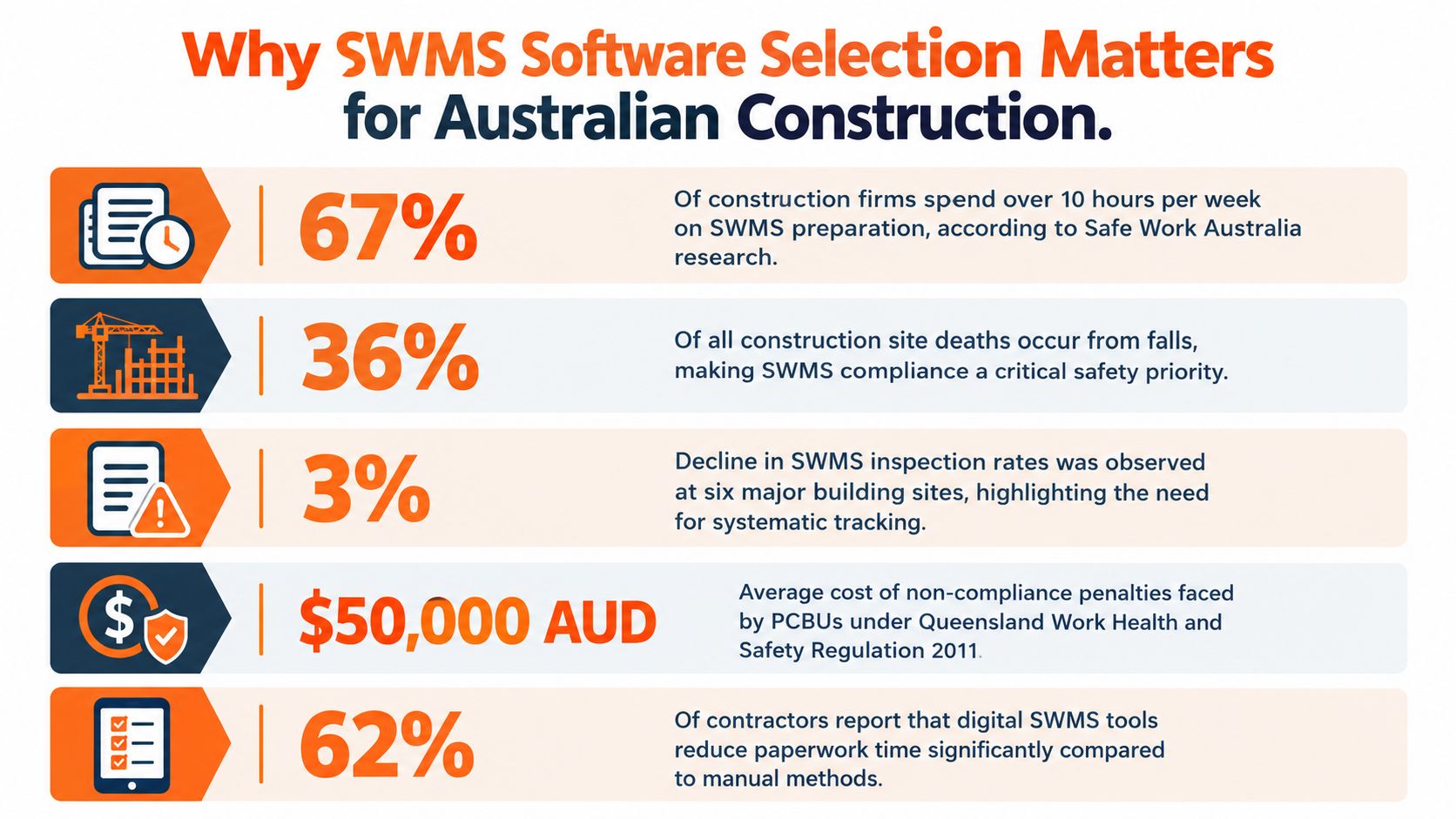
A platform earns its place on site only if it cuts the paper chase. Crews need the current SWMS on a phone or tablet, supervisors need to issue updates without chasing emails, and managers need a record that shows who saw which version and when. If the software cannot handle field use, version control, and sign-off without friction, the admin load moves from folders to screens.
Compliance duties add to that load, and Section 4 deals with the legal detail. Here, the practical question is whether the software removes workflow friction or creates another system to babysit. high risk construction work requiring SWMS and Queensland SWMS guidance both point to the need for current, accessible records, but the test on site is simple: can the team use the document at the workface, not back at the trailer?
Practical rule: if a site supervisor cannot open the current SWMS on a phone at the workface, the software has not solved the real problem.
That is why PDF storage falls short. A file in a folder does not show whether a worker reviewed it before the job started, whether a revision reached the right crew, or whether the control set changed after an incident. Those gaps matter more on smaller sites with limited admin time, where one person often carries planning, supervision, and paperwork. Larger firms face a different burden. They need consistency across multiple crews, stronger reporting, and fewer manual handovers between office and field.
Australia's injury profile also shows why history and follow-through matter. Safe Work Australia's latest WHS statistics report 188 worker deaths from traumatic injuries in 2024 and 146,700 serious workers' compensation claims in 2023–24 latest WHS statistics. Construction accounted for 37 fatalities in 2024, or 20% of the national total latest WHS statistics. Software will not remove risk on its own, but it should connect SWMS to hazards, actions, inspections, and incident records so the business can see what happened and what changed.
Comparing Top SWMS Software Features for Australian Workplaces
The feature gap between a basic platform and an integrated safety system shows up in daily use. A basic product may let users upload a SWMS and add signatures. That helps with storage, but not with control implementation, revision tracking or later evidence review.
What matters on site
The first filter is field access. If crews can't open the current SWMS on a mobile device, or if the app fails when reception is poor, adoption drops fast. Australian construction teams also need version control, timestamped acknowledgements and a clear audit trail, because the document must be current and retrievable when someone asks for it.
A second filter is workflow. The software should let supervisors assign controls, collect worker sign-on, push revisions through approval steps and retain previous records without overwriting them. That matters when the work changes mid-job, or when an incident forces a review.
compare proposals and file sharing only helps if the underlying process still supports consultation, sign-off and a clean record trail. For SWMS, the file exchange itself is not the outcome. The outcome is that the right workers saw the right version before high-risk work started.
Feature comparison for Australian businesses
| Feature | Basic Platforms | Integrated Safety Platforms |
|---|---|---|
| Drag-and-drop form builder | Sometimes | Usually |
| Offline mobile access | Often limited | More likely designed in |
| Worker sign-on | Basic e-signature only | Timestamped acknowledgements with audit trail |
| Version control | File revisions | Controlled approvals and retained history |
| Corrective actions | Separate system | Linked directly to SWMS and incidents |
| Searchable records | Folder search | Site, job and date-based retrieval |
| Inspection linkage | Rare | Common |
| Multi-site reporting | Limited | Designed for it |
| Subcontractor access | Usually clunky | Role-based access and permissions |
| Exportable records | PDF download | Regulator-ready record sets |
Safety Space's Australian WHS software is one option in this category, with SWMS, incidents, hazards, actions, training and site-level reporting in one system. That kind of structure is what matters when the business wants more than a static document archive.
A SWMS platform that can't connect a failed inspection to a corrective action usually leaves the same gap open next week.
That gap is why the feature list should be judged against actual site workflow. A polished template editor is useful, but only if it sits inside a system workers can use in the field and managers can audit later.
How to Match SWMS Software to Your Business Size and Industry
Smaller firms often need speed and simplicity more than a broad enterprise stack. Larger organisations usually need deeper permissions, reporting and oversight across multiple sites. The right answer depends on who is filling out the SWMS, who signs it off, and how often work changes after the document is issued.
Small teams need low-friction use
A small residential builder, cleaner or waste contractor usually benefits from software that keeps form completion short and readable. If the process takes too many taps, workers revert to paper, photos or chat messages. That is where the compliance trail starts to fall apart.
For small teams, the key checks are practical:
- Can crews finish a SWMS on a phone without training: If the form is hard to read or edit, it won't get used.
- Does it work offline: Remote sites and weak coverage still happen.
- Can workers use personal devices safely: If the answer is no, adoption may stall.
- Does the setup fit limited admin capacity: Small businesses rarely have spare time to chase document hygiene.
Larger businesses need control and visibility
Australian survey data shows 24% of construction businesses used specialist safety software overall, rising to 66% among organisations with 100 or more employees Procore Australian survey. The same survey found larger firms were more likely to use leading indicators and proactive inspections. That points to a simple truth, bigger sites usually need software that joins up SWMS with inspections, corrective actions and reporting.
Decision rule: if a business has multiple sites, multiple supervisors or multiple subcontractors, the software needs permissions and reporting first, templates second.
Manufacturing, cleaning and facilities teams should pay attention to the same pattern even when the terminology differs. The work may not always be labelled as high risk construction work, but the operational need is the same, clear controls, clear sign-off and retrievable evidence. If the software can't organise records by site or project, and can't show who saw what and when, it will struggle in any multi-location business.
Australian WHS Compliance Requirements for SWMS Software
A SWMS is required paperwork for high risk construction work, but the operational burden is significant. Queensland guidance says it must be prepared before the work starts, given to the principal contractor, reviewed when needed, and kept for the required period. Safe Work Australia also says it must stay accessible to workers during the job and be retained for at least two years after a notifiable incident model code of practice.
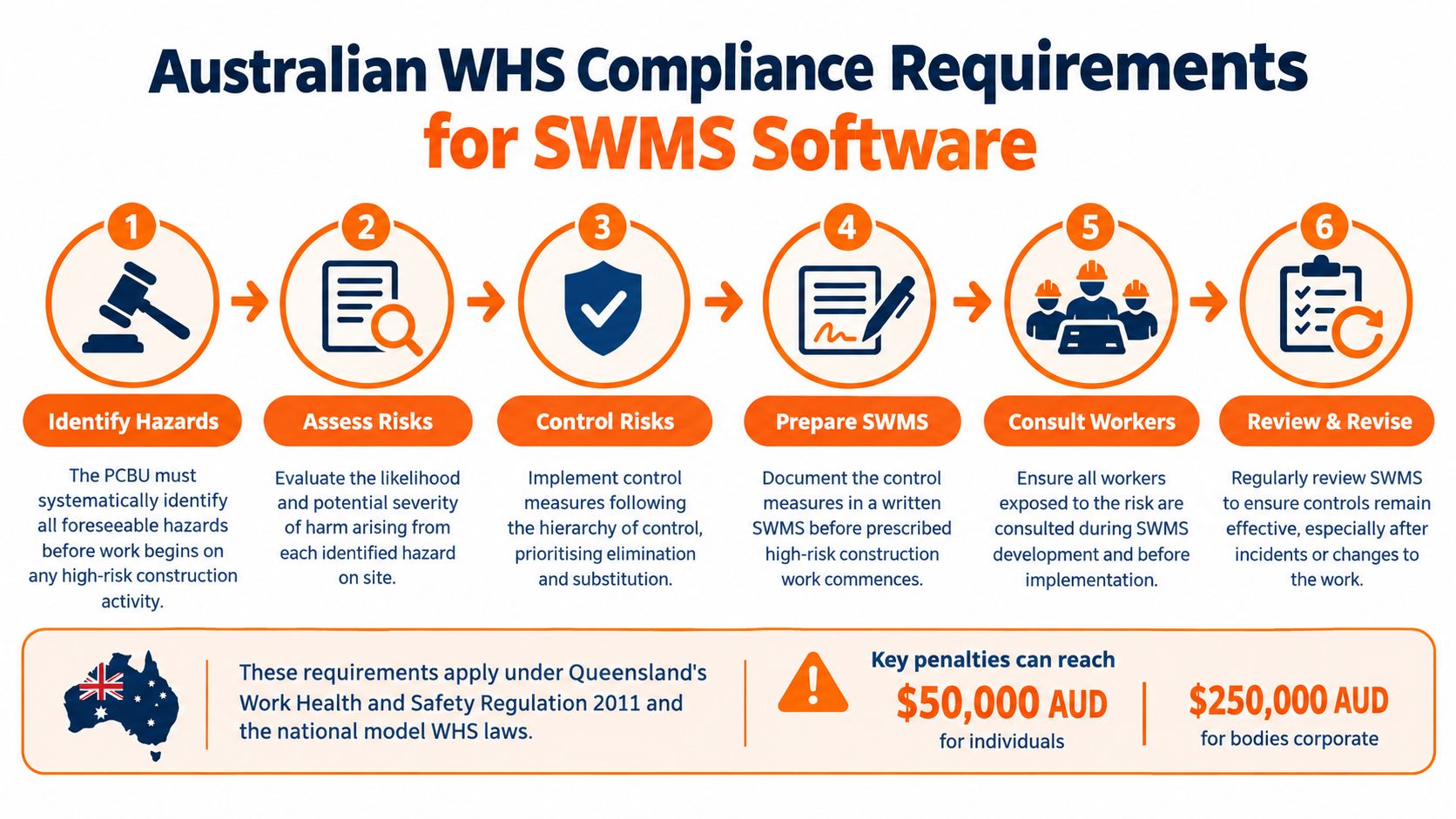
The workflow software needs to support
Software earns its place when it supports the full compliance trail, not just document creation. It should show which hazards were identified, which controls were chosen, who reviewed the method statement, and whether workers acknowledged it before the job began. It should also keep the earlier version when a SWMS changes after a hazard update or incident.
Safe Work Australia identifies 18 categories of high risk construction work that require a SWMS, including work where a person could fall more than 2 metres, demolition affecting a load-bearing structure, asbestos disturbance, confined space work, work near a trench deeper than 1.5 metres, and work near energised electrical services interactive SWMS tool. Good software should classify tasks against those triggers, not treat every construction task the same.
What to look for in the record trail
A system has to stand up to questions after the job. That means version control with approvals so revised SWMS do not overwrite the original, timestamped worker acknowledgements so consultation is visible, and immutable audit history so changes can be traced after an incident.
Retrieval matters just as much. If a principal contractor or regulator asks for records, the file should be easy to find by site, project, or task. That is where many paper-heavy setups fail, especially on larger sites with several supervisors and subcontractors. A clear search trail reduces the time spent chasing copies and reduces the risk of stale documents circulating in the field.
What the record should make easy to prove
The duty is about control of the work, not document creation alone. A practical platform should make it easy to show that the right method statement was used for the right task, that workers saw it before starting, and that changes were captured when the job changed. A clear example of that approach is SWMS for construction, where the record follows the job instead of living in a desktop folder.
Implementation Costs and Total Ownership for Australian Businesses
Headline pricing rarely tells the full story. A cheaper platform can end up costing more if workers don't use it, supervisors have to maintain parallel spreadsheets, or subcontractor records live in separate folders. What matters is whether the system removes admin or just digitises the same admin.
Hidden costs show up in adoption
Support matters more than many buying teams expect. If setup is left to the business, the internal team ends up building forms, permissions and workflows from scratch. That steals time from site safety work and usually leads to patchy rollout.
The other hidden cost is friction in the field. Poor connectivity, limited digital confidence and mixed language environments can break an otherwise solid platform. If crews can't complete the SWMS on site, the office ends up re-entering it later, which puts the business right back where it started.
Cost should be judged against use, not licence labels
Australian small businesses often have the tools, but not always the trust or support needed to use them consistently. The broader digital research environment also shows a cybersecurity gap in smaller firms, with fewer than one-quarter having a cybersecurity policy or staff training and only 20% having either in 2025 auDA digital lives research. That doesn't mean every SWMS buyer needs enterprise controls, but it does mean buyers should ask about access, retention, backups and role-based permissions.
A sensible commercial review should include:
- Setup effort: Who configures the templates, permissions and site structure.
- Support model: Whether the vendor helps the rollout or leaves the team on its own.
- Device fit: Whether the platform works on phones used by field workers.
- Record duplication: Whether subcontractor and site records must be entered twice.
- Usage outcome: Whether active workers complete the process, not just receive the licence.
If a lower-cost product produces more internal admin, it is not lower cost. The best value comes from software that shortens preparation time while keeping the evidence trail intact.
Moving from SWMS Tools to Integrated Safety Management Systems
The strongest business case sits in integration. A stand-alone SWMS tool can create a document, but an integrated system connects that document to inspections, incidents, hazards, actions, training and site-level reporting. That matters because SWMS only works properly when the controls are carried through the job and reviewed when conditions change.
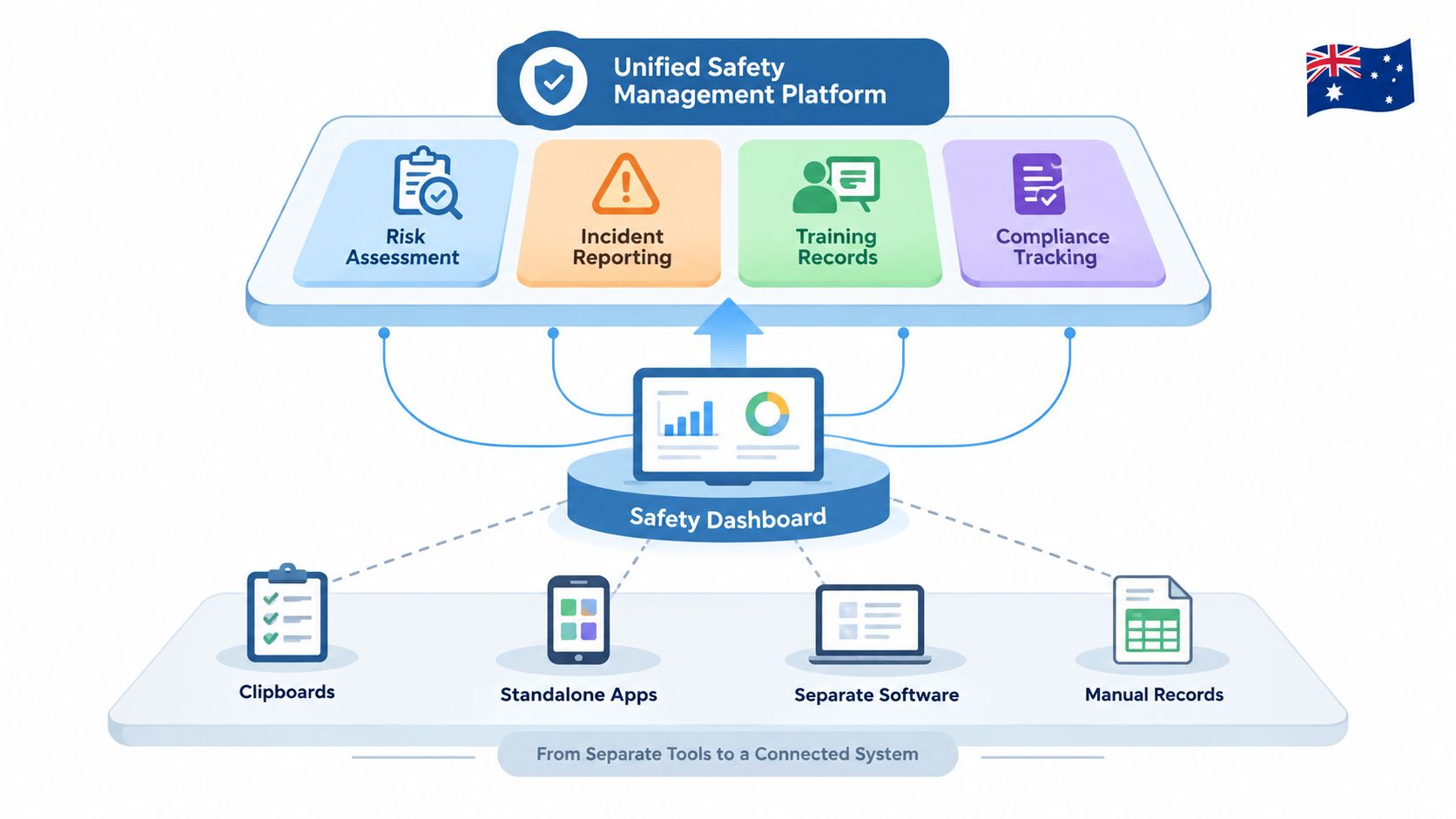
The practical difference on site
Integrated platforms let managers turn SWMS controls into tasks, then follow those tasks through to completion. Failed inspections can become corrective actions. Incident reports can point back to the SWMS version that was live at the time. Training records can show whether the worker had been briefed before the job started.
That is a better fit for the compliance burden described earlier, because it ties together the work, the people and the evidence. It also suits businesses that operate across multiple sites, where paper habits break down quickly.
What to check before buying
Integrated management system software should be judged against the same checklist every time:
- Does the SWMS connect to inspections and corrective actions?
- Can supervisors see overdue actions by site or contractor?
- Are training and sign-on records linked to the task?
- Can the platform retain previous versions after a revision?
- Can the field team use it on a phone?
The answer to those questions usually tells you more than a feature brochure does. A system that only stores completed documents may satisfy a filing habit. A system that records the full control loop supports actual WHS management.
Safety Space gives Australian businesses SWMS, incidents, hazards, actions, training, contractor management and site-level records in one system, with mobile access and offline field use. If the current process still relies on disconnected templates, spreadsheets and email chains, visit Safety Space and review how a connected safety platform fits your sites, users and SWMS workflow.
Ready to Transform Your Safety Management?
Discover how Safety Space can help you implement the strategies discussed in this article.
Explore Safety Space FeaturesRelated Topics
Safety Space Features
Explore all the AI-powered features that make Safety Space the complete workplace safety solution.
Articles & Resources
Explore our complete collection of workplace safety articles, tools, and resources.