
The most common advice on document control is to build one controlled library, lock down editing rights and stop people keeping local copies. That advice is half right, and the missing half is the one that hurts you. A tidy library proves a document exists. It doesn't prove the crew doing the high-risk work had the current version in front of them at 7am, and it doesn't prove anyone withdrew the printout pinned in the site shed.
A document control procedure earns its keep when it can answer a harder question: who had which version, where, when, and who authorised it. Filing is the easy part. Field access and evidence are the parts that fail.
Table of Contents
- The Seven Stages Every Document Control Procedure Needs
- How to Draft, Review and Approve Controlled Documents
- How to Control Distribution and Revision at the Point of Work
- How Long to Keep Each Document
- How to Audit Whether the Procedure Is Working
- Where Document Control Breaks Down and How to Fix It
- Set Up Document Control in Your First 30 Days
The Seven Stages Every Document Control Procedure Needs
A document control procedure sets out how a controlled document is created, reviewed, approved, issued, changed, withdrawn and archived. In Australia it doubles as compliance evidence, because Safe Work Australia's guidance on managing WHS risks states that keeping records of the risk-management process can demonstrate compliance with the WHS Act and Regulations. Seven stages cover the full life of a controlled document, and each one has to leave a record behind.
| Stage | What it produces | Owner | Evidence |
|---|---|---|---|
| 1. Identify and classify | Document title, type, owner and risk category | Document owner | Register entry naming the owner and type |
| 2. Set approval authority and review frequency | A named approver and a review cycle or trigger | WHS manager | Approval matrix and review schedule |
| 3. Issue a numbered version | A unique version number and effective date | Document owner | Version record showing the effective date |
| 4. Distribute | The current version in every place it is needed | Operations or site manager | Distribution list and acknowledgement records |
| 5. Withdraw superseded copies | Superseded copies marked, removed or archived | Document owner | Withdrawal record and the archived previous version |
| 6. Retain revision and approval history | A history of who changed and approved what, and when | WHS manager | Audit trail and signed approvals |
| 7. Audit use in the field | Proof the current version is the one in use | WHS manager or auditor | Audit report with corrective actions |
The pass mark for each stage
Set one standard and apply it to every sample: 100% of sampled operational documents have an owner, an approval record, a current revision, an effective date and a known distribution point. Safe Work Australia's safety management systems guidance frames the audit criteria as systematic development and identification, systematic prompt distribution, and systematic removal of obsolete documents, and it suggests measuring the percentage of obsolete procedures in the documentation set as a workable KPI.
Practical rule: an obsolete copy found at a point of use is a corrective action with a named owner and a due date, not an administrative defect to be tidied up on the spot.
The records underneath those stages matter as much as the stages themselves. Your system has to show identified hazards, assessed risks, the controls selected, when those controls were implemented, monitored and reviewed, consultation with workers, training information, and planned workplace changes. A procedure that only stores the final PDF can't produce that chain.
The two stages organisations skip
Approval authority is the first casualty. Documents get written, circulated and used without anyone deciding who has the standing to say the content is fit for the risk it controls. The second is withdrawal. Issuing version 3 is a task someone owns; removing version 2 from three sheds, two tablets and a shared drive usually isn't.
Revision history is where those two gaps meet, and it's the same discipline that applies to technical files, as this piece on keeping engineering drawings traceable sets out. If a revision overwrites the previous file instead of archiving it, you lose the ability to say what control applied on the day the work was done.
How to Draft, Review and Approve Controlled Documents
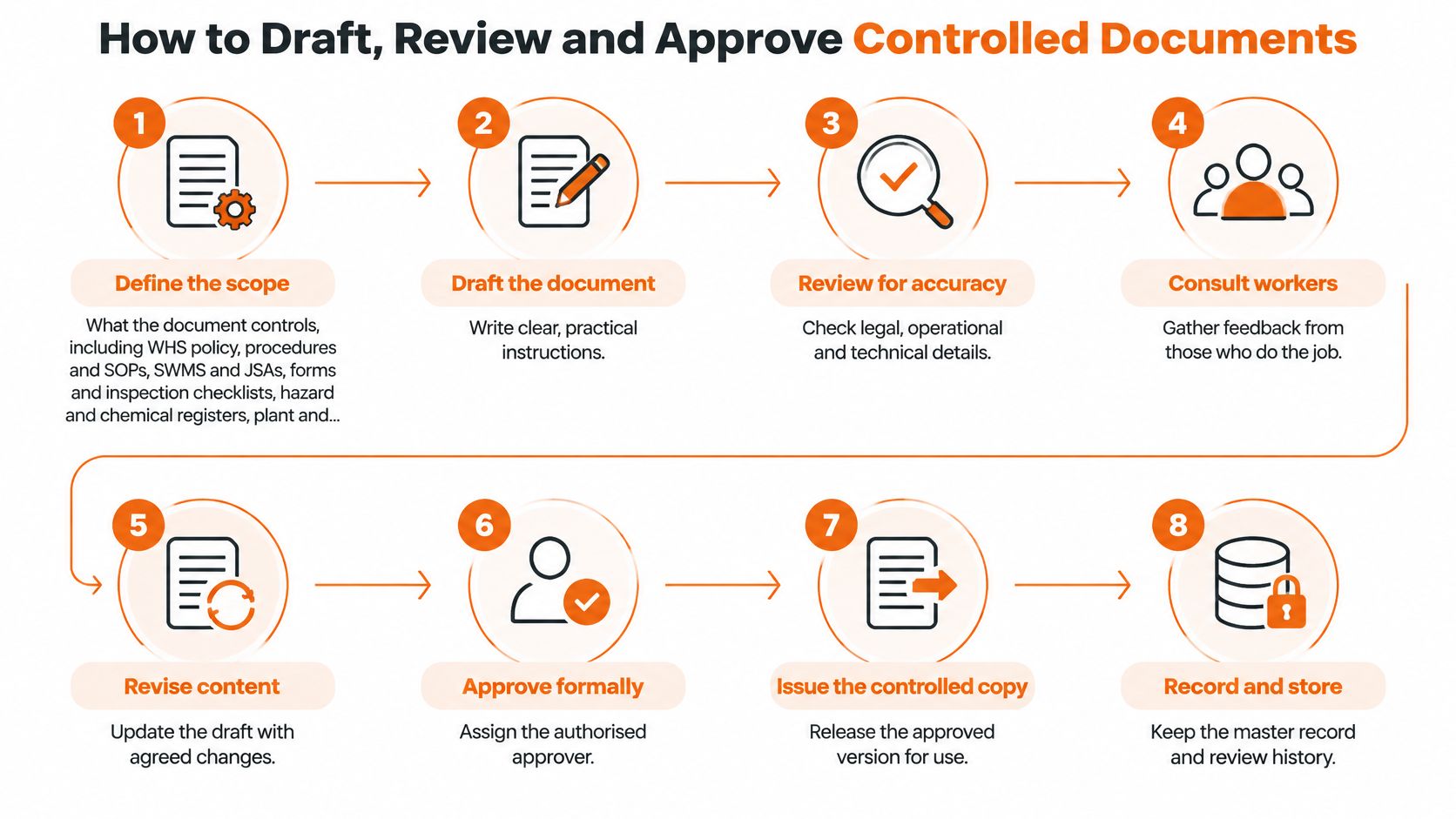
Write the procedure as eight numbered steps, each with the reason attached, so a supervisor can follow it without asking the WHS manager what was intended.
- Define what it controls. WHS policy, procedures and SOPs, SWMS and JSAs, forms and inspection checklists, hazard and chemical registers, plant and training records, contractor certificates, and health-monitoring reports. Anything that directs work or evidences a control belongs in scope.
- Set a numbering and titling rule. Carry document type, sequence, version and effective date in the identifier, for example SOP-014 v2.0 effective 3 March 2026. A crew can then read the version off a printout without opening a system.
- Assign approval authority by risk. A SWMS for high-risk construction work needs a different sign-off from a cleaning SOP, because the consequence of getting it wrong is different.
- Set a review cycle plus review triggers. Scheduled date, new plant or chemical, legislative change, notifiable incident, or an audit finding. Triggers catch the changes a calendar misses.
- Define consultation. WHS duties require workers and their representatives to be consulted on matters affecting their health and safety, so draft with the crew who do the task, not just for them.
- Make approval a required field. Name, role and date, captured at the moment of approval. Verbal sign-off is not a record.
- Specify the digital audit trail. Role-based permissions, time-stamped approvals, and logs of who drafted, changed, published, superseded or withdrew the document, with a rule that AI-assisted drafting still ends with a human approver.
- Publish, then brief crews. Issue the controlled version and run the change through a toolbox talk before the effective date, not after it.
Why the metadata is part of the evidence
An approved PDF on its own may not be enough. The Australian Government's document management standard requires digital systems to preserve information that is genuine, accurate, complete, findable, usable, and protected from unauthorised alteration or deletion. That shifts the question from "do you have the procedure" to "can you show its history". Specify immutable audit logs, exportable evidence, retention and disposal rules, and controls over automated drafting, because a system that lets an administrator edit an approval record without notice won't survive scrutiny.
Approval matrix as a starting point
Treat the matrix below as a default to adjust to your structure, not a legal schedule. Where one person holds two roles, name a second reviewer so no document is drafted, reviewed and approved by the same pair of hands.
| Document type | Drafted by | Reviewed by | Approved by | Review cycle |
|---|---|---|---|---|
| WHS policy | WHS manager | Senior managers and health and safety representatives | Managing director or PCBU officer | 2 years or on significant change |
| Procedure or SOP | Process owner with a WHS adviser | WHS manager and affected supervisors | Operations manager | 1 to 2 years |
| SWMS for high-risk construction work | Supervisor who runs the task | WHS adviser and the crew doing the work | Project manager | Each new task, plant item or site condition |
| Forms and inspection checklists | WHS officer | People who fill the form in | WHS manager | Annual or after an incident finding |
| Registers for hazards, chemicals, plant and training | WHS officer | WHS manager | Operations manager | Continuous updates with a full annual review |
| Contractor and supplier certificates | Contractor | Contractor manager | WHS manager | On expiry, with reminders before the date |
The procedure document itself needs its own headings: purpose, scope, definitions, responsibilities, the seven-stage process, the approval matrix, the retention schedule and the records list. Number every clause. When an auditor asks how you control superseded copies, the site should be able to cite the numbered clause rather than describe a habit.
How to Control Distribution and Revision at the Point of Work
Distribution is where most procedures stop being a document and start being a safety control. Run it as six steps.
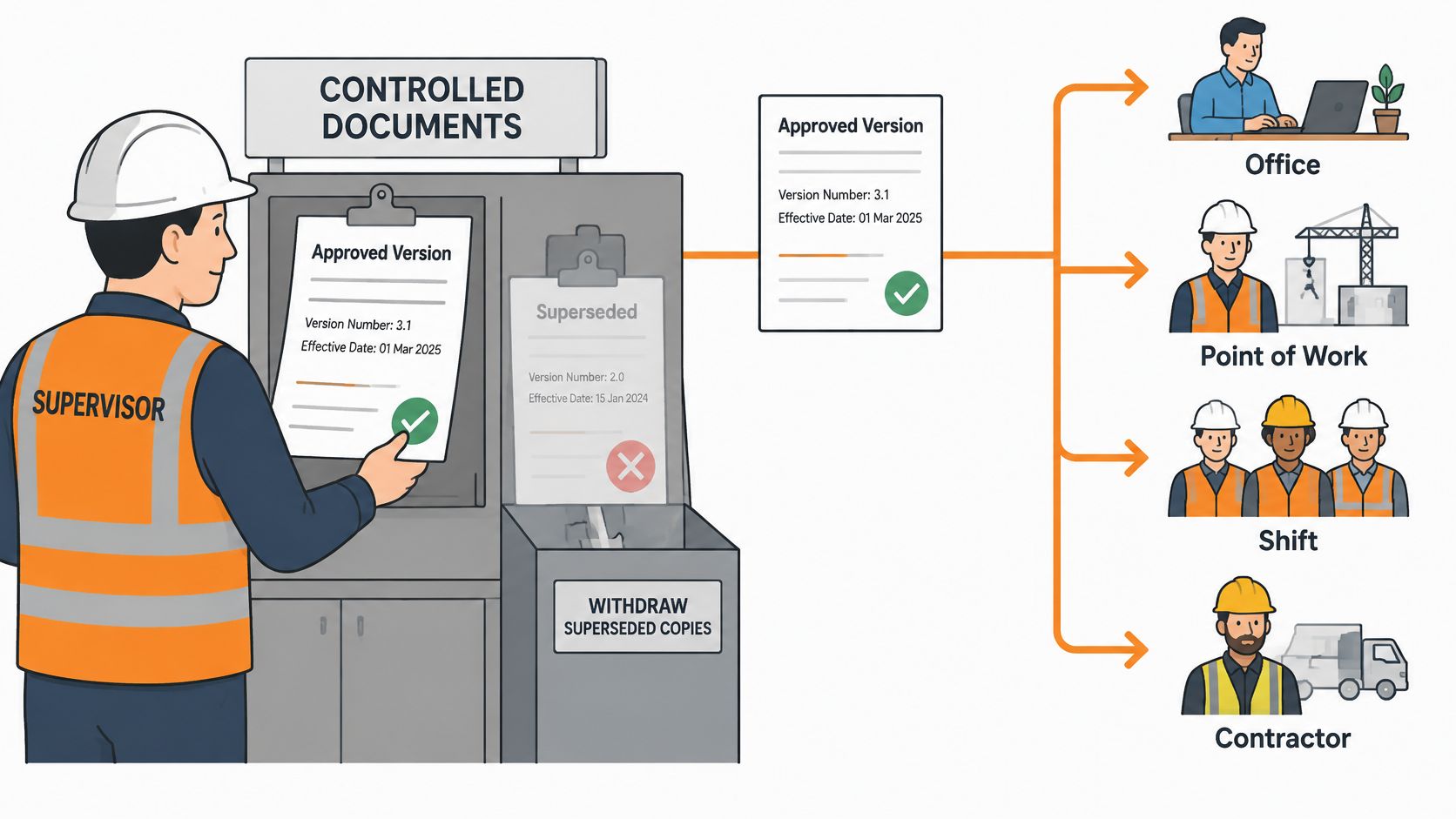
- Issue the approved version with its version number and effective date visible on the document itself, not only in the register.
- Push it to every role, site and shift that needs it, including contractors and labour-hire crews. A distribution list based on head office roles will miss the night shift.
- Withdraw superseded copies by marking them superseded or moving them to the archive, and raise withdrawal as a task created by the revision itself, with an owner.
- Control printed copies with a register, a date stamp and a destruction rule that fires on revision. Unmanaged printing is the single biggest source of obsolete documents in the field.
- Record acknowledgement or sign-on against the exact version, so you can show who received what and when.
- Make the current version available offline on a phone, because the tasks that most need a SWMS often happen where there's no signal.
The access tension you have to resolve
Locking documents down and keeping them reachable pull in opposite directions. The NSW code of practice for safety management systems says controlled documents should have identifiable versions, dates, approval status and review arrangements with obsolete copies removed or archived, and it also warns that document control must not restrict access to information needed to implement the safety management system. A permissions model that stops a supervisor opening a chemical SDS on a Saturday has failed, however tidy the library looks.
The legal floor is specific. Safe Work Australia's SWMS information sheet requires a PCBU to keep the relevant SWMS readily accessible to the workers doing the high-risk construction work and available for WHS inspection, and every revised version must be retained rather than overwritten. That means the archive is a live compliance asset, not a backup.
The test isn't whether the right version exists. It's whether the right person had it at the point of work, and whether the system can show that without putting a login wall in front of the crew.
A field-use control model for each document
Set these fields per document, not per system: owner, approval authority, review trigger, offline availability, expiry behaviour, acknowledgement or sign-on, local-copy handling, and the evidence that a worker received the current version. Printed copies deserve their own rule, and the same logic applies to vehicle and plant paperwork, as this piece on retiring outdated fleet safety forms explains.
If you run the register in software, judge it on one thing: does it put the current version in front of the person filling the form? Safety Space is one option to evaluate against that test. Each document carries a name, a version and a review date at upload, keeps a review history recorded once the document has been checked as current, and a Document question can be added to a form so the chosen document is shown while the form is filled, including on public links. That last detail matters for contractors who won't have a login.
How Long to Keep Each Document
One retention period for everything is wrong. The applicable duration depends on the document type, the hazard, the event and the legal context, and the spread in the model WHS Regulations runs from weeks to decades.
| Record | Minimum retention | Clock starts |
|---|---|---|
| Risk assessment for completed work | 28 days | When the work is completed |
| Risk assessment or SWMS connected to a notifiable incident | 2 years | Date of the incident |
| SWMS for high-risk construction work | Until the work is completed, or 2 years after a notifiable incident | Completion of the work or the incident date |
| Records of high-risk work evidence | 1 year | When the work is completed |
| Notifiable incident records | 5 years | Date of the incident |
| Plant safety-integrity records | 5 years | The relevant inspection or test |
| Health-monitoring reports | 30 years, kept as confidential records | Date the record is created |
What each row forces you to build
The model WHS Regulations set these minimums: a risk assessment generally kept until at least 28 days after the related work is completed, at least 2 years after a notifiable incident for the assessment or SWMS, at least 1 year for certain high-risk-work evidence, 5 years for some plant safety-integrity records, and at least 30 years for health-monitoring reports held as confidential records. Earlier Safe Work Australia guidance also identifies a 5-year minimum for records of notifiable incidents.
Set retention as a field on each document record, not as a paragraph in the procedure. A field lets the register show what's due for disposal and what must not be deleted, and it lets you tie the clock to a real date: completion of the work, the incident date, the inspection, or the day the record was created. Without that date, the rule is unenforceable.
Health-monitoring reports need separate access controls, because a 30-year confidential record sitting in a general library is a privacy problem waiting for a staff change. Disposal needs authorisation and a record of who approved it, so a deletion is a decision rather than an accident.
For the SWMS, keep the approved version and every revision, with the clock tied to completion of the high-risk construction work or to the notifiable incident date, whichever applies. Records also have to stay retrievable long after a project closes or a worker leaves, which is where a practical document retention policy earns its place.
New Zealand note: the Health and Safety at Work Act 2015 sets similar record-keeping and notification duties, but the periods aren't identical. Check WorkSafe NZ and legislation.govt.nz for the durations that apply before adopting the Australian figures above.
How to Audit Whether the Procedure Is Working
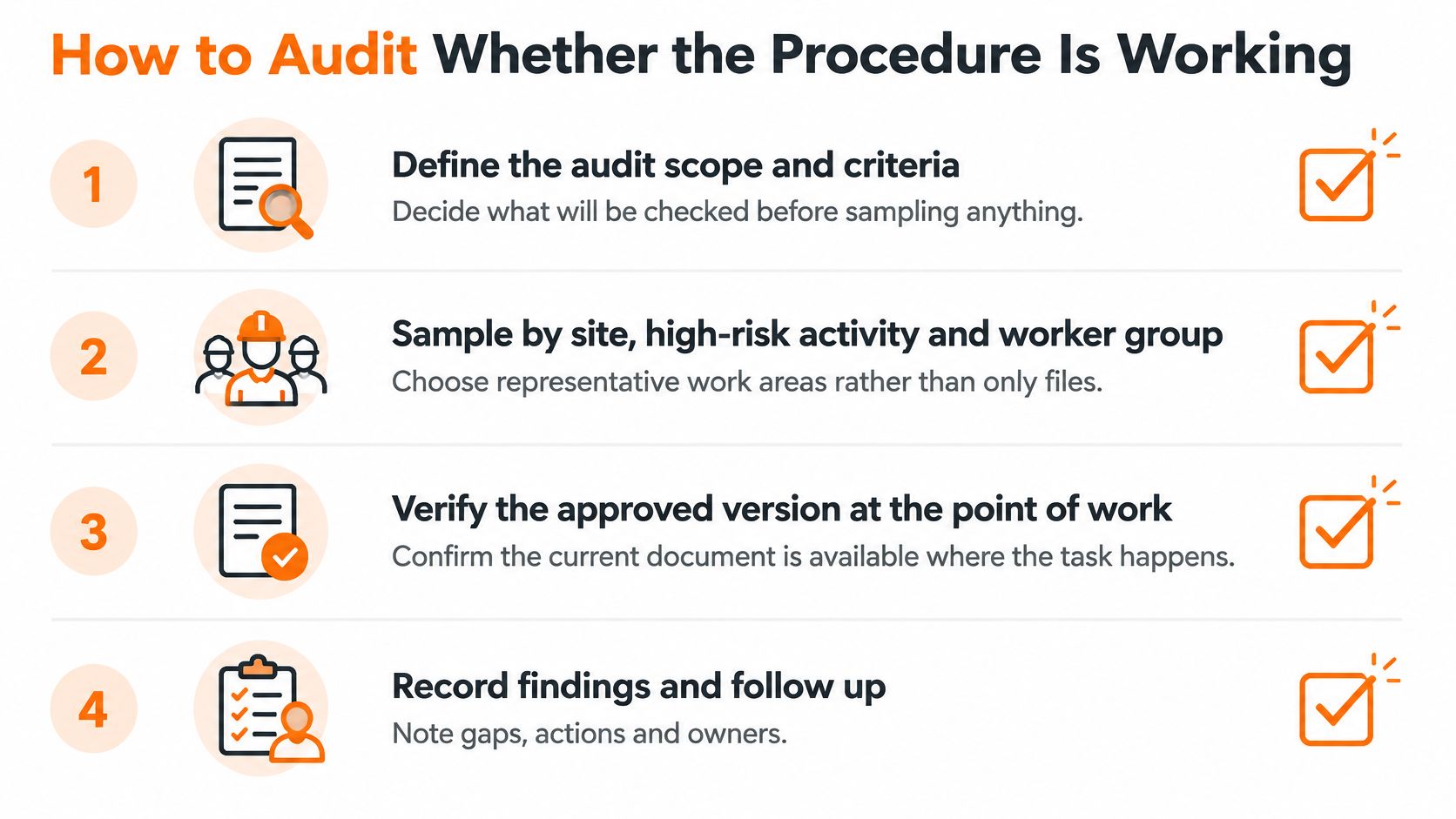
Audit document control as an operational control, not a filing check. The sequence is short: define scope and criteria, determine methodology, conduct the audit, report results.
- Define the audit scope and criteria before sampling anything.
- Sample by site, high-risk activity and worker group rather than by file.
- Verify the approved version is available at the point of work.
- Interview two or three users about the procedure that applies to their task.
- Compare field practice with the document.
- Record each non-conformance.
- Assign corrective actions with owners and due dates.
- Verify closure with evidence or re-inspection.
Why document counts mislead managers
Having a procedure and delivering it are different outcomes. In Safe Work Australia's assurance and verification information review, 93% of construction employers reported having hazard-control procedures, while 16% of workers exposed to airborne hazards reported receiving no control measures. That gap is exactly what a document count hides. A register can be complete while the control never reaches the person breathing the dust.
Audit test: ask a worker to open the procedure for the task they're doing right now. What they can produce in under a minute is your real distribution rate.
The metrics to report each month
- Current-version availability at the point of work: the share of sampled tasks where the crew can produce the approved version. This is the headline number.
- Worker acknowledgement rate: measured against the exact revision, not the document title.
- Overdue reviews: count and age, with the owner named for each.
- Obsolete-copy findings at points of use: every one raised as a corrective action.
- Corrective-action closure rate: verified by evidence or re-inspection, not by a status change.
- Percentage of obsolete procedures in the documentation set: the trend that tells you whether withdrawal is working.
Act first on current-version availability and obsolete-copy findings. They tell you whether the right version reaches the crew, which is the failure mode that injures someone. Overdue reviews matter, but a late review on a document nobody reads is a lesser problem than a superseded one everybody follows. Build the sampling into your routine audits and compliance schedule so it runs monthly rather than before a certification visit.
Where Document Control Breaks Down and How to Fix It
The most common finding is an obsolete copy still in circulation, and the usual response is to bin that copy. That fixes nothing. The cause is almost always an unmanaged printing habit or a revision process with no withdrawal step, and it will produce the same finding next month in a different shed.
Classify each fix before you write it: a rule (someone must do something), a workflow change (the process creates the task automatically), or a system setting (the software enforces it). Rules are cheapest and weakest. Settings hold.
| What you find | Usual cause | Fix |
|---|---|---|
| Superseded SOP printed and pinned in the site shed | Printing is unmanaged and no one withdraws old copies | Register printed copies, date stamp them, and make withdrawal a task on the revision |
| Review dates overdue across the register | Documents were uploaded without an owner | Name an owner on every document and set the review date at upload |
| Crews photograph a SWMS and share it on their phones | No reliable offline access to the current version | Provide the current version through an app that works offline, with sign-on recorded |
| Contractor insurance certificates expired | Renewals are chased by hand | Automate reminders before expiry and hold site access until the certificate is current |
| Two versions of the same procedure in circulation | Files sit on shared drives and local folders | Keep one controlled library and mark everything else uncontrolled or archived |
| Approvals given verbally and never recorded | No approval field or sign-off step | Make approver name, role and date a required field |
| An obsolete copy found at a point of use | Treated as a filing error | Raise a corrective action with a named owner and a due date |
Crews photographing a SWMS aren't misbehaving, they're solving an access problem you left them. Give them a current version that works offline and the photographs stop. For the wider filing habits behind these findings, this guide to organising business records is a useful companion to the control rules above.
Set Up Document Control in Your First 30 Days
Run this as four weeks of work, not a project plan. Each week produces something an auditor could look at.
Week 1: inventory and ownership. List every WHS document the business relies on, sort it by type, and name an owner for each. Flag anything with no owner or an expired review date. You'll usually find the register is smaller than expected and the orphan count is larger.
Week 2: write and approve the procedure. Use the seven stages and the approval matrix. Set the numbering rule, review cycles, retention fields and distribution points. Get it approved and record the approval with name, role and date, so the procedure itself passes the standard it sets.
Week 3: publish and withdraw. Issue the current versions, archive superseded copies, brief crews at toolbox talks and collect acknowledgements against the version number. Set up one controlled library so there's a single place to look, and mark every other location uncontrolled. A structured document management program gives this week a defined shape rather than a folder reorganisation.
Week 4: audit and correct. Sample across two sites, log the non-conformances, raise corrective actions with owners and due dates, and set the next review dates while you're in the record.
Two measures go to management each month:
- Percentage of controlled documents with a current review date.
- Number of obsolete copies found at a point of use.
The first shows whether ownership is real. The second shows whether the crew is working from what you approved. Report both, and act on the second first.
Safety Space keeps document names, versions, review dates and review histories in one library, shows the chosen document inside the form a crew is filling (including on public links), and works offline through the iOS and Android apps so the current version is reachable in a shed with no signal. If you want your register to prove field access rather than just store files, visit Safety Space and set up your document library against the seven stages above.
Ready to Transform Your Safety Management?
Discover how Safety Space can help you implement the strategies discussed in this article.
Explore Safety Space FeaturesRelated Topics
Safety Space Features
Explore all the AI-powered features that make Safety Space the complete workplace safety solution.
Articles & Resources
Explore our complete collection of workplace safety articles, tools, and resources.