
We've all had those heart-stopping moments on site. The close call that makes you take a deep breath and think, "that was lucky." Maybe it was a wrench falling from scaffolding that landed just metres away, or a slip on a wet floor where you caught your balance just in time.
That’s a near miss: an incident that didn't result in an injury or damage, but very easily could have.
What Is Near Miss Reporting?

Near miss reporting is simply the process of formally documenting these close calls. It’s not about pointing fingers or getting someone in trouble. Instead, it’s about finding and fixing problems before they lead to a real accident.
Think of it as an early-warning system for your worksite.
When your team reports these events, they’re giving you priceless, real-time information about potential dangers. This lets you spot patterns and fix underlying issues that might otherwise fly under the radar until it's too late.
Your near-miss process works a bit like a smoke detector: it should flag trouble while it is still small, not after the room is alight. One report might look minor; a run of reports in the same area is your signal to act.
Near miss, incident, or accident
People mix these terms. On site, it helps when everyone uses the same words. Here is a plain comparison using construction examples.
| Term | Definition | Example (construction site) |
|---|---|---|
| Near miss | An event that could have caused harm, but did not. | A hammer falls from scaffolding and lands on the empty ground below. |
| Incident | An unplanned event that results in property damage but no injury. | A forklift backs into a wall and damages the wall, without injuring the operator. |
| Accident | An unplanned event that results in injury or illness to a person. | A worker trips over a loose cable and sprains an ankle. |
Clear labels mean clearer follow-up and fewer reports filed under the wrong bucket.
The Value of Early Warnings
Every near miss is a free lesson. It flags a weakness in your safety processes, equipment, or work environment that needs attention. Capturing these details allows you to make practical, targeted changes.
For example, if you get several reports of workers tripping over a loose cable in the same hallway, you have a specific, fixable problem. Securing that cable prevents the serious fall that was bound to happen. This hands-on approach is what makes near miss reporting so useful.
A near miss is a free lesson in workplace safety. It gives you all the information of an actual accident without the costs of injury, downtime, and equipment damage. Ignoring it is like ignoring a smoke alarm.
In high-risk industries like construction and manufacturing, these warnings are critical. An Australian study of near-miss reports revealed a scary truth: 26% were classified as critical risk and another 30% were high risk.
Even more concerning, 45% of these incidents had the potential to cause permanent disability or even a fatality if things had gone slightly differently.
Practical Benefits of Tracking Near Misses
A solid near miss reporting system brings real advantages that go beyond just preventing injuries. It shifts your safety approach from guesswork to informed, data-driven decisions.
Here are a few of the key benefits:
- Identify Hidden Hazards: It shines a light on unsafe conditions or workarounds that managers might never spot during a formal inspection.
- Prevent Repeat Events: By digging into the root cause, you stop the same close call from happening over and over again until someone finally gets hurt.
- Improve Worker Involvement: When your team sees their reports actually lead to changes, they become far more engaged and proactive about site safety.
- Gather Actionable Data: It gives you the hard evidence you need to justify spending on new equipment, better training, or updated procedures.
Why Workers Stay Silent About Near Misses
So, you've set up a near miss reporting program, but the reports just aren't coming in. It’s a common frustration. You know there’s valuable information out there on the floor, but all you hear is silence.
Some crews still treat reporting as box-ticking or someone else’s job. When you show that a report leads to a guard fixed or a trip hazard gone, scepticism drops. The shift is from “why bother?” to “this is how we look after each other.”
The reason is almost always simple: your workers are staying quiet for very practical reasons. Understanding these barriers is the first step to removing them. This silence isn't a sign of carelessness; it's often a logical response to a system that feels confusing, risky, or just plain pointless.
Here in Australia, underreporting is a significant problem. Industry analysis suggests around 31% of safety incidents go unreported, a figure that's higher than the global average. This happens because workers are either unsure what even counts as a near miss, fear getting themselves (or a mate) in trouble, or believe their report will just end up in a forgotten folder with no action taken.
Definitions matter more than they sound. In Australian rail, when near-miss criteria were tightened, reported counts fell from an average of 821 events per year (2016–2021) to 8 in 2023–2024. That was largely definitional change, not a sudden jump in safety. Stable, simple definitions keep your data usable year on year.
The Fear Factor
Let's be blunt: the biggest reason for silence is fear.
Workers worry that reporting a near miss will lead to blame, extra scrutiny, or even disciplinary action. This is especially true if their own actions played a part in the event. They’re left asking themselves, "If I report this, will I get my mate in trouble? Or is the boss just going to see me as the problem?"
This fear creates an environment where it feels safer to say nothing. At its core, this is about a lack of psychological safety at work. To get people speaking up, you need a genuine no-blame approach, where the focus is always on fixing the system, not pointing fingers.
When a worker reports a near miss, they are doing the company a favour. The process must reward this action by being respectful and focused on solutions, not on finding someone to blame for the situation.
Process and Payoff Problems
Even if you remove the fear, workers still won't report issues if the process is a hassle or if they believe it's a complete waste of their time. These practical hurdles are just as damaging as an intimidating environment.
Here are the most common process-related reasons for silence:
- Confusing Paperwork: If a report form is long, complicated, and takes 20 minutes to fill out, forget it. Most people simply won't bother when they have a job to do.
- Unclear Procedures: Do workers know who to report to? How to submit the form? What information is actually needed? If the process isn't crystal clear, it won't get used.
- No Visible Outcome: This is the single most demotivating factor. If an employee takes the time to report a hazard and nothing changes, they learn one thing very quickly: their effort is wasted. Why report a trip hazard if the same cable is still lying across the floor a week later?
To get people talking, the system has to be fast, simple, and transparent. Workers need to see with their own eyes that their input leads to real, tangible changes that make their job safer.
Building a Simple and Effective Reporting Process
To get your team on board with near miss reporting, the process has to be dead simple. Seriously. If it's quicker and easier than just complaining about a problem, you'll get reports. If it involves complicated forms or confusing steps, you'll get radio silence. A great system isn’t about fancy software; it’s about stripping out all the friction.
The goal is to design a process that someone can complete in less than two minutes. This means you only ask for the absolute essential information needed to understand and act on what happened. The easier you make it, the more valuable data you'll collect.
Before you jump in and design the workflow, it can be really helpful to use some basic business process mapping techniques. This helps you visualise the steps from the moment an event happens to when a report lands in your inbox, letting you spot any potential roadblocks before they become an issue.
This simple three-step flow is a great model to follow.
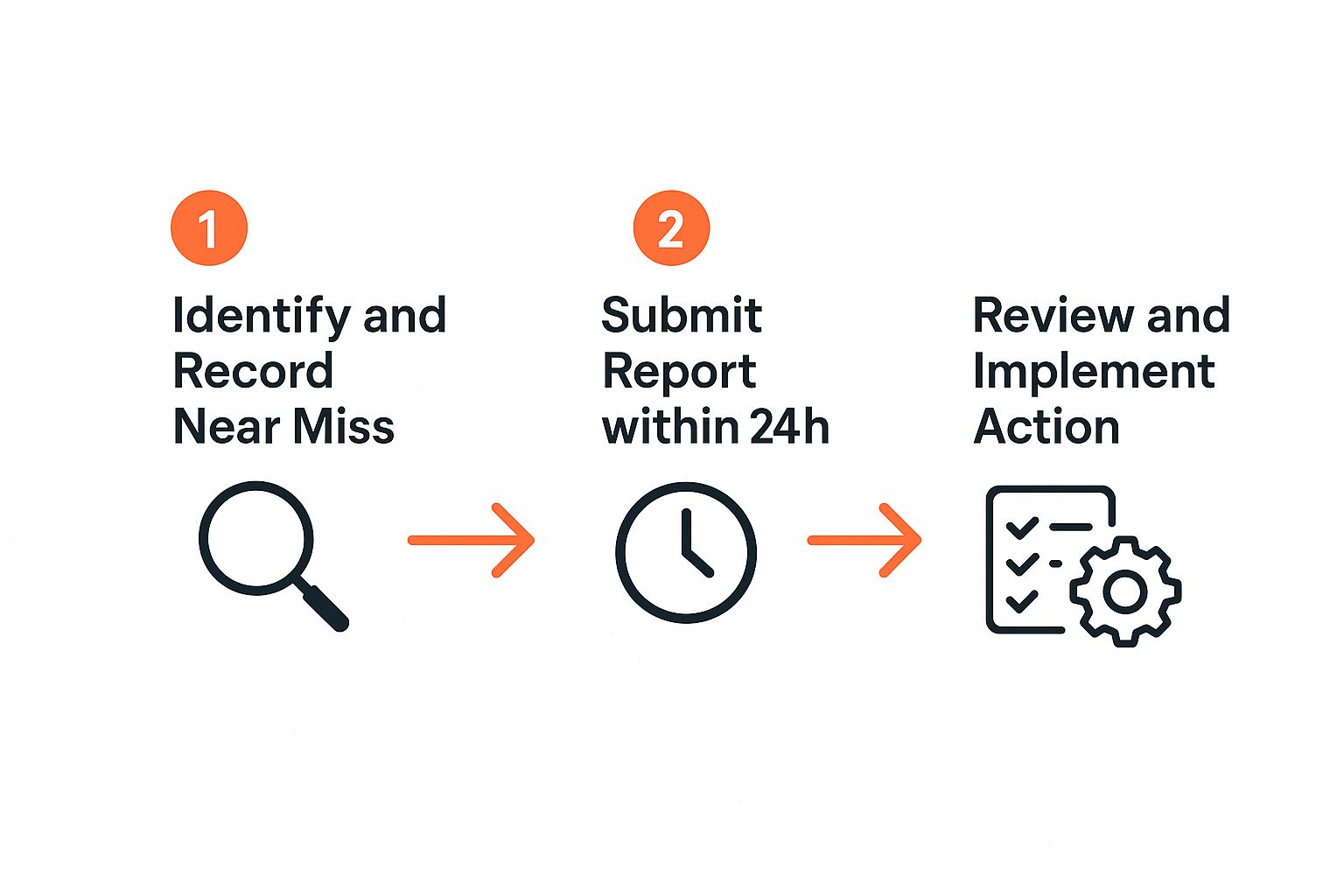
It breaks the whole system down into its core actions: quick identification, prompt submission, and timely review. That’s all a good process needs.
Keep the Reporting Form Basic
The reporting form itself, whether it's a piece of paper or a screen on a phone, is where most systems fall apart. If your form looks like a tax return, it’s going to be ignored. It should only ask for the bare minimum needed to start a conversation.
This simple table lays out exactly what information you need to capture to get a useful report without overwhelming your team.
Essential Information for a Near Miss Report
| Information Field | Why It's Important | Example |
|---|---|---|
| What happened? | A simple, one-sentence description gives you immediate context. | "A box of tiles fell from the top shelf of the racking." |
| Where and when? | Helps identify hotspots or recurring issues tied to a location or time. | "In warehouse Bay 7, around 2:00 PM on Tuesday." |
| What could have happened? | This is crucial. It tells you the potential severity of the incident. | "It nearly hit someone walking past. Could have caused a serious head injury." |
| Ideas to fix it? (Optional) | Gives you solutions from the frontline and shows you value workers' input. | "Maybe we need to wrap the pallets on the top shelf." |
That’s it. You can always follow up for more details if a deeper investigation is warranted. The initial report just needs to open the door. For more guidance on this, see our incident reports samples page.
Provide Multiple Ways to Report
People have different comfort levels with technology and different work styles, so your reporting system should offer a few options. Not everyone wants to use a digital app, and paper forms can easily get lost in a busy environment. By providing multiple channels, you remove yet another barrier to participation.
Consider setting up a mix of these methods:
- A physical drop-box: A simple, clearly labelled box placed in a high-traffic spot like the break room or site office.
- A dedicated email address: Perfect for supervisors or office staff who can quickly send in a report from any device.
- A simple app or QR code: This is ideal for on-the-spot reporting. A worker can just scan a code with their phone and fill out a quick digital form.
The key is making submission quick and accessible from anywhere on the worksite. Don't make someone trek across the entire site just to find the right form.
Decide Who Reviews Reports and When
A report that just sits in an inbox is a completely wasted opportunity. You need a clear and consistent plan for what happens after a report is submitted. This isn’t about creating a huge committee; it’s about assigning clear responsibility.
The most important part of any reporting process is what happens next. If reports go into a black hole, the system will fail. Workers need to see that their input leads to visible action.
Assign one or two people, like a site supervisor or the safety coordinator, to be the first point of contact. They should be responsible for reviewing new reports daily or at the start of each shift. Their job is to quickly sort reports, fix the simple stuff immediately, and flag the more serious issues for further review.
This makes sure every single report gets seen and acted on quickly, which is absolutely crucial for building trust in the system.
How to Analyse Reports and Take Action
Collecting near miss reports is only the beginning. The real value comes from what you do with them next. A stack of unread forms gathering dust in the site office isn't making anyone safer. It's the analysis and the action that follows which actually prevents incidents.
Good follow-up leans on clear workplace safety procedures your crew actually use, not binders nobody opens.
This process doesn't need to be some complicated data exercise. It’s about spotting patterns, figuring out what to fix first, and, most importantly, showing your team that their input truly matters. A solid, systematic approach is what turns that raw data into tangible safety improvements on the ground.
Leading companies like Downer Infrastructure have proven how powerful this is. They moved from only tracking injuries after they happened to using proactive data from near misses to stop them from happening in the first place.
Sorting and Finding Patterns
First things first, you need to get organised. Don't just look at each report in isolation. The magic happens when you start grouping them together to see the bigger picture. This is how you spot recurring issues that point to a system problem, not just a one-off fluke.
Start looking for trends by sorting your reports. Ask yourself:
- Where is it happening? Are multiple near misses popping up in the same spot, like Warehouse Bay 3 or the main site entry?
- What's involved? Do reports keep mentioning a specific task, like loading trucks, or a particular piece of equipment?
- When is it happening? Are incidents clustering around the end of a shift when fatigue might be kicking in?
Spotting these patterns is the whole game. A single report of a slippery floor is one thing; five reports about the same area over two weeks is a massive red flag that needs a proper fix. This is where an effective incident management system becomes a game-changer, helping you track and analyse this data without getting buried in spreadsheets.
Prioritising What to Fix First
You can't fix everything at once. It's just not realistic. Once you've identified the key problems, you need to prioritise them based on risk. This makes sure you're putting your time, energy, and resources where they’ll have the biggest safety impact.
A simple way to do this is to assess two key factors for each trend you've spotted:
- Severity: If this near miss had played out fully, how bad would it have been? A trip hazard might cause a sprained ankle, but a near miss with a forklift could easily be fatal.
- Likelihood: How likely is this to happen again? An issue that’s been reported multiple times is obviously far more likely to happen again than some freak, one-in-a-million event.
Focus your energy on the high-severity, high-likelihood problems first. These are the accidents just waiting to happen, and they represent the most urgent risks to your team's wellbeing.
Closing the Loop with Communication
This final step is absolutely critical for keeping your team engaged with near miss reporting. After you've taken action, you must communicate what you’ve done back to the entire crew. This is the only way to prove their reports aren't just disappearing into a black hole.
Share the outcomes in a direct, visible way. It doesn't have to be fancy:
- Toolbox Talks: Kick off the meeting by mentioning a recent report and the fix. Something like, "Great news. Thanks to a report about that loose grating near the workshop, we've now welded it down. Cheers to whoever flagged that."
- Notice Boards: Post a simple "You Reported, We Fixed" update. A before-and-after photo can be incredibly powerful.
When people see tangible proof that their actions lead to a safer worksite, they see the value in the system. This positive feedback loop is what keeps people reporting, and it's what makes the entire process work in the long run.
Common Mistakes That Can Derail Your Program
Even the most well-intentioned near miss reporting program can stumble if it falls into a few common traps. It’s one thing to set up a system, but it's another thing entirely to get people to actually use it. Steering clear of these pitfalls is the difference between an empty gesture and a genuine tool for making your site safer.
The biggest mistake is also the simplest: failing to act on the information you receive. When your team sees that their reports vanish into a black hole with no visible changes, the entire system loses credibility. Participation will dry up faster than you can say "toolbox talk." Inaction sends a quiet but powerful message: their input isn't valued.
Overly Complicated Processes
If reporting a near miss feels like filling out a tax return, your team won’t bother. A long, confusing form with dozens of mandatory fields is a guaranteed way to kill engagement. Your crew is busy, and their main job isn't paperwork.
The fix is to keep it brutally simple. Your reporting form, whether it’s on paper or an app, should take less than two minutes to complete. Just focus on the absolute essentials: what happened, where it happened, and what could have happened. You can always circle back to gather more details later if the situation warrants it.
A complicated process is the enemy of good data. The easier you make it for someone to report an issue, the more likely they are to do it. Aim for a process so simple it's faster than complaining to a coworker.
Blaming the Individual
Nothing will shut down your reporting program faster than an atmosphere of blame. If a worker reports a close call and the first question they hear is, "What did you do wrong?", you can bet it’s the last report you’ll ever get from them. And their colleagues who saw it happen? They won't be reporting anything either.
This approach creates fear and guarantees that incidents get swept under the rug. People will avoid reporting to protect themselves or their mates from getting in trouble.
To stop this from happening, you have to shift the focus of any follow-up from the person to the process.
- Ask "why," not "who." Why did the spill happen? Not, who made the spill?
- Look for system flaws. Was the equipment faulty? Was the procedure unclear? Was the lighting terrible?
- Reinforce the goal. Remind everyone that the whole point of near miss reporting is to find and fix problems in the workplace, not to point fingers.
A Lack of Clear Training
You can't expect your team to report incidents if they don't even know what you're looking for. A lot of workers are genuinely unsure what qualifies as a "near miss." They might think it’s only for those dramatic, life-or-death moments, not the everyday close calls.
This uncertainty leads to hesitation and, ultimately, underreporting. Thankfully, a short, practical training session is all it takes to fix this. Use a toolbox talk to walk through clear, relatable examples from your own worksite. Show them what a near miss looks like in their daily tasks and run through the simple steps of how to report it. Clarity is everything.
Your Near Miss Reporting Questions Answered
Even with a rock-solid process in place, questions about near miss reporting are always going to pop up on site. If the crew isn't clear on the why and the how, the whole system can fall flat.
Getting everyone on the same page with straight answers is key. Here are some of the most common questions we hear from managers and workers, along with practical answers you can actually use.
What’s the Difference Between a Near Miss and a Hazard?
This is probably the most common point of confusion out there, but the distinction is actually pretty simple once you see it in action.
A hazard is a condition with the potential to cause harm. Think of a puddle of oil on the workshop floor or an unsecured ladder propped against a wall. It’s a ticking time bomb, a risk just waiting for a person to interact with it.
A near miss, on the other hand, is an actual event that happens because of that hazard, but luckily doesn’t result in an injury. Someone slips on that same oil puddle but catches their balance at the last second. The hazard just became an active incident, even though no one got hurt.
Reporting the hazard is good, but reporting the near miss is even better. It proves the risk isn't just theoretical, it's real, and it needs immediate attention before someone isn't so lucky next time.
How Do We Get Our Team to Actually Report Near Misses?
Getting your crew to consistently report near misses boils down to three things: make it easy, make it safe, and make it worthwhile. If any one of these is missing, your program is going to struggle.
First up, the process has to be dead simple. If it takes more than a couple of minutes, people just won't do it. Use a simple form, or even better, an app on their phone.
Next, and this is non-negotiable, you must have a no-blame system. The focus has to be 100% on fixing the problem, not pointing fingers at the people involved. If workers fear they'll be disciplined for reporting something, they’ll stay quiet every single time.
Finally, you have to close the loop. Show them their reports lead to real action. When your crew sees a new guardrail installed or a leaky pipe fixed because of a report they submitted, they know their input matters. That visible result is the most powerful motivation you can possibly offer.
Should We Offer Rewards for Reporting?
This one’s a bit of a minefield, so it pays to tread carefully.
Offering small rewards like gift cards might seem like a great way to boost reporting numbers, but it often backfires. It can easily lead to a flood of low-quality, trivial reports from people just trying to get a prize. This just creates a mountain of admin work without adding any real value to your safety program.
A much better approach is recognition, not rewards. Publicly thank individuals or teams for high-quality reports during toolbox talks. This shows that management genuinely values their contribution, which is a far stronger and more sustainable motivator than a cheap giveaway.
Do We Have to Investigate Every Single Report?
Look, you don't need to launch a full-scale investigation for every single report that comes in. But you absolutely must review all of them. The key is to sort them based on potential risk.
For minor issues, say, a frayed extension cord, a quick fix and a note in a logbook might be all that's needed.
But for reports that point to a much higher risk, like a near miss involving heavy machinery or a potential fall from height, you need to dig deeper to find the root cause. This sorting process allows you to focus your time and energy where it's needed most, making sure the biggest risks are dealt with before they turn into a real incident.
At Safety Space, we provide an all-in-one platform designed to simplify your entire health and safety system. Our software makes near miss reporting fast and straightforward, helping you spot trends and take action before incidents happen. See how you can build a safer, more compliant worksite by booking a free demo.
Ready to Transform Your Safety Management?
Discover how Safety Space can help you build a safer, more compliant workplace with our comprehensive safety management platform.
Book a Free DemoRelated Topics
Safety Space Features
Explore all the AI-powered features that make Safety Space the complete workplace safety solution.
Articles & Resources
Explore our complete collection of workplace safety articles, tools, and resources.