
Ever feel like you’re drowning in paperwork? Think of the typical site supervisor’s ute dashboard, overflowing with dog-eared incident reports, muddy checklists, and binders full of contractor docs. Finding the right form when you need it is a nightmare.
That’s where risk and compliance software comes in. It takes that entire mess and organises it into a single, clean hub on your tablet or phone. It’s a digital home for all your safety and compliance tasks, getting rid of scattered paper forms, confusing spreadsheets, and endless email chains.
This isn't just about digitising paperwork. It's about connecting the dots. An incident report lodged on-site can instantly link to its relevant risk assessment and ping a manager with a corrective action. Suddenly, you have a live, accurate picture of your Work Health and Safety (WHS) obligations, not a rear-view look from weeks ago.
The Shift from Paper to Platforms
Moving from clipboards to cloud platforms isn’t just a trend; it’s quickly becoming the standard. The Australian market for this kind of software is tipped to hit USD 3.7 billion by 2033. This massive growth signals a clear move away from manual methods that just can't keep up.
For construction and manufacturing businesses juggling multiple sites and an army of subcontractors, this change is a game-changer. Digital records are secure, searchable, and easy to analyse, all crucial for proving due diligence when it counts. Our complete guide on risk and compliance management dives deeper into these benefits.
At its heart, risk and compliance software is built to run an Occupational Health and Safety Management System. It gives you the structure and tools to actually execute your policies, track what’s happening, and keep a rock-solid record of your compliance activities.
To see just how different the day-to-day reality is, let's compare the old way with the new.
Old Methods vs New Tools
| Task | Manual Systems (Paper and Spreadsheets) | Risk Compliance Software |
|---|---|---|
| Incident Reporting | Paper forms filled out on-site, manually entered into a spreadsheet later. Delays are common. | Real-time reporting from any device. Photos attached, notifications sent instantly. |
| Tracking Actions | Relies on email chains and memory. Easy for tasks to get lost or forgotten. | Automated tracking of corrective actions with assigned owners and due dates. |
| Audits & Inspections | Printing checklists, taking notes, then typing up a report. Slow and inefficient. | Digital checklists on a tablet, with findings logged and reports generated automatically. |
| Contractor Docs | Chasing subcontractors for tickets and licenses via phone and email. Stored in filing cabinets. | A central portal where contractors upload their own documents. Automatic expiry alerts. |
| Finding Information | Sifting through folders, binders, and messy spreadsheets. A huge time sink, especially for audits. | A single, searchable database for all safety data. Find anything in seconds. |
The table makes it pretty clear. The old way is slow, disconnected, and full of gaps where things can go wrong. The new way is fast, connected, and gives you a level of control you just can’t get with paper.
Why a Central Hub Matters So Much
Having one place for all your risk and compliance data isn’t just about being organised. It's about seeing the bigger picture.
When all your information flows into one system, you start spotting patterns you’d otherwise miss. For instance, you might notice that a specific piece of equipment keeps popping up in near-miss reports across different sites. That’s a clear signal to review its maintenance schedule or retrain the operators.
This kind of proactive insight is impossible when your data is fragmented. A central hub turns isolated bits of information into powerful, actionable intelligence.
Core Tools That Solve On-Site Problems
Good risk and compliance software isn't about adding another layer of complexity to your day. It’s about giving you simple, direct tools that fix the frustrating, real-world problems managers face on a busy construction site or factory floor.
These features are built to finally ditch the stacks of inefficient paperwork for faster, more reliable digital workflows.
Instead of chasing down a missing form, you get instant visibility. Instead of guessing whether a task was actually completed, you have a clear, time-stamped digital record. Let's break down the core components that make this happen.
The diagram below shows how a central software hub connects all your key operational areas, like incidents, audits, and contractor management, into one clean system.
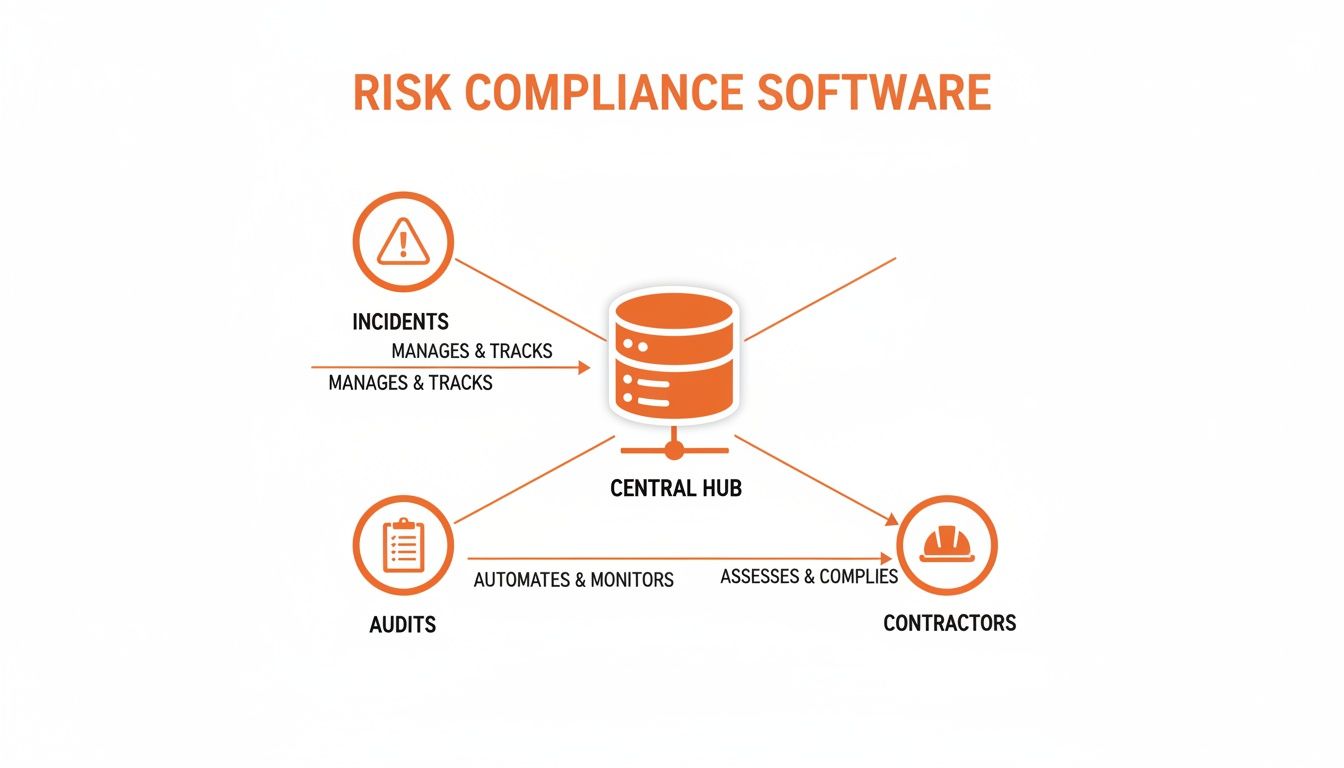
Think of it as the command centre for your site safety, making sure data from every safety function flows into one organised, easy-to-manage place.
Instant Incident Reporting from Anywhere
Let's be honest, the old way of reporting an incident is broken. A worker fills out a paper form, it gets tossed on the dashboard of a ute for a day or two, and then someone back in the office has to decipher the handwriting and punch it into a spreadsheet.
By the time a manager finally sees it, critical details are forgotten and the chance for a quick, effective response is long gone.
Risk compliance software completely changes the game with mobile reporting.
- On-the-Spot Data Capture: Anyone with a smartphone can report an incident or a near-miss the second it happens. They can snap photos or take a quick video right there on site, giving you the kind of clear, visual context a written description could never capture.
- Immediate Notifications: The moment a report is submitted, key people are automatically pinged. This means a supervisor can kick off an investigation in minutes, not days.
- Structured Information: Digital forms make sure you get all the crucial information, every single time. No more incomplete or illegible paperwork. To see this in action, check out our deep dive on incident management software.
This immediate feedback loop closes the dangerous gap between an event happening and the right people knowing about it, which is always the first step to making sure it never happens again.
Dynamic Risk Registers Instead of Static Spreadsheets
A risk register stuck in an Excel spreadsheet is usually out of date the minute you hit 'save'. It’s a static document that just can’t keep up with the constantly changing conditions of a live worksite. It quickly becomes a tick-box exercise for compliance, not a living tool you can actually use to manage risk.
A digital risk register, on the other hand, is a completely different beast. It's an active dashboard, not a passive file sitting on a server.
It directly connects identified hazards to the specific controls meant to manage them, and just as importantly, to the people responsible for those controls. This creates a clear line of accountability that a spreadsheet simply can't offer.
For example, when a new piece of machinery arrives on site, you can instantly add it to the register, link it directly to the relevant Safe Work Method Statements (SWMS), and assign regular inspection checklists. If an inspection gets missed, the system flags it automatically. This transforms the register from a dead document into a proactive management tool.
Digital Audit Trails and Corrective Actions
Audits and inspections are vital, but the real work starts after they're done. The paper-based way involves manually creating a list of corrective actions, emailing them around, and then spending weeks chasing people to see if anything was actually fixed. It's an administrative nightmare where important tasks can easily fall through the cracks.
With risk compliance software, the entire process is connected from start to finish.
- Conduct Audits on a Tablet: A supervisor walks the site with a tablet, working through a digital checklist. They can add notes and attach photos for any non-compliance they find.
- Assign Actions Instantly: Right there from the audit form, the supervisor can create a corrective action, assign it to a team member, and set a firm due date.
- Track to Completion: The system automatically tracks the status of every single action item. Managers can see what's overdue at a glance, and automated reminders are sent out so you don't have to chase people up.
This creates a transparent and accountable workflow, ensuring the issues you identify during an audit actually get resolved. It also provides a solid, time-stamped record proving due diligence was followed, something that’s invaluable during any formal review or investigation.
Where This Software Really Shines: Builders and Manufacturers
Generic, off-the-shelf software just doesn't cut it for high-risk industries. Builders and manufacturers operate in complex, ever-changing environments where one small oversight can snowball into a massive problem. This is exactly where tailored risk and compliance software stops being just another app and becomes a critical operational tool.
For these sectors, the software isn't about generic checklists. It's configured to handle the precise workflows, checks, and documentation that regulators, clients, and your own standards demand. We're talking about moving beyond basic safety management to tackle the specific hazards of a busy factory floor or a sprawling, multi-stage construction project.
Think of it like this: a worker on site can use a tablet to capture and send compliance data instantly, creating an immediate, accurate record of what's happening on the ground.
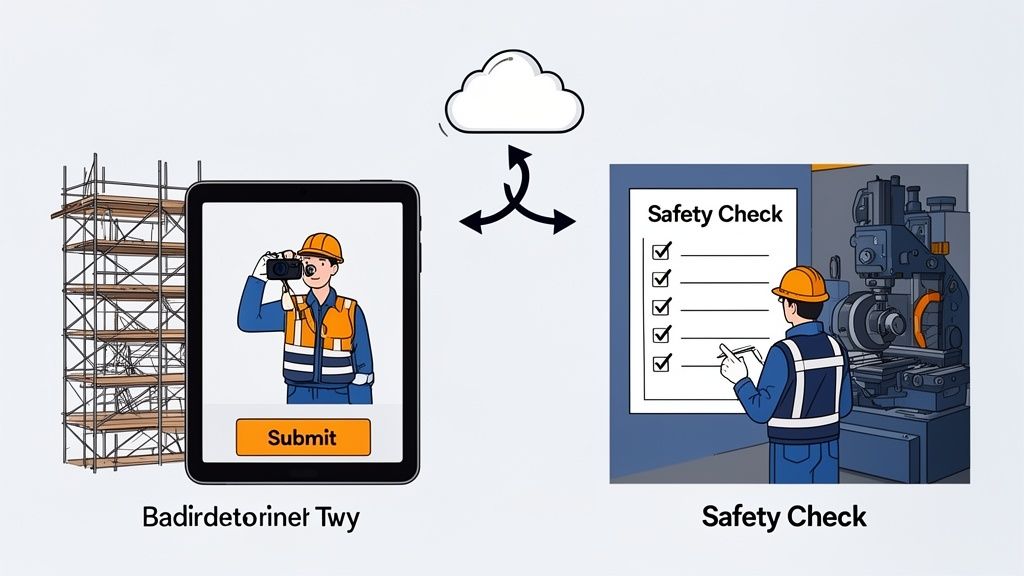
This direct line from the worksite to the central system closes dangerous information gaps and gives managers a live view of operations. No more waiting for paperwork to catch up.
On the Factory Floor
In a manufacturing plant, compliance isn't just a safety issue, it's tied directly to quality control and operational uptime. A multi-site manufacturer, for instance, has the tough job of ensuring every location follows the exact same high standard for machine safety checks and hazardous substance handling.
Risk and compliance software is the key to making this happen, standardising crucial procedures across the entire organisation.
- Machine Safety Checks: Digital pre-start checklists for complex machinery are loaded onto tablets. An operator must complete the checklist before the equipment can be used, and the results are logged instantly. This builds an ironclad audit trail for every single machine.
- Hazardous Substance Protocols: The software manages Safety Data Sheets (SDS) and can require workers to confirm they’ve read and understood handling procedures for specific chemicals before they even start a task.
- Quality Control Audits: Regular quality checks can be scheduled and tracked right in the system. If a product fails an inspection, a non-conformance report is automatically generated and an action is assigned to the right manager for immediate resolution.
This level of structured oversight is what helps prevent accidents and product defects, all while building a strong record of compliance for regulators. For businesses managing these kinds of complex operations, our guide to enterprise risk assessment software dives into more detailed strategies.
Imagine a plant manager gets an alert that three different sites have reported minor faults on the same model of press in the last month. With all the data centralised, this pattern becomes blindingly obvious. It allows for proactive maintenance across the entire fleet before a major, costly failure occurs.
On the Construction Site
The dynamic, often chaotic nature of construction sites presents a unique set of challenges. Multiple subcontractors, constantly changing site conditions, and high-risk activities make maintaining control a daily battle. Builders face countless compliance challenges in the construction industry, where disconnected, paper-based processes can easily lead to serious incidents.
Risk and compliance software brings order to this controlled chaos. It becomes the single source of truth for every project, from a small residential build to a massive commercial development.
A Practical Example in Construction
Picture a site supervisor starting their day. Instead of juggling a clipboard, a camera, and their phone, they just grab their tablet.
- Morning Safety Walk: The supervisor opens a digital site inspection form. As they walk the site, they check off items like scaffolding integrity, excavation permits, and whether everyone is wearing the right PPE.
- Instant Issue Logging: They spot a trip hazard where a subcontractor has left materials in a walkway. They snap a photo with the tablet, which is automatically attached to the inspection report with a timestamp and location.
- On-the-Spot Action: Right then and there, the supervisor creates a corrective action, assigns it to the subcontractor's foreman, and sets a two-hour deadline. The foreman gets an instant notification on their phone.
- Real-Time Sync: By the time the supervisor is back in the site office, all the data from their walk is already synced to the company's central dashboard. The project manager back in the head office can see the hazard was identified and that an action is already underway to fix it.
This workflow transforms a slow, manual process into a fast, accountable system. It connects the field to the office in real time, making sure nothing gets missed and everyone knows exactly what they need to do.
Choosing the Right Risk Compliance Software
Picking the right risk compliance software isn't about finding the platform with the flashiest features. It's about finding the one that actually fits how your team works day-to-day. A system might look great in a slick sales demo, but if it’s too clunky for your crew to use on-site, it’s just a wasted investment.
The real goal here is to find a practical tool that solves your specific problems, not some generic platform built for a different industry. This means you need to push past the glossy brochures and start asking the hard questions about how the software will actually perform in the hands of your people.
After all, the best system is one your workers will actually use. If they don't, you've just bought yourself a very expensive and very empty database.
The pressure to get this decision right is higher than ever. Australian executives are facing more and more scrutiny to prove their organisations are compliant with a tangled mess of regulations. A recent PwC Global Compliance Survey highlighted this, showing a massive 93% of Australian respondents felt technology was the area most impacted by these compliance demands. For managers in construction and manufacturing, that means the software they choose has to connect WHS, contractor safety, and operational risks, all in one place.
Key Questions to Ask Every Vendor
Before you even think about signing a contract, you need to have a checklist of non-negotiable questions ready. These will help you slice through the sales pitch and figure out if a platform is genuinely built for the tough realities of a construction or manufacturing environment.
- How easy is it for someone on-site to actually use? Don't just take their word for it. Ask for a live demo showing how a worker would fill out a pre-start checklist or log an incident on their phone. If it takes more than a few straightforward taps, it's too complicated for a busy site.
- Can we digitise our existing paper forms? You shouldn't have to throw out your proven, field-tested processes just to fit a new system. Good software adapts to you, not the other way around. It should let you perfectly recreate your current forms, audits, and SWMS.
- Does it work without an internet connection? Let's be honest, mobile reception on many construction sites and remote facilities is patchy at best. The software absolutely must have solid offline functionality. Your team needs to be able to fill out forms and have the data automatically sync up the second they're back online.
- How does it handle subcontractor management? The system needs a dead-simple way to onboard subcontractors, track their licenses and insurance, and send out automatic alerts before critical documents expire.
Looking Beyond the Core Features
Once you've covered the basics, a few other factors can make or break your experience. These are the details that often get overlooked in the sales process but are absolutely critical for long-term success.
A huge one is the provider's support model. When an urgent issue pops up on-site, you need to talk to someone local, someone in Australia who gets your industry and can give you a fast, practical fix. Waiting 24 hours for a reply from an overseas helpdesk just isn't an option.
It's also vital to understand how the platform scales. Can you easily manage multiple sites, projects, or business units from a single dashboard? Your software needs to grow with your business, not hold it back.
Understanding Pricing Models
Finally, let's talk about the money. Risk compliance software pricing varies, but for most businesses in construction and manufacturing, a monthly subscription model makes the most sense.
Subscription-Based Pricing (SaaS)
- Lower Upfront Cost: You can avoid a massive capital outlay, which makes budgeting a whole lot easier.
- Flexibility: It's simple to scale your user numbers up or down as projects start and finish.
- Includes Updates and Support: The monthly fee typically bundles in all software updates, security patches, and access to customer support, so there are no surprise costs.
This approach lets you get started without a huge financial commitment and ensures you're always on the latest, most secure version of the software. It’s a flexible model built for the dynamic, project-based nature of our work. By focusing on these practical criteria, you can find a system that starts delivering real value from day one.
A Realistic Plan for Getting Your Team on Board
Introducing new software can feel like a huge disruption, especially on a busy worksite where every single minute counts. The secret to a smooth transition isn’t forcing a new system on everyone overnight. It’s all about having a clear, phased plan that shows your crew exactly how this change will make their job easier, not harder.
Forget the idea of a massive, company-wide launch. A successful rollout of risk and compliance software is gradual. It proves its value every step of the way. By starting small and involving the right people, you build momentum and get genuine buy-in from the ground up, turning sceptical workers into the system’s biggest supporters.
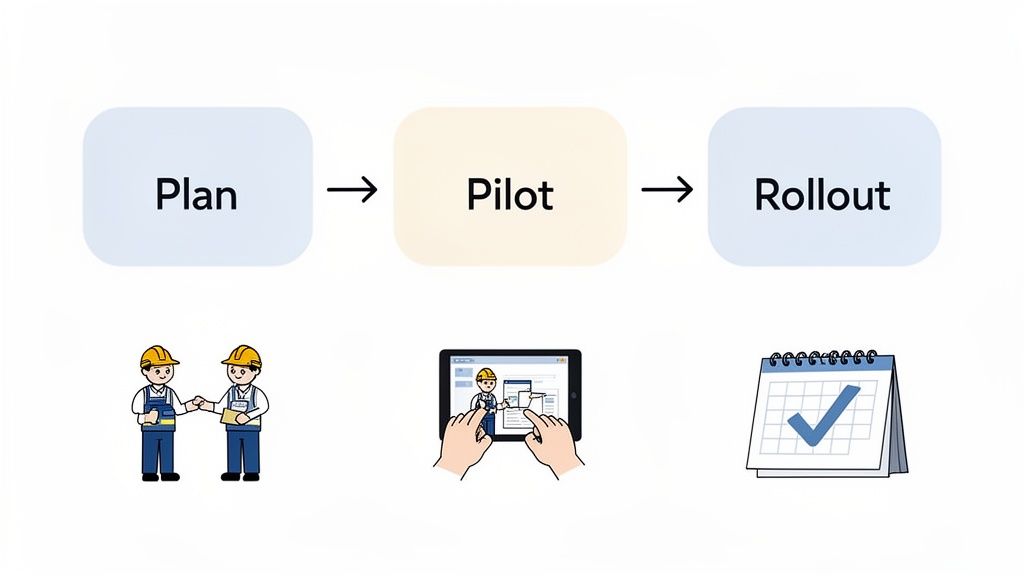
This simple, three-phase approach, Plan, Pilot, and Rollout, breaks the whole process down into manageable chunks. This makes the change less daunting and far more likely to stick.
Phase 1: Planning and Setup
Before you even think about training, get your key people in a room. Bring your most experienced site supervisors and team leaders into the selection and setup process. These are the people who live and breathe the on-the-ground realities of your worksite.
Their input is pure gold. Ask them which paper forms cause the most headaches or which processes eat up the most time. This isn't just about making them feel included; it's about pinpointing the biggest pain points the software can solve first.
The single biggest selling point for your team is time. Frame the software as a tool that gets them out of the site office faster and lets them focus on their real work. Show them it means less paperwork, not more screen time.
During this phase, work with your software provider to digitise one or two of your most frustrating paper forms, think of the daily pre-start checklist or a basic incident report. Keep it simple and aim for an immediate, noticeable win.
Phase 2: The Pilot Program
Now it’s time to test the system in the real world, but on a small scale. Choose a single project or a specific team to run a pilot program. This small group will be your test case, giving you honest feedback without disrupting your entire operation.
Provide direct, hands-on training for this group. Don't just email them a user manual. Get out on site, stand with them, and walk them through how to use the tablet or phone to complete their first digital form. It makes all the difference.
This pilot phase is absolutely critical for a few reasons:
- It finds the practical issues: You might discover a form needs an extra field, or that the button layout is confusing on a certain device. It's better to find this out now.
- It creates champions: When the pilot team sees they can finish their reports in half the time, they will start talking about it. Word-of-mouth praise from a trusted colleague is far more powerful than any memo from management.
- It builds confidence: A successful small-scale trial proves the system works in your specific environment, getting rid of the fear and uncertainty about a full-scale change.
Use the feedback from this group to make adjustments before you even think about moving forward.
Phase 3: The Full Rollout
Once your pilot program is running smoothly and you’ve ironed out the kinks, you can begin a wider rollout. But don't do it all at once. Introduce the risk compliance software to other teams or sites in a staggered, controlled manner.
Start with the one process you perfected in the pilot, like incident reporting. Once everyone is comfortable with that, add the next module, maybe site inspections or contractor management. This phased approach stops your team from feeling overwhelmed.
Continue providing on-site support and training as you expand. Make sure your supervisors and managers are ready to answer questions and lead by example. By showing your team a clear plan and focusing on practical benefits, you transform the implementation from a top-down mandate into a shared goal for a safer, more efficient workplace.
Measuring the Return on Your Investment
Whenever you're thinking about new tech, it always boils down to one simple question: what’s the return? While the list of features is great, the real value of risk and compliance software shows up in tangible business results. We're talking about everything from saved time to lower operational costs.
This isn't some vague promise of future benefits. The return is something you can see on your bottom line and feel in your day-to-day operations.
Leaving paper and spreadsheets behind brings immediate efficiency gains. Instead of paying good people to spend hours on mind-numbing data entry, that time is freed up for productive, valuable work. The true return on investment (ROI) is a mix of these direct savings and, more importantly, the prevention of much bigger financial hits down the line.
Tangible Gains in Time and Money
The first and most obvious returns come from automating those repetitive admin tasks. This lets your skilled supervisors and managers get back to focusing on what they do best: running the site, not chasing paperwork.
Case Study: Construction A mid-sized construction firm switched to digital incident reporting and the results were staggering. They managed to cut the time from an incident happening to a completed report being filed by a massive 75%. This single change saved their admin team over 20 hours of work every single week.
Case Study: Manufacturing A manufacturing plant started using its new software to properly analyse audit data. It didn't take long to spot a recurring fault in a specific machine that kept popping up across different shifts, a pattern that was completely invisible in their old paper records. This insight allowed them to schedule preventative maintenance, avoiding a catastrophic breakdown that would have cost them an estimated $150,000 in lost production.
Beyond the Balance Sheet
Not every benefit comes with a neat dollar figure attached, but that doesn't make them any less valuable. These non-financial returns are what protect your business from serious risks and improve how you’re seen by regulators and insurers.
A solid, accessible, and time-stamped digital record of all your compliance activities is your single best defence during a regulatory audit. It proves due diligence in a way that messy binders and scattered spreadsheets never could.
On top of that, many insurance providers look very favourably on businesses that use proactive risk management tools. When you can show them clear data on how you identify and control hazards, it often leads to better terms and even lower insurance premiums. It's simple: you're showing them you are actively working to be less of a risk.
This is how an investment in risk and compliance software starts to pay for itself in multiple, practical ways.
Frequently Asked Questions
We get it. Bringing in new software can feel like a big step, so it’s natural to have questions. Here are some of the most common ones we hear from managers in construction and manufacturing.
How Long Does It Take to Get Started?
Honestly, it’s much faster than most people think. A good provider can help you digitise your most important forms in just a few sessions. We find the best approach is to start small and nail one or two key processes first.
For example, you could focus entirely on incident reporting to begin with. This lets your team get comfortable with the new tool on a single, high-value task that they do regularly. Most teams start seeing practical results within the first week, long before the full system is rolled out over the following weeks.
Is This Software Suitable for a Small Business?
Absolutely. Modern risk and compliance software isn't just for the big players anymore. It’s designed to scale right alongside your business, giving a small or medium-sized company the same organisational muscle as a major corporation, but without the eye-watering price tag or complexity.
Because it’s usually subscription-based, you avoid a massive upfront cost. It’s a practical tool that directly replaces tedious manual work, helping smaller teams manage their safety and compliance duties far more effectively.
Our Workers Aren’t Tech-Savvy. Will They Be Able to Use It?
This is probably the most common concern we hear, and it’s a completely valid one. The best platforms are built with this exact problem in mind. The focus is all on simplicity, think clear icons and simple, logical steps, just like the apps people already use on their phones every day.
Our experience shows that after one short, hands-on training session on-site, the vast majority of workers strongly prefer tapping a few buttons on an app over filling out the same old repetitive paper forms by hand.
The whole point is to make their job easier, not to add another technical headache. The software should feel natural and straightforward from the very first time they use it.
Can We Customise the Software to Our Company Forms?
Yes, and this is non-negotiable for any system worth its salt. A one-size-fits-all approach just doesn't work in health and safety because every business has its own unique processes and risks. A flexible platform has to let you recreate your existing paper forms, checklists, and audit templates.
This means you get to keep the workflows and questions your team already knows and trusts. You’re simply moving those proven processes into a much more efficient digital system, gaining all the perks of real-time data and automated tracking without having to tear up your entire safety program and start from scratch.
Ready to see how a truly practical system can solve your on-site compliance challenges? Safety Space replaces paperwork with a simple, powerful platform your team will actually use. Book a free demo today and see how you can get started in just a few days.
Ready to Transform Your Safety Management?
Discover how Safety Space can help you implement the strategies discussed in this article.
Explore Safety Space FeaturesRelated Topics
Safety Space Features
Explore all the AI-powered features that make Safety Space the complete workplace safety solution.
Articles & Resources
Explore our complete collection of workplace safety articles, tools, and resources.