
A current electrical tag can be a valid testing record, but it isn't automatically a complete one. The Safe Work Australia electrical risks code requires records to identify the tester, test date, outcome and next due date, with retention until the equipment is tested again, permanently removed or disposed of. A business still needs to connect that evidence to the exact item in use.
A useful test and tag register template therefore starts with asset identity, not tag colour. For construction, manufacturing, cleaning and facilities teams, the difficult cases are equipment that changes sites, fails inspection or returns after repair. The register needs to handle those cases without losing the history.
Table of Contents
- Fields Your Register Must Capture
- Retest Intervals to Calculate for Each Asset
- How to Set Up the Register Workflow
- Tags Versus Register Records for Moved and Failed Items
- Monthly Review and Set-Up Checklist
Fields Your Register Must Capture
Start with tester identity, test date, test outcome and next due date. The NSW electrical equipment record provisions require those details and retention until the equipment is next tested, permanently removed from the workplace or disposed of. These requirements apply to socket-supplied equipment used in operating conditions likely to damage it or reduce its expected life.
Moisture, heat, vibration, mechanical damage, corrosive chemicals and dust are relevant exposures. A workshop grinder and a vacuum used for commercial cleaning shouldn't enter the register with nothing more than a description and a green status.
Required fields for a test and tag register
The table separates the core test record from the supporting information needed to locate equipment, select an interval and manage defects. Not every supporting field is a separately prescribed legal requirement in every jurisdiction, but each serves a practical purpose.
| Field | What to record | Why it matters |
|---|---|---|
| Asset ID | Unique plant, serial or register ID | Ties every result to one physical item |
| Description, make and model | Item name, make and model number | Lets the item be found again on any site |
| Serial number | Manufacturer serial where fitted | Separates identical items on the same site |
| Location or site | Site, project, work area and responsible person | Shows where the item is used and who manages it |
| Equipment category | Item type, such as portable tool or extension lead | Supports selection of the applicable interval |
| Work environment | Construction, manufacturing, office or service work | Supports the risk-based interval and applicable procedure |
| Protection features | Double insulation or safety-switch protection | Helps select the interval under state guidance |
| Tester name or identifier | Competent person's name, with any identifier linked to it | Identifies who performed the test |
| Test date | Date testing was performed | Starts the next-due calculation |
| Test outcome | Pass or fail, with withdrawn recorded separately as an asset status | Separates the test result from service availability |
| Next test due date | Date calculated from the applicable interval | Supports reminders and overdue reports |
| Defect and corrective action | Defect, repair details and retest reference | Preserves failed-item history |
| Tag number and disposal status | Physical tag reference and removal or disposal status | Connects the tag to the record and closes the asset's service history |
Separate permanent identity from replaceable tags
A tag number isn't an asset ID. Tags can be replaced after testing, damaged during use or removed when equipment is withdrawn. Keep the asset ID stable and attach successive test records to it.
Use controlled choices for equipment category, environment and status. Free-text descriptions remain useful for defects, but inconsistent status entries make filtering unreliable.
Completion rule: A missing tester, test date, outcome or due date should prevent a routine test record from being marked complete. Exceptions need an explicit reason, not an unexplained blank.
For New Zealand operations, check duties under the Health and Safety at Work Act 2015 against WorkSafe NZ guidance before adopting the Australian field list as a compliance specification.
Retest Intervals to Calculate for Each Asset
Retest intervals depend on risk, so a default annual reminder is often the wrong schedule. Classify the work setting, equipment type and protection features before entering any dates. A generic anniversary can under-test equipment exposed to damage and create unnecessary work for lower-risk assets.
The register should hold the interval, its jurisdiction, the supporting publication and any shorter organisational requirement. For mobile equipment, record the actual work activity rather than treating the depot address as its operating environment.
Maximum retest intervals by work setting and equipment
The values below apply to the stated settings and jurisdictions. The named publication in each row is the authority for that value, and the requirements aren't interchangeable across borders.
| Work setting | Equipment | Maximum interval | Source |
|---|---|---|---|
| Construction work | Transportable structures, fixed and transportable equipment, construction wiring | 6 months | WorkSafe Queensland testing and tagging guidance |
| Construction work | Other equipment | 3 months | WorkSafe Queensland testing and tagging guidance |
| NSW construction sites | Portable tools, extension leads, portable socket assemblies, portable RCDs | 3 months | SafeWork NSW electrical inspection and testing guidance |
| Manufacturing | Double-insulated equipment | 12 months | WorkSafe Queensland testing and tagging guidance |
| Manufacturing | Equipment that isn't double insulated | 6 months | WorkSafe Queensland testing and tagging guidance |
| Manufacturing and workshops | Electrical equipment | 6 months | Safe Work Australia model code on managing electrical risks |
| Commercial cleaning | Cleaning equipment | 6 months | Safe Work Australia model code on managing electrical risks |
| Higher-risk workplaces | General electrical equipment | 12 months | Safe Work Australia WHS duties guidance |
| Office work without safety switch | Office equipment | 5 years | WorkSafe Queensland testing and tagging guidance |
| Service work without safety switch | Service equipment | 12 months | WorkSafe Queensland testing and tagging guidance |
| New Zealand | All equipment | Set from applicable NZ guidance and operating conditions | WorkSafe NZ guidance on electrical safety |
The NSW construction interval comes from that state's own inspection and testing guidance rather than the Queensland instrument. State and national publications also describe equipment categories differently, so the scheduler must establish which requirement applies to each asset rather than choosing the longest available interval.
Record the reason behind the date
A maximum interval is a ceiling, and shorter cycles are appropriate where exposure, movement, damage history or the risk assessment warrants them. Testing schedules never replace a check for damage before equipment is used.
For New Zealand assets, confirm the applicable approach under the Health and Safety at Work Act 2015 and WorkSafe NZ guidance. Australian table values don't transfer automatically.
Use next due date = test date + applicable interval, calculated in calendar months rather than approximate day counts. Store the source beside the interval and require a reason for any manual override. Keep test-equipment calibration management separate from appliance retest dates so the two schedules don't become confused.
Tag durability matters where moisture, abrasion or chemicals can make dates unreadable. Evright Industrial's resource can help teams compare durable electrical tag materials when specifying tags for those conditions.
How to Set Up the Register Workflow
Build the workflow around one equipment record with successive inspection and test entries. The SafeWork NSW electrical inspection and testing guidance supports competent testing, traceable records and the construction intervals identified above. The register should capture the work performed, not merely the contractor's visit.
The asset-record structure provides the foundation for the operational steps.
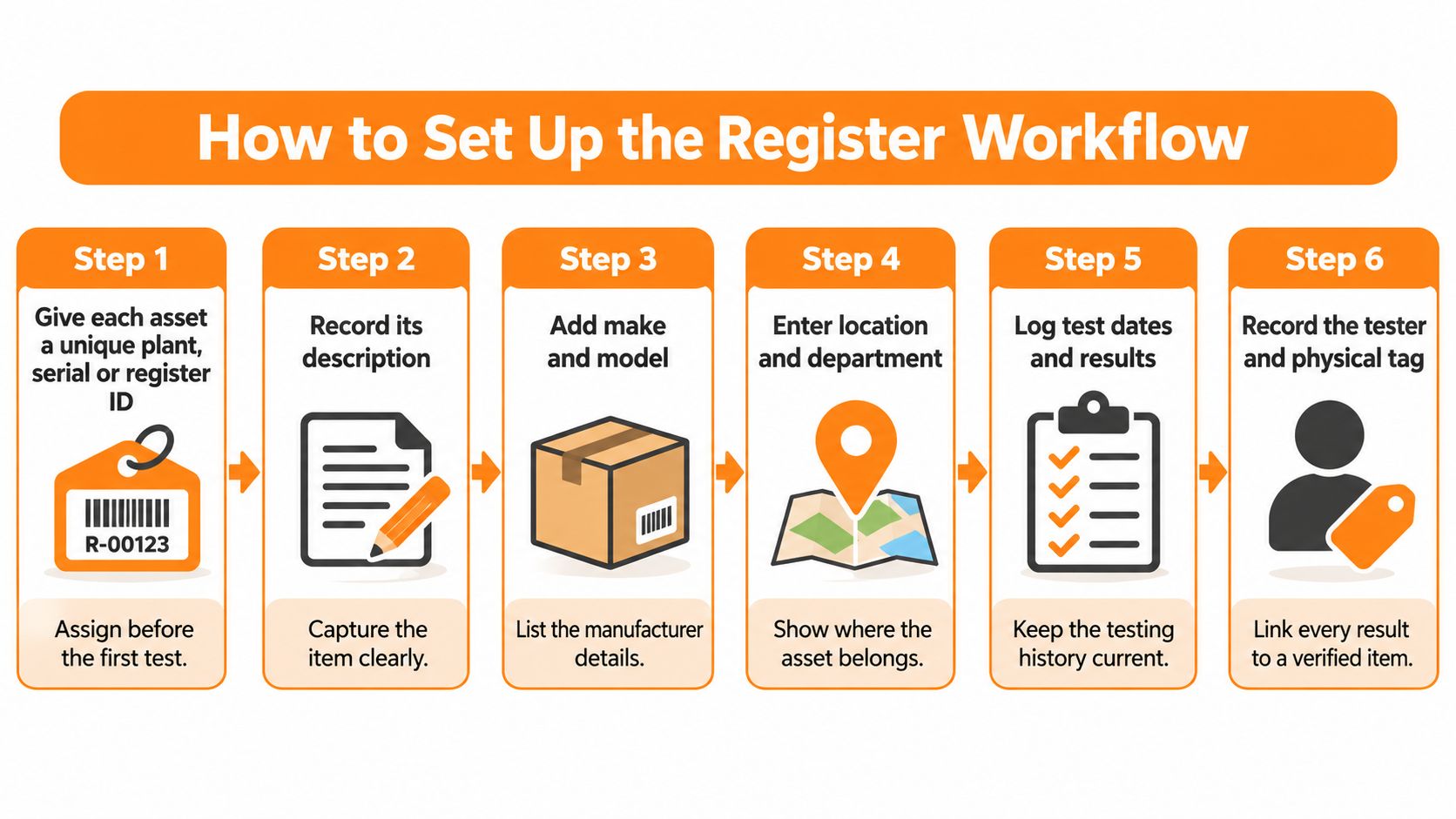
Run the inspection-to-release sequence
Assign the permanent identity before testing. Give each asset a unique plant, serial or register ID. Check for an existing record first, especially when equipment arrives from another project.
Capture description, location and responsible site. Record enough detail for someone other than the tester to find the item. Include its custodian where equipment travels with a crew or service vehicle.
Perform the visual inspection and applicable electrical tests. The competent person should use the applicable AS/NZS 3760 methods. Keep visual findings distinguishable from electrical-test results rather than compressing everything into an unexplained pass.
Enter the test evidence and next due date. Record the tester's identity, test date and outcome, then calculate the due date using the approved interval. Link competency evidence and the contractor report where those records are held separately.
Tag passing equipment and connect the references. Attach the durable tag and enter its number against the asset ID. Check the physical tag and register entry together before releasing the item.
Quarantine failures and control return to service. Record the defect, repair or withdrawal decision, and prevent reissue until the required retest has passed. Assign responsibility for the physical quarantine, not just the administrative entry.
If the register will run in software, Safety Space is one option to evaluate against these fields. Its inspection builder supports question types, scoring and photo capture, with controlled template versions. An equipment register assessment should also test the proposed fail-to-retest process, rather than assuming any asset list provides release controls.
Keep the failed-to-pass sequence visible
Consider a hypothetical 15 m extension lead, asset EXT-0142, that fails testing at a building site in March. The custodian changes its service status to failed, removes the superseded pass tag from use and places the lead in the designated quarantine area. The record retains the failed result and identifies who will arrange the next action.
After an authorised repair, the competent tester logs the retest as a new entry. Only a passing retest permits the custodian to release the lead and attach the replacement tag.
A coloured spreadsheet cell doesn't quarantine equipment. A named person, a controlled storage location and a release decision do.
Automated due-date alerts and a fail-status lockout are useful controls to specify. Where software can't enforce a lockout, use a documented release approval and restrict who can change service status.
Pilot the workflow in a single work area. Test a normal pass, a failure and a repaired item's return before extending it across the site.
Tags Versus Register Records for Moved and Failed Items
A moved item exposes the weakness of treating the tag as the record. The tag may still show a valid date while the register no longer shows where the equipment is, who accepted it or which environmental exposure now applies. The Victorian Government testing and tagging procedure expects an equivalent register to include equipment name, location, test date, next test date, pass/fail result and tag number. It also expects tester or supplier information and testing dates for the tag.
Use the tag for immediate identification. Use the linked register entry for information the label cannot carry: transfer history, contractor report references, failed-status evidence and notes supporting the current service status.
Moving equipment without losing custody
An asset transferred between sites should keep its permanent asset ID. Update the current location when the receiving supervisor accepts the item, and retain the previous location in the movement history so competing current entries do not accumulate.
A single asset record preserves the test history. Creating a record for each project makes one physical item look like several assets and fragments its evidence.
- Transfer acceptance: The receiving custodian checks the asset ID, service status and physical tag.
- Changed exposure: A move into a harsher work environment prompts review of the interval and applicable requirements.
- Unlocated equipment: Mark it for investigation until someone confirms its location and condition.
Accepting contractor reports and repaired items
Check a bulk contractor report line by line before acceptance. Descriptions such as extension lead or vacuum cleaner are insufficient when the business owns several identical items. Unmatched report lines should remain unresolved until the asset can be identified confidently.
Keep the original contractor file and connect each result to the matching asset entry. Where the contractor uses a different identifier, record it as an explicit cross-reference while retaining the business's permanent asset ID.
Failed items need the same matching care when rectification paperwork arrives under a job number or contractor asset code. Link the failed report, repair document and return-to-service evidence to the same asset entry so a reviewer can trace why the item was withdrawn and which document supports its current status.
Traceability test: Another supervisor should be able to identify the item, establish its current status and follow the evidence supporting that status.
A durable tag identifies the equipment at the point of use. The register carries the connected evidence behind the tag, particularly when equipment has moved, failed or changed hands between the contractor and site team.
Monthly Review and Set-Up Checklist
A monthly review earns its place when it runs as a reconciliation: match the register to the equipment, then chase every gap to a person who can close it. Filter for equipment due within 30 days, overdue assets, failed tests, missing tester details and records without a physical tag. Allocate each exception to someone who can find the item or resolve the evidence gap.
The SafeWork NSW construction findings for 2020–21 reported that 20% of inspected sites failed the control covering inspection before energisation and subsequent visual inspection of construction wiring, switchboards and transportable structures at intervals not exceeding six months. In its 2024 electrical safety findings, the regulator recorded 76% compliance and 24% non-compliance for that control, while 41% of flexible cords, power tools and portable outlet assemblies at inspected sites hadn't been tested and tagged by a competent person, with records kept.
Those findings concern inspected NSW construction sites, not every Australian workplace. They still show why a manager should check both equipment status and the evidence supporting it.
A dashboard shows status. The review itself needs an exception list someone owns and a physical check.
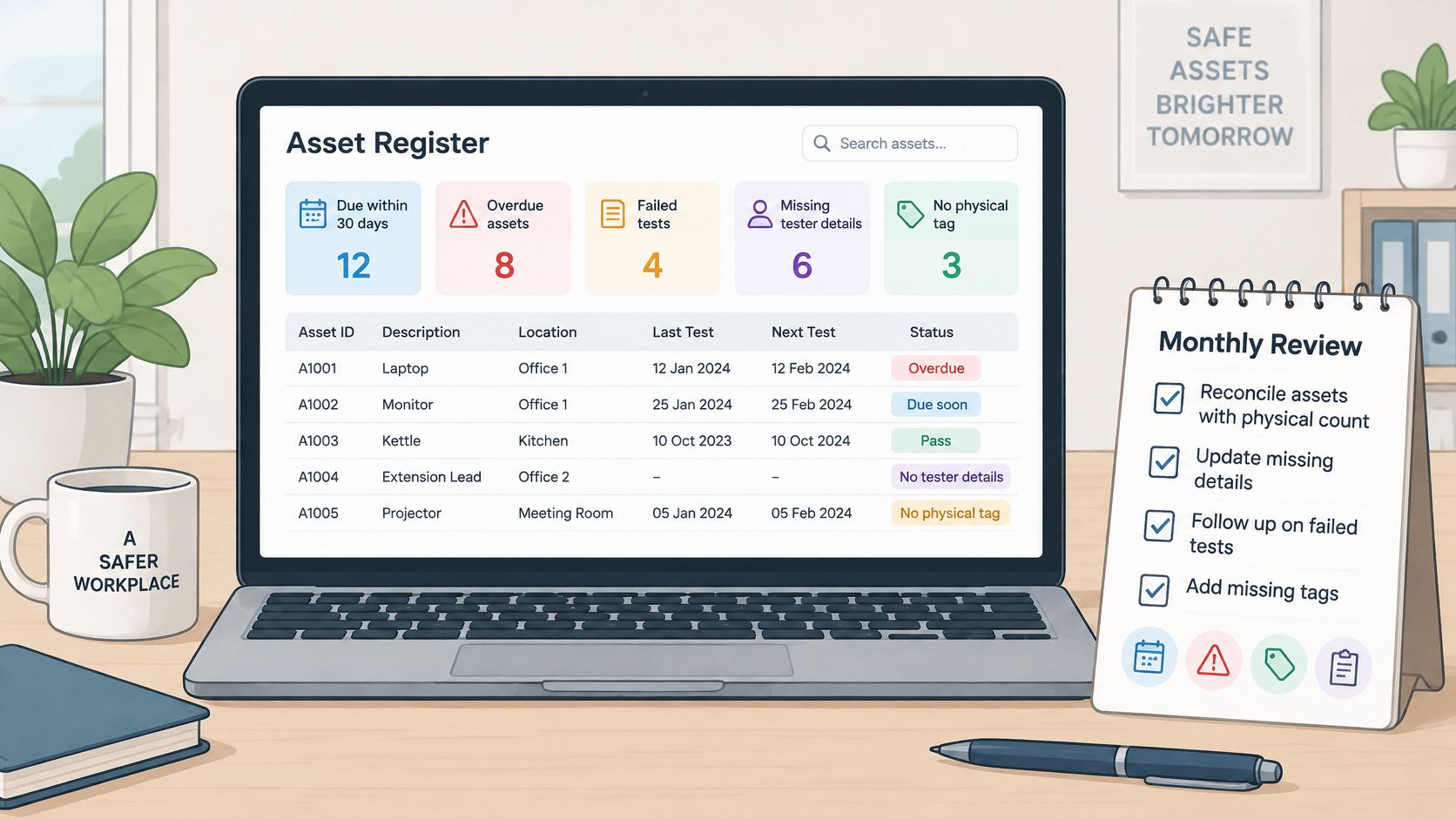
Check the register against the work area
Select equipment from each work area and compare the physical asset ID, tag number, location and service status with the register. Check in both directions: find listed assets on site, then pick physical items and locate their records.
For every transferred item, pull its full history in the same pass. The record should show the move sitting between the last test at the old location and a next due date that reflects the new environment. A current location with no recorded transfer is a defect, even when the dates look right. Include items awaiting repair in the sweep; a review limited to equipment neatly stored in the workshop misses the mobile gear that needs closer attention.
The reviewer should also inspect the register's audit trail for unexplained edits. A changed due date needs a reason and an accountable editor, especially if the change makes an overdue item appear current.
Four defects tend to repeat as registers age:
- Tag date only: The entry doesn't establish the outcome, tester or scheduling basis.
- Missing failure history: Repairs appear without the defect or original withdrawal decision.
- Generic pass entries: The result can't be tied confidently to a physical asset.
- Stale transfer details: Equipment retains an obsolete location or a schedule that hasn't been checked against its new use.
Expiry tracking needs deliberate configuration. Each date question has a Track expiry switch; enabling Notify when expired allows selection of a named staff member or the person completing the form as the email recipient. The Expiry Register can be filtered by form or status, and still includes submissions made on earlier form versions.
An expiry email marks the date; planning the work around it stays with the responsible person. Access, testing and replacement equipment all need arranging before an asset becomes unavailable.
Put the template into service
Use this set-up checklist before treating the register as operational:
- Confirm the fields. Check that the template captures the required test evidence and the supporting identity, location and defect information.
- Approve the intervals. Assign the applicable maximum interval to each asset and record the jurisdiction, guidance and any shorter risk-based requirement.
- Verify the calculations. Check next due dates and export the upcoming-work list for the review window.
- Name the alert recipient. Give a specific person responsibility for overdue notifications and nominate cover during absences.
- Control physical release. Connect passing tags to asset IDs, quarantine failed equipment and assign authority for return to service.
- Book the first reconciliation. Start with a single work area and document corrections before expanding the process.
Schedule that first review before the register goes live. Treat missing fields, incorrect intervals and unassigned alerts as set-up defects to fix, not administrative tasks to defer.
Safety Space combines equipment registers with configurable inspection forms for item-level test and tag records. Visit Safety Space to discuss a register built around asset identity and test evidence, then validate the workflow against a moved item and a failed item before rollout.
Ready to Transform Your Safety Management?
Discover how Safety Space can help you implement the strategies discussed in this article.
Explore Safety Space FeaturesRelated Topics
Safety Space Features
Explore all the AI-powered features that make Safety Space the complete workplace safety solution.
Articles & Resources
Explore our complete collection of workplace safety articles, tools, and resources.