
Think of a worker safety app as a digital tool in your employee's pocket, especially for those out on their own or in high-risk spots. Whether you call it an employee safety app or a lone worker safety app, the job is the same: a smart app, installed on a regular smartphone, that monitors for emergencies and calls for help when it’s needed most. It’s like having a digital spotter with every worker, 24/7.
What Is a Worker Safety App and How Does It Work?
At its heart, a worker safety app turns a standard smartphone into a personal safety device. The good part is that it doesn't rely on special hardware. Instead, it uses the tech that’s already built into every modern phone to keep your team protected.
The app uses a mix of the phone’s sensors to pick up on potential trouble. For instance, the accelerometer can detect a sudden jolt from a fall or a complete lack of movement, which might signal that a worker is down and injured.
A worker safety app creates a direct link between an employee in distress and the people who can help them. It’s all about closing that critical time gap between an incident happening and a response kicking into gear.
This simple, effective approach makes safety monitoring a practical and affordable option for any business, big or small.
Key Functions in Real-World Scenarios
The easiest way to understand how these apps work is to picture them in action on a construction site or in a manufacturing plant. These aren't just abstract ideas; they're practical tools designed for the real-world risks your people face every day.
- Lone Worker Check-ins: Imagine a maintenance tech working at a remote pump station. They can set a check-in timer on their app. If they don't tap to confirm they're safe by the scheduled time, the app automatically flags an alert to their supervisor, complete with their last known GPS location.
- Man-Down Detection: On a factory floor, if a worker slips and is knocked unconscious, the app’s no-motion sensor kicks in. After a set time without movement, it triggers an alert, making sure help is sent immediately even if the worker can't call for it themselves.
- Duress or SOS Button: If an employee feels threatened or faces an immediate hazard, they can discreetly hit an SOS button on their screen. This sends an instant, silent notification to a monitoring team or emergency services without making the situation worse.
More Than Just Alarms
But it's not all about reacting to emergencies. Modern safety apps are also about proactive safety. Many of the more advanced apps incorporate things like augmented reality safety programs, which overlay digital information onto the physical work environment. This can guide employees through hazardous tasks and highlight risks before they become incidents.
This capability shifts the app from being just a simple alert system into a tool that actively helps prevent accidents from happening in the first place.
The Business Case for Investing in a Safety App
It's one thing to understand how a worker safety app works, but the real question for any business is always about the return on investment. Let's be honest, any decision to adopt new tech comes down to the numbers. The good news is that a safety app makes a very strong financial case by hitting major operational costs and risks.
At its core, this technology is all about prevention and rapid response. These two elements have a huge impact on your bottom line, especially when it comes to things like workers' compensation claims and regulatory fines.
Investing in a safety app isn't just another operational expense. Think of it as a strategic move to protect your most valuable asset, your people, while also protecting the financial health of your business. It's how you turn a commitment to safety into measurable financial results.
When you give your team the tools to prevent an incident or drastically reduce its severity, you create a more predictable and stable financial environment for your entire operation.
Reducing Direct and Indirect Costs
The financial perks of a worker safety app go way beyond just ticking a compliance box. They touch on several key areas of business spending, both the obvious ones and the hidden ones that often get overlooked.
A massive area of impact is the reduction in workers' compensation claims. When something does go wrong, a faster response can dramatically lessen how severe an injury is. For example, getting immediate medical help to a worker after a fall can be the difference between a minor issue and a long-term disability claim, which comes with enormous costs.
On top of that, non-compliance with Work Health and Safety (WHS) regulations can lead to some seriously painful fines. A well-documented safety system, which an app provides, is your proof of due diligence and helps you sidestep these costly penalties. The app creates a clear, time-stamped record of every safety check, alert, and response.
Operational Gains and Staff Retention
But the benefits aren't just about avoiding problems. A solid safety system also drives positive operational gains that directly boost profitability.
One of the biggest wins is improved staff retention. High-risk industries often struggle with high employee turnover, and everyone knows how expensive recruitment and training can be. When workers feel looked after and see their employer investing in their wellbeing, they're far more likely to stick around. That kind of stability is priceless.
The numbers back this up. In Australia and New Zealand, the user base for lone worker safety solutions, many of which are app-based, has already hit about 490,000 users. Projections show this number climbing to around 700,000 users as more businesses switch from old hardware for flexible smartphone apps.
The improved incident response times also mean less operational downtime. When you can resolve a safety event quickly, the rest of the team can get back to work faster, minimizing disruptions to your project schedules. To see how this fits into a broader strategy, it’s worth exploring different types of WHS software that can support your goals.
Ultimately, a worker safety app is a practical, down-to-earth tool that delivers a clear financial return by taming risks and improving operational stability.
Essential Features Every Worker Safety App Needs
When you start looking at worker safety apps, it’s easy to get bogged down by a long list of bells and whistles. The trick is to cut through the noise and focus on the practical, non-negotiable tools that actually keep your people safe, especially in high-risk environments like construction, manufacturing, and logistics. These are the core functions that form the base of any reliable safety system.
Think of these features like a tradie's essential toolkit. You wouldn't send a technician to a job without their multimeter and pliers, and you shouldn't deploy a safety app that’s missing these fundamentals. Each one is designed to tackle a specific, critical risk that workers face on the ground every day.
This diagram breaks down the three must-have components that work together to create a complete safety net for your team.
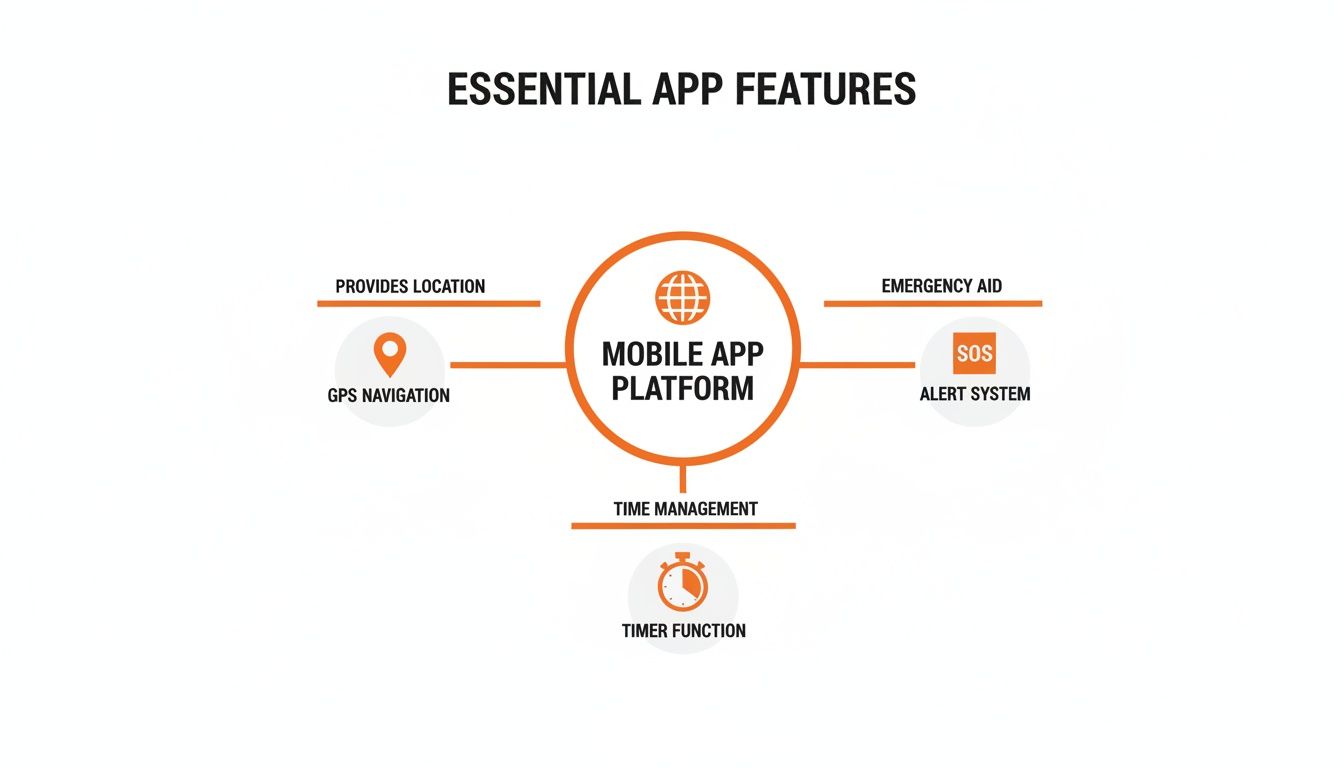
You can see how location tracking, alert systems, and timed check-ins are connected. They aren’t just separate features; they’re layers of a single, robust system.
To help you prioritize, we've broken down the features you'll come across into two categories: the absolute essentials and the valuable, but optional, extras.
Essential vs. Optional Worker Safety App Features
| Feature Type | Feature Name | Primary Function | Importance |
|---|---|---|---|
| Location & Alerts | Real-Time GPS Tracking | Pinpoints a worker's exact location during an emergency for rapid response. | Essential |
| Location & Alerts | Accessible SOS/Duress Button | Allows a worker to manually and discreetly signal for immediate help. | Essential |
| Automated Safety | Man-Down & No-Motion Detection | Automatically triggers an alert after a fall or impact if the worker is unresponsive. | Essential |
| Automated Safety | Scheduled Check-In Timer | Triggers an alert if a lone worker fails to confirm their safety by a set time. | Essential |
| Productivity | Digital Forms & Checklists | Simplifies safety inspections, hazard reports, and compliance paperwork. | Optional |
| Productivity | Journey Management | Monitors travel plans for workers driving to and from remote or high-risk locations. | Optional |
| Communication | Mass Notifications | Sends urgent safety messages to all staff or specific groups during a site-wide event. | Optional |
| Communication | Indoor Location Beacons | Provides precise location tracking inside large buildings where GPS is unreliable. | Optional |
While the optional features add value, no app should be considered without the four essentials. They form the core of a system designed to save lives.
Real-Time GPS Tracking and Location Services
Knowing where your workers are is the first step in any emergency response. This isn't about micromanagement; it's about being able to react instantly. When an alert is triggered, the first question is always, "Where are they?" Any decent worker safety app must provide precise, real-time location data.
Picture a worker on a sprawling construction site having a medical emergency. With accurate GPS, you can guide first responders directly to them, cutting through the confusion of a complex and ever-changing environment. That speed can be the difference between a close call and a tragedy.
Without this, an SOS alert loses most of its power. It’s like a smoke alarm going off but not telling you which room the fire is in.
Man-Down and No-Motion Detection
Sometimes, the most dangerous situations are the ones where a worker can't physically call for help. A slip on a wet factory floor or a fall from a ladder could leave someone unconscious and unable to hit an SOS button. This is where automatic detection becomes a lifesaver.
Man-down detection uses the phone's built-in sensors (like the accelerometer) to register a sudden impact followed by a period of no movement. If the worker doesn't respond to a pre-alert on their device, the app automatically signals for help.
This feature is like having a digital spotter for every single employee. It’s a proactive safeguard that works on a worst-case assumption: a worker is down and unresponsive. The app takes charge, making sure an incident never goes unnoticed.
Accessible SOS Button and Scheduled Check-Ins
While automation is critical, workers still need a simple, reliable way to signal for help themselves. An easy-to-find SOS button is non-negotiable. It has to be something they can activate under stress, sending a discreet but immediate alert to the monitoring team.
This is especially vital in situations involving threats or workplace violence. In fact, Safe Work Australia reported a 56% increase in serious workers’ compensation claims related to assault in recent years. In response, Australian businesses are turning to smart safety apps with silent alarms and GPS trackers to better protect their staff and meet their WHS duties.
Scheduled check-ins are the other side of the coin, providing routine assurance for lone workers.
- How it works: A worker starts a timer for how long they expect a task to take.
- What happens if they miss it: If they don't check in as "safe" before the timer runs out, the app automatically triggers an alarm.
- Practical use: It's perfect for remote maintenance crews, utility workers, or anyone operating in an isolated area. It provides peace of mind for both the employee and their manager.
To create a truly comprehensive system, many top-tier safety apps also include tools like digital inspection checklists for safety and code compliance, similar to those used in commercial building inspections. When combined with GPS, automatic detection, and manual alerts, these features build a multi-layered safety net that addresses the full spectrum of real-world risks.
Meeting Your WHS Duties with a Lone Worker Safety App
If your people ever work by themselves, a maintenance tech doing rounds after hours, a surveyor kilometres from the nearest crew, a driver between depots, you have a legal duty of care under Australian Work Health and Safety (WHS) laws. Those laws require you to actively identify and manage the risks faced by isolated workers, and a lone worker safety app is one of the most practical ways to do exactly that.
The risk is anything but theoretical. A recent study found that 68% of Australian companies had a lone worker incident in the last three years, with around one in five of those classed as severe. Zoom out and the picture is just as sobering: in 2024-25, an estimated 497,300 Australians suffered a work-related injury or illness, roughly 3.5% of the entire workforce. There is a big gap between having a lone worker policy sitting in a folder and having a working system out in the field.
Building a Defensible Safety Record
A huge part of WHS compliance is being able to show you took reasonable steps to keep your people safe. This is where the app quietly earns its keep: every check-in, alert, and response creates a permanent, time-stamped digital record.
- Logged check-ins: A complete history of every time a worker confirmed they were safe.
- Missed alert escalations: A clear record of what happened when a check-in was missed, proving your response plan was actually followed.
- GPS location data: Pinpoint location information attached to every check-in and alert.
- Incident reports: The full detail from a duress alert or man-down detection, including the time, location, and the response taken.
For regulators, proof of a working safety system is far more compelling than a policy document sitting on a shelf. An app provides exactly that: a logged history of proactive safety management in action.
One important caveat: an app on its own doesn't make you compliant. You still need documented risk assessments for every lone working role, clear safe work procedures, and proper training on both. The app is the technology that executes and documents your monitoring and emergency response; pairing it with safety management system software keeps all of that evidence in one place.
Duress Alerts, GPS Check-Ins and Escalation Chains
An SOS button is only as good as what happens after it's pressed. Before anyone downloads the app, map out a simple chain of command for every duress or missed check-in alert:
- First contact: Does the alert go to a direct supervisor, a central office, or a 24/7 monitoring service?
- Second contact: If the first person doesn't acknowledge it within a set window (say, two minutes), who is next in line?
- Final action: Define the exact criteria for calling emergency services, so nobody hesitates when it counts.
Then tune the settings to the job, because not all lone workers face the same risks. Someone in a confined space or working at heights should be on tight GPS check-in timers, every 15 to 30 minutes, with highly sensitive man-down detection. A rep driving between client sites might run 90-minute windows and lean on the duress button for roadside emergencies. And for genuinely off-grid work, look for an app that pairs with satellite communicators, so SOS alerts and GPS coordinates still get through with zero mobile coverage.
How to Choose the Right App for Your Industry
Let's be honest, not all work environments are created equal. A safety app designed for a quiet office simply won't cut it on a noisy construction site. Likewise, an app that works fine for city-based teams might completely fail in a remote area with patchy mobile reception.
Choosing the right worker safety app isn’t about ticking boxes on a feature list. It’s about matching its capabilities directly to the real, practical risks your team faces every single day.
A one-size-fits-all approach just doesn't work when it comes to keeping people safe. The key is to look past the generic sales pitches and seriously analyze how an app’s functions will hold up in your actual work environment. To help, we’ll break down the non-negotiables for three high-risk sectors: construction, manufacturing, and logistics.
Construction Sites High Demands
Construction sites are dynamic, noisy, and physically demanding. A standard safety app often falls short because it just isn't built to handle these conditions. Your workers need a tool that's as rugged and reliable as the rest of their gear.
For this industry, look for a worker safety app with features built for the job site:
- Loud, Distinct Alarms: On a site roaring with heavy machinery and power tools, a standard phone vibration or quiet chime is useless. The app must have alarms that are loud and piercing enough to be heard over the chaos.
- Geofencing for Hazard Zones: Sites have constantly changing hazards, from deep excavations to active demolition zones. An app with geofencing acts like a digital barricade, automatically alerting any worker who wanders into a restricted area.
- Compatibility with Rugged Devices: Many construction workers use rugged phones and tablets designed to withstand drops, dust, and water. The app has to be fully compatible with these devices and their operating systems, otherwise, it’s just another point of failure.
Think of the right app for construction as another piece of PPE. It needs to be tough, loud, and aware of its physical surroundings to be genuinely effective.
Manufacturing and Plant Operations
Manufacturing facilities present a different set of challenges. These are often vast, complex buildings where GPS signals are weak or non-existent, making it incredibly difficult to pinpoint a worker’s exact location during an emergency. Plus, most plants already have emergency systems in place, and any new app must work with them, not against them.
Key features for a manufacturing setting include:
- Indoor Location Tracking: Standard GPS is notoriously unreliable inside large steel and concrete structures. Look for apps that support indoor positioning systems, like Bluetooth beacons, to give you precise location data. This is critical for finding someone quickly on a sprawling factory floor.
- Integration with Plant-Wide Alert Systems: Many plants have established alarm systems, such as horns or flashing lights. A truly valuable safety app will integrate with these systems, allowing a mobile SOS alert to trigger a site-wide emergency response.
Logistics and Remote Work
For the logistics industry, the main challenges are distance and connectivity. Drivers and remote technicians often work alone, sometimes in areas with poor or no cellular service. A safety app that relies solely on a strong mobile signal is a serious liability for these workers.
If you want to dig deeper, our guide on various workplace health and safety apps offers more context.
The most important features for logistics professionals are all about reliability, no matter where they are:
- Offline Functionality: The app absolutely must work without a live internet connection. It should be able to log check-ins, record incident details, and cache data locally, then automatically sync everything once a connection is restored.
- Reliable Duress and Check-In Timers: For lone workers, these features are their lifeline. The app needs to guarantee that a missed check-in will trigger an alert as soon as the device is back online. This provides a dependable safety net for people operating far from any immediate support.
More Than Emergencies: An Employee Safety App for the Whole Team
SOS buttons and man-down alerts protect people on their worst day. But an employee safety app earns its keep on the ordinary days too, because the same app sitting in every worker's pocket is also the fastest way to move safety information between the field and the office.
Instead of tracking down a supervisor to report an unsecured ladder, a worker snaps a photo, logs it in seconds, and creates an instant, time-stamped record. Pre-start checks, hazard reports, and site inspections all happen on the phone rather than a soggy paper form, which means managers hear about risks as they happen, not at the end of a shift.
That reporting channel matters for more than physical hazards. A recent report found that while 65% of Australian workers have dealt with aggressive customers, 35% received no support from their employer. An app gives them an immediate, documented way to report these psychosocial events and get help, instead of shrugging them off.
What Each Role Gets Out of It
- Workers on the tools: A dead-simple way to flag hazards, complete checks, and call for help, with the peace of mind that their reports actually go somewhere.
- Site supervisors: A real-time view of who is on site, which pre-start checks are done, and instant notifications when something new is reported, all without chasing paperwork.
- WHS managers: One central hub for incident data, audits, and checklists, which makes compliance reporting faster and helps them spot recurring risks early. Connecting the app to incident management software closes the loop from report to resolution.
The engagement payoff is real. Research shows 60% of Australian workers rate employee apps as their most trusted channel for company communication, which gives you a strong foundation to build on. When workers see their reports lead to visible action, the app stops being a management tool and becomes their tool, and that is exactly the buy-in you need before the rollout steps below.
Your Step-by-Step Plan for Rolling Out a Safety App
Let’s be honest: introducing any new piece of technology is more about people than software. Even the most powerful safety app will fall flat if your team doesn't understand it, trust it, or know how to use it when the pressure is on. That's why a clear, step-by-step rollout plan is non-negotiable.
The goal is to move methodically, building confidence and competence at each stage. If you rush it, you’ll likely create confusion and resistance. But a structured approach makes sure the transition is smooth and gets everyone on board from day one. Think of it like building a house, you need a solid foundation before you can even think about putting up the walls.
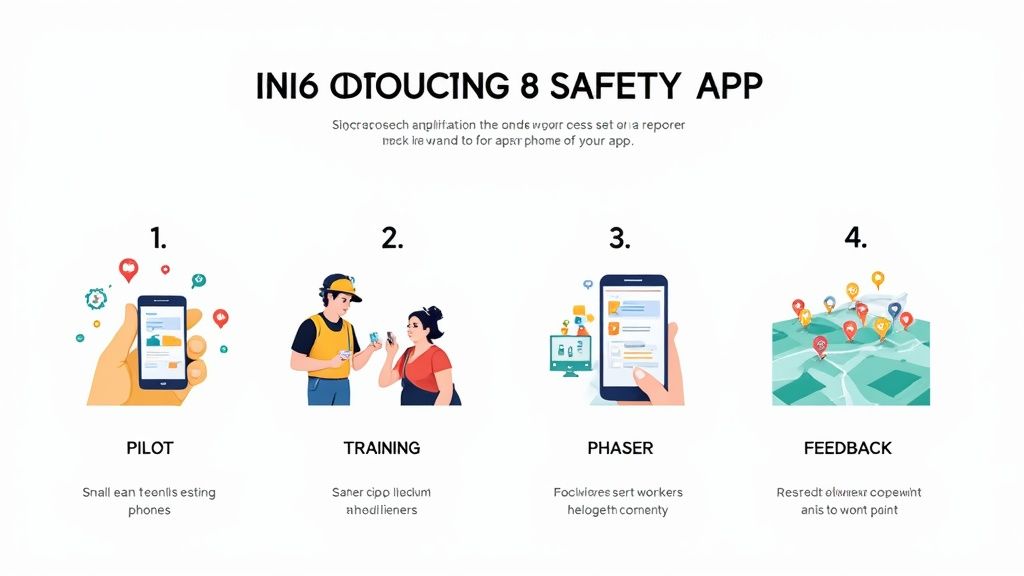
Here's a practical roadmap we’ve seen work time and time again, broken down into manageable phases.
Phase 1: Run a Pilot Program
Before you even think about deploying the app across the entire company, start small. Handpick a single team or a small group of trusted workers, preferably from a high-risk area, to test the app in their actual work environment. This gives you a low-risk way to kick the tires and see how it performs in the real world, not just in a demo.
During this phase, your only job is to listen and gather honest feedback. Ask the pilot team what works, what doesn’t, and what could be clearer. Is the duress alarm loud enough to be heard over machinery? Is the check-in process actually practical during a busy shift? Now is the time to find out.
A pilot program turns your team into valuable partners. They’ll spot practical problems you might miss and often come up with brilliant, simple solutions to make the app work better for everyone.
This initial test run will give you the crucial insights needed to fine-tune your plan for the wider rollout.
Phase 2: Conduct Hands-On Worker Training
Once you've ironed out the kinks based on pilot feedback, it's time for training. And I don’t mean a dusty PowerPoint presentation. Effective training is practical, hands-on, and directly addresses the concerns your workers will have. It's vital to not only show them how to use the app but explain why it’s being introduced, to keep them safe.
Organise sessions where every worker can physically use the app on a device. Guide them through the core functions they'll actually use:
- Activating an SOS Alert: Show them exactly which button to press and what happens next in an emergency.
- Setting a Check-In Timer: Walk them through starting and stopping a timed session for lone work.
- Responding to a Man-Down Pre-Alert: Explain what that warning sound means and, just as importantly, how to cancel a false alarm.
Be upfront about privacy. Explain that this is a safety lifeline, not a Big Brother tracking device, and clarify that location data is only ever accessed during a genuine alert. Good workplace safety training builds trust and makes sure everyone knows exactly what to do when seconds count.
Phase 3: Use a Phased Rollout and Get Feedback
With your team trained, resist the urge for a "big bang" launch. Instead, roll the app out team by team or site by site. This phased approach is far more manageable. It allows you to provide focused support to each group as they get started, preventing your key people from being spread too thin.
A great tip is to appoint a tech-savvy "safety champion" within each team. This person can be the first port of call for colleagues with simple questions, taking some of the load off managers and your IT department. It’s also helpful to provide simple job aids, like wallet-sized quick-start cards, that remind workers of the core functions.
Finally, set up a simple and clear way to gather ongoing feedback. Let your team know who to talk to if they find a bug, have a suggestion, or just need a refresher. An open feedback loop shows you value their input and are committed to making the system work for them in the long run.
How Safety Space Solves Your Key Safety Problems
All the theory in the world doesn’t mean much when things go sideways on a chaotic worksite. We’ve covered the features, benefits, and how to roll out a worker safety app. Now, let’s connect the dots and show you how Safety Space gives you practical, no-nonsense answers to the daily headaches Health and Safety managers face.
This isn't just a list of features. It’s about showing how those features actually work together to solve real-world problems. When you have people in high-risk industries, you need more than just good ideas. You need tools that are dead simple to use and completely reliable when it counts.
We built Safety Space from the ground up to handle these exact situations, bridging the gap between your WHS obligations and the messy reality of a busy site.
Making Compliance Practical
Meeting your Work Health and Safety (WHS) obligations can feel like you’re drowning in paperwork. Safety Space flips that on its head by making safety monitoring a simple, automated part of your day-to-day. Our real-time monitoring and reporting give you a clean, time-stamped digital record of every check-in, alert, and response.
That digital trail is gold. It’s your proof that you have a solid system in place to protect your team, a critical defense against potential non-compliance fines. We designed the entire system for simplicity, from the worker’s app to the manager’s dashboard, so you can be confident it's actually getting used correctly.
A complicated safety tool is a tool that won't be used. Safety Space is built with an extremely simple interface so that workers can adopt it quickly, without needing extensive training sessions. Its core functions are intuitive, making safety second nature.
Take our check-in timer, for example. It's the perfect fix for managers with remote teams. A utility worker heading to an isolated substation can start a timer with two taps. If they miss that check-in, their manager gets an instant alert with their precise GPS location. What could have been a crisis becomes a manageable event.
Real-World Scenarios in High-Risk Industries
The true test of any worker safety app is how it performs in a high-stakes scenario. Let’s walk through a couple of examples in manufacturing and construction.
Scenario 1: The Factory Floor Incident
A worker on a noisy manufacturing line slips on a coolant spill and is knocked unconscious. They can't call for help, and with the machinery roaring, nobody notices right away. Safety Space's man-down detection automatically registers the impact and lack of movement. A short pre-alert buzzes on their device, which they can't cancel. The system then fires off an urgent SOS to the shift supervisor and first aid team, pinpointing their exact spot in the plant using indoor beacons. Help is there in minutes, not hours.Scenario 2: The Lone Worker on a Construction Site
A subcontractor is finishing up on the top floor of an unfinished building after everyone else has gone home. They suddenly feel unwell and realize something is seriously wrong. Instead of trying to unlock their phone and dial a number, they just hit the big, obvious SOS button in the Safety Space app. This sends a silent duress alert to the site manager and the 24/7 monitoring center, providing a live GPS track. Help can be sent straight to them, even in a confusing, multi-level site.
These aren't hypotheticals; they're the kinds of dangerous situations that happen every day. They show how Safety Space provides a direct, logical solution, closing that critical gap between an incident and the arrival of help.
Your Questions Answered: Safety Apps in the Real World
When you're looking at bringing a new worker safety app into your operations, it's natural to have questions. You need to know how this technology will actually work for your team on the ground. Let's get straight into the most common concerns we hear from Health and Safety managers in construction and manufacturing.
These are the big ones: worker privacy, what happens when there's no phone signal, and how much time it will take to get everyone trained up and using the app properly.
How Do You Handle Worker Privacy Concerns?
This is usually the first question, and it's the most important. Let me be clear: modern safety apps are built for safety, not surveillance. It’s crucial that everyone understands location data is almost always shared only under very specific, emergency-related circumstances.
For instance, an employee's location is typically only sent to a monitoring dashboard during two key events:
- When they actively press an SOS or duress button.
- After a scheduled check-in is missed, which kicks off an automatic alert.
The whole point of the app is to get help to the right person, in the right place, at the right time. It’s not about tracking their movements during a normal shift. This has to be communicated clearly and openly with all your staff to build trust from day one.
What If a Worker Is in an Area with No Reception?
A very real problem, especially for teams working on large, remote construction sites or in logistics. Any safety app worth its salt has a plan for these connectivity black spots.
Many of the best apps have offline capabilities. This just means the app can store information locally on the device, like a completed safety checklist or a check-in confirmation. As soon as the worker's phone reconnects to a mobile or Wi-Fi network, that stored data gets sent and synced automatically.
But technology is only half the answer. You still need secondary communication plans and procedures for any known reception black spots on your worksite. Think of it as having multiple layers of protection in place.
How Much Training Is Needed to Use the App?
Honestly, the amount of training required is a great test of how well-designed an app is. A good one should feel intuitive and not need more than a 30-minute hands-on session to get your team comfortable. The interface should be simple, with big, obvious buttons for the important stuff.
The key to good training is to focus relentlessly on the core emergency functions. Your workers don't need to be experts on every single feature. They just need to know exactly how to trigger an SOS and manage their check-in timers until it becomes second nature.
Ready to see how a straightforward, reliable safety platform can solve these problems for your team? Safety Space provides the practical tools you need to protect your workers without the complexity. Get a free demo and see how it works at https://safetyspace.co.
Ready to Transform Your Safety Management?
Discover how Safety Space can help you implement the strategies discussed in this article.
Explore Safety Space FeaturesRelated Topics
Safety Space Features
Explore all the AI-powered features that make Safety Space the complete workplace safety solution.
Articles & Resources
Explore our complete collection of workplace safety articles, tools, and resources.