
Storing a contractor's insurance certificate in a shared drive doesn't make the work controlled. That popular advice confuses document collection with operational assurance. The best contractor management software in Australia should show who was authorised, which controls applied, whether the relevant worker completed the induction, and what happened when someone found a problem.
That distinction matters across construction, residential building, property development, manufacturing, cleaning, facilities services and waste management. Safe Work Australia recorded 37 work-related traumatic fatalities in construction in 2024, equal to 20% of the 188 worker fatalities nationally. Construction's fatality rate was 2.8 deaths per 100,000 workers, more than twice the national rate of 1.3 per 100,000. Safe Work Australia's latest WHS statistics provide the context, but the buying decision is practical: can the system produce reliable evidence at site level?
| Evaluation area | What a credible system should prove | Warning sign |
|---|---|---|
| Contractor approval | The business and individual worker meet defined requirements | One approved company record covers every worker |
| Document control | Licences, insurance and competencies remain current | Expiry dates sit in a spreadsheet |
| Site access | Only authorised, inducted people can sign in | A paper register accepts anyone |
| High-risk work | The relevant SWMS is reviewed, current and acknowledged | A PDF is uploaded with no approval trail |
| Field assurance | Inspections, incidents and actions connect to the contractor and site | Findings remain in separate forms |
| Audit evidence | The business can export who approved, reviewed and closed each item | Reports show status but not accountability |
Table of Contents
- The Legal Reality of Managing Contractors in Australia
- Core Compliance Workflows for High-Risk Construction Work
- Evaluating Software Categories for Subcontractor Oversight
- Executing Site Access and Document Verification Workflows
- Technology Adoption and Implementation Realities
- Assessing AI and Automation Risks in Safety Platforms
- Procurement and Onboarding Checklist for WHS Managers
The Legal Reality of Managing Contractors in Australia
A contractor's contract can allocate commercial responsibilities, but it can't transfer the principal business's WHS duty. Under Australian WHS law, a Person Conducting a Business or Undertaking, or PCBU, must protect workers and other people affected by the business so far as is reasonably practicable. PCBUs must also consult, cooperate and coordinate with other duty holders. Safe Work Australia's guidance on PCBU duties states that contractual terms attempting to transfer or reduce a duty holder's responsibility are invalid.
That makes a document repository an inadequate control. It may show that a certificate, licence or policy existed, but it doesn't prove that the right person was approved for the right site, that the site induction occurred, or that the supervisor acted on an identified hazard.
Passive storage versus active assurance
Passive storage answers, “What file was uploaded?” Active assurance answers harder questions:
- Who was authorised? The system should identify the contractor, worker, role and approval status.
- What applied to the work? Requirements should reflect the site, project, task and risk profile.
- Was the control current? Expiry dates, document versions and review records need ownership.
- What happened after a finding? An action should have an owner, due date, evidence and closure approval.
- Can the record withstand scrutiny? Audit history should show who made each decision and when.
The distinction also applies outside construction. A property manager, manufacturer or facilities operator may use different forms, but the assurance question remains the same. A contractor's own safety system doesn't remove the host business's responsibility to coordinate work and verify that controls operate in practice.
Contract administration still matters. Clear scopes, responsibilities, approvals and change records support the commercial relationship, while contract management best practices can help teams organise those obligations. WHS software should sit alongside that process, not pretend that a signed agreement is a safety control.
A useful internal distinction is set out in contractor versus subcontractor responsibilities. The label matters less than the actual work, the control each duty holder can influence, and the evidence retained.
Practical rule: If a system can't show that a control was active when the work occurred, it records administration, not assurance.
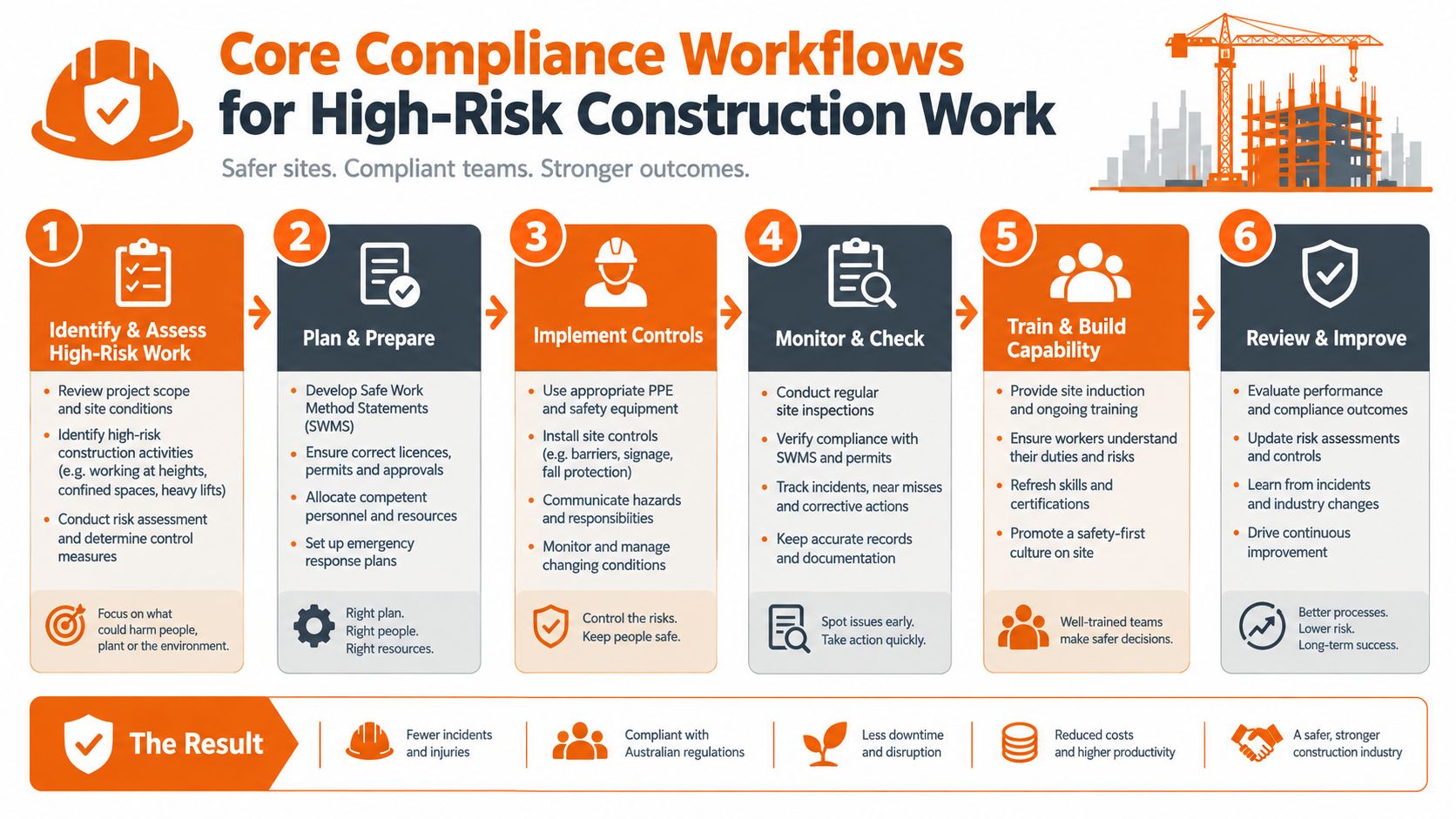
Core Compliance Workflows for High-Risk Construction Work
High-risk construction work requires a workflow, not a file upload. Before work starts, the relevant PCBU must prepare, keep, comply with and review a Safe Work Method Statement, or SWMS. A principal contractor must obtain the SWMS before high-risk work begins. If the contractor hasn't supplied one, the principal contractor must arrange for one to be prepared. Safe Work Australia's SWMS information sheet sets out this obligation.
The software should support the complete lifecycle:
- Classify the activity. Identify whether the contracted scope involves high-risk construction work.
- Request the SWMS. Set the requirement before mobilisation, not after the crew arrives.
- Review the content. Check that the document addresses the actual activity, hazards, site and controls.
- Approve a version. Keep the approved document identifiable, with its review history.
- Brief the workforce. Capture worker sign-on or acknowledgement before work starts.
- Verify in the field. Record inspections, deviations, incidents and corrective actions against the relevant work.
Why incident records need connected evidence
A notifiable incident creates a separate test of system quality. The PCBU must notify the applicable regulator immediately and preserve the incident site until an inspector arrives or gives another direction. The obligation to notify sits with the business, not the software. Safe Work Australia's incident-reporting guidance also states that the relevant risk assessment, WHS management plan and/or SWMS must be retained for two years after the incident.
A useful incident workflow should link:
- the contractor and affected worker
- the site and project
- the task and relevant SWMS
- photographs, statements and attachments
- notification time and responsible personnel
- corrective actions, owners and closure evidence
That connection helps an investigator understand what happened without searching through unrelated folders. It also supports internal review after the immediate response.
The exposure isn't limited to fatalities. WorkSafe Queensland, using Safe Work Australia data for 2020 and 2021, reported a construction serious-claim incidence rate of 16.9 claims per 1,000 workers, compared with 10.5 per 1,000 across all industries, approximately 61% higher. The WorkSafe Queensland summary of construction injury data also records historical construction fatality patterns involving employees and self-employed workers. A platform therefore needs to cover both groups and connect field activity to the evidence that follows.
For practical SWMS review criteria, teams can use SWMS guidance for construction as a reference point, then configure the approval workflow to match the business's sites and responsibilities.
Evaluating Software Categories for Subcontractor Oversight
Different software categories solve different problems. A shared document system may organise files well. An enterprise system may connect procurement and finance. A dedicated WHS platform usually starts with the control question: can the business verify that the person doing the work is authorised and site-ready?
| Software Category | Subcontractor Onboarding | Field Mobile Usability | SWMS & Induction Enforcement | Best Fit For |
|---|---|---|---|---|
| Generic document management | Easy to create folders and request files, but approval logic is often manual | Usually adequate for viewing, weaker for field workflows | Usually depends on manual checks and separate forms | Office-based document storage |
| Enterprise resource planning add-on | Can connect supplier records with purchasing and work orders | Depends heavily on configuration and the selected mobile tools | May support records, but site controls can become secondary | Larger organisations needing finance and procurement integration |
| Dedicated WHS platform | Designed for contractor, worker, site and requirement records | Built around browser and mobile field use where supported | Can connect approvals, inductions, sign-on, inspections and actions | Businesses needing operational assurance across sites |
The onboarding trade-off
A large system may offer extensive configuration, but complexity can create friction for small subcontractors. A sole trader arriving for a short job won't tolerate a long account setup, unclear requirements or a process that only works on a desktop. If the process becomes difficult, the site team often creates workarounds. Those workarounds become the actual system.
A lighter tool may be easier to adopt but lack site-specific rules, worker-level records or evidence of review. The right choice depends on the operational risk, not the length of the feature list.
What procurement teams should test
A vendor demonstration should use a real scenario, such as a subcontractor with an expiring licence, a new worker who has not completed the site induction, and a current SWMS awaiting approval. The vendor should demonstrate what the supervisor sees, what the worker can do, what gets blocked, and which notification is sent.
Teams reviewing improving vendor management workflows should separate commercial supplier management from WHS assurance. Procurement can approve a vendor relationship, but site controls still need to verify people, tasks, documents and conditions before work begins.
Executing Site Access and Document Verification Workflows
The site gate is where contractor management either works or fails. A sensible process starts before arrival, checks the worker rather than only the company, and prevents site access from becoming disconnected from the records held in the office.
A workable site sequence
- Create the contractor record. Collect the organisation's required insurances, licences, competency evidence and safety documents.
- Set expiry ownership. Assign reminders and escalation rules before a document becomes invalid.
- Apply site requirements. Add the induction, training, permit or SWMS requirements for the specific location and task.
- Review and approve. A named person checks the evidence rather than accepting an automatic green status.
- Complete the induction. The worker acknowledges the site rules and task-specific requirements.
- Sign in at the gate. The record should identify who entered, where and under which approval.
- Record field activity. Inspections, incidents and corrective actions should remain connected to the worker, contractor and site.
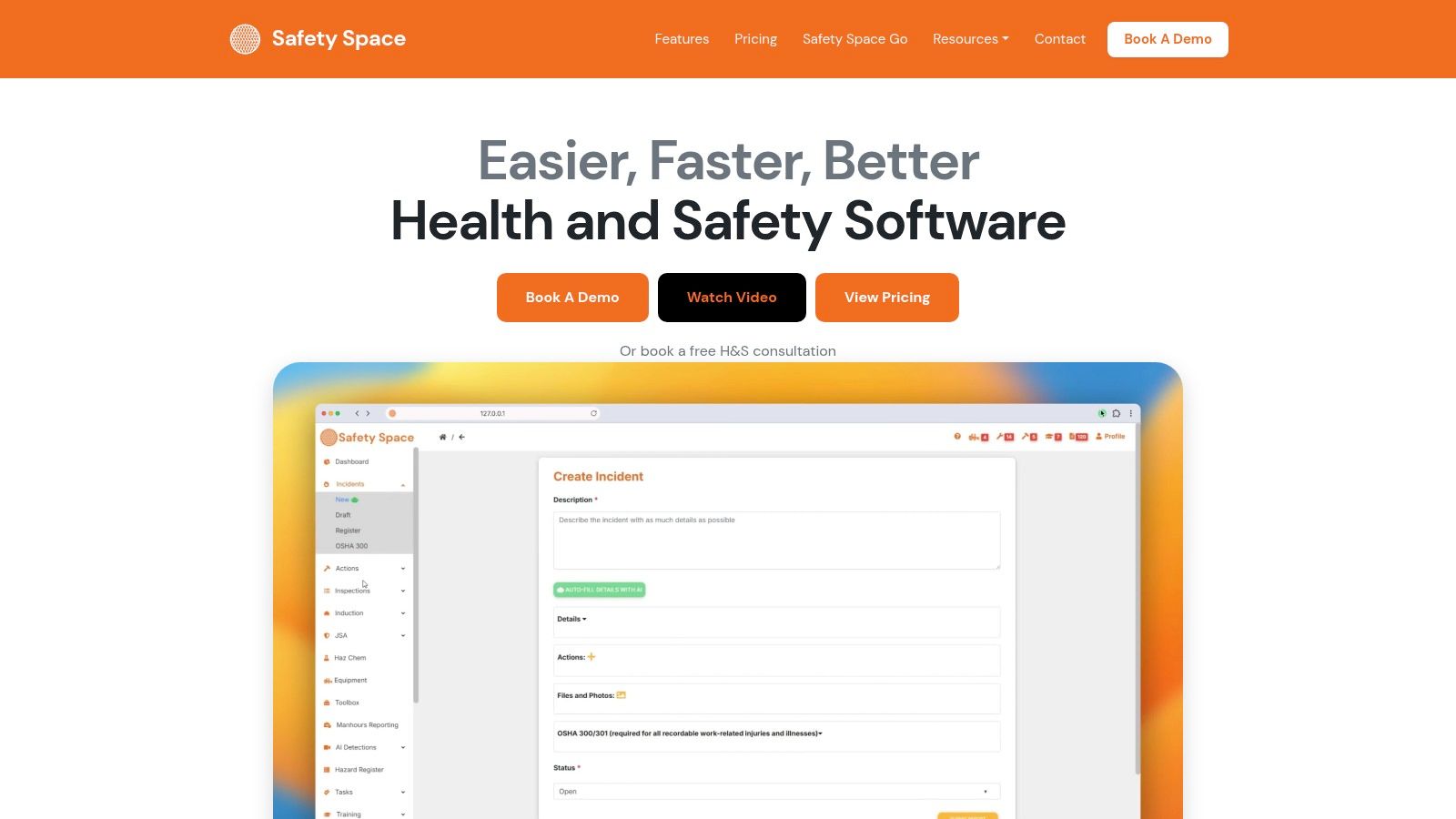
Safety Space provides one example of this workflow. Its contractor management functions collect insurances and documents, send reminders before expiry, support inductions for contractors and visitors, and provide QR code site sign-in. The platform is available through a browser and iOS and Android apps that work offline. Its records can be organised by site or project, with dashboards and a map view for each site.
The control point that matters
The important question isn't whether a contractor can upload a document. It's whether the system can stop an unapproved person from being treated as ready for work, while giving an authorised supervisor a clear way to resolve the exception.
Offline capability matters at basements, remote sites, plant areas and locations with unreliable coverage. A worker should be able to capture the required information in the field, with the system preserving the record for synchronisation later. The process also needs a human fallback for emergencies, because no application replaces the supervisor's judgement or the PCBU's duty.
A contractor safety passport can help when workers move between sites, but the receiving site still needs to apply its own requirements. Contractor safety passport system guidance is useful for evaluating whether a portable worker record supports, rather than bypasses, site-specific verification.
Technology Adoption and Implementation Realities
Australian construction organisations reported using an average of 5.0 technologies, rising to 6.1 among medium and large enterprises. Nearly 80% of adopted technologies were reported as successful, but only 23% of Australian businesses had a defined technology strategy, while 76% reported a technical-skills gap. Built Offsite's summary of the Autodesk and Deloitte 2024 construction technology study shows why buying another application without a rollout plan creates risk.
The technical challenge is rarely the software alone. It's the combination of project teams, subcontractors, supervisors, office administrators and workers who use different devices, have different levels of digital confidence and may work across several client systems.
Test adoption before signing
A procurement team should ask the vendor to demonstrate the experience from the field worker's perspective. The test should include a new contractor, a returning worker, an expired document and a site with no connection.
Look for these practical characteristics:
- Low-friction access: Workers should reach the required form or induction without unnecessary navigation.
- Mobile-first forms: A supervisor should be able to inspect, photograph, assign and close actions from the work area.
- Offline operation: The system should explain what can be captured offline and how synchronisation handles conflicts.
- Configurable requirements: Administrators should change forms and requirement sets without waiting for custom development.
- Implementation support: The vendor should provide configuration help, training and a clear owner for migration issues.
Australian Industry Group research adds a useful procurement signal. In its August to September 2024 survey of 182 private-sector businesses, 84% of business leaders reported adopting new technology, including 82% of medium-sized businesses and 63% of small businesses. The Australian Industry Group technology-adoption survey indicates that adoption is widespread, but not uniform.
Roll out the control, not every feature
Start with the contractor records, document expiry, inductions and site access that create the greatest daily exposure. Add inspections, incidents, corrective actions and other modules after supervisors can use the initial workflow reliably. Pricing based on sites, users and modules can reduce the risk of paying for functions that field teams aren't ready to use.
The vendor's implementation team should help clean duplicate contractor records, define approval roles and set escalation rules. A technically successful launch still fails if supervisors keep a parallel spreadsheet because the system doesn't reflect how work is conducted.
Assessing AI and Automation Risks in Safety Platforms
AI can draft a SWMS, summarise a record, extract details from an SDS or populate an incident form from a plain description. Those tasks may reduce repetitive entry, but automation doesn't make a control valid by itself. A person with the relevant responsibility still needs to decide whether the output fits the work, site and legal context.
Australian policy discussions reflect both adoption and capability constraints. More than one-third of Australian SMEs have adopted AI, while parliamentary recommendations have called for affordable RegTech, compliance guidance and a Safe Work Australia code addressing AI-related workplace risks. The Australian Government response on employment, education and training technology issues provides the policy context.
Questions for an AI feature demonstration
A safety manager should not accept “AI-powered” as a procurement criterion. The vendor should answer:
- Who approves the output? A draft control must remain a draft until an authorised person reviews it.
- What sources inform it? The system should identify the records, documents or instructions used.
- How are changes recorded? Version history should show edits, approvers and dates.
- What happens offline? The workflow should remain usable when a worker has no connection.
- How does it handle Australian terminology? The vendor should demonstrate PCBU, SWMS, notifiable incident and site-specific requirements.
- What are the permissions? Sensitive incident and worker records need controlled access.
- Can records be exported? The business should be able to retain evidence independently of the vendor.
Automation becomes dangerous when it creates false confidence. An automatically generated form may contain plausible language while missing a critical hazard, using the wrong site assumptions or repeating an outdated control. A summary may omit the disagreement that led to a revised procedure. The system should make those limitations visible rather than hide them behind a green status.
Safe automation has boundaries
Good automation removes duplicate entry and prompts people before a document expires. It can flag incomplete records, route an inspection finding to an owner and assemble related evidence for review. It shouldn't decide that a contractor is competent, that a SWMS is adequate or that a notifiable incident does not require regulator contact.
For many small and mid-sized businesses, a reviewable workflow is more valuable than an impressive AI feature. The selection test is simple: does automation leave a clearer record of human responsibility, or does it make the reasoning harder to reconstruct?
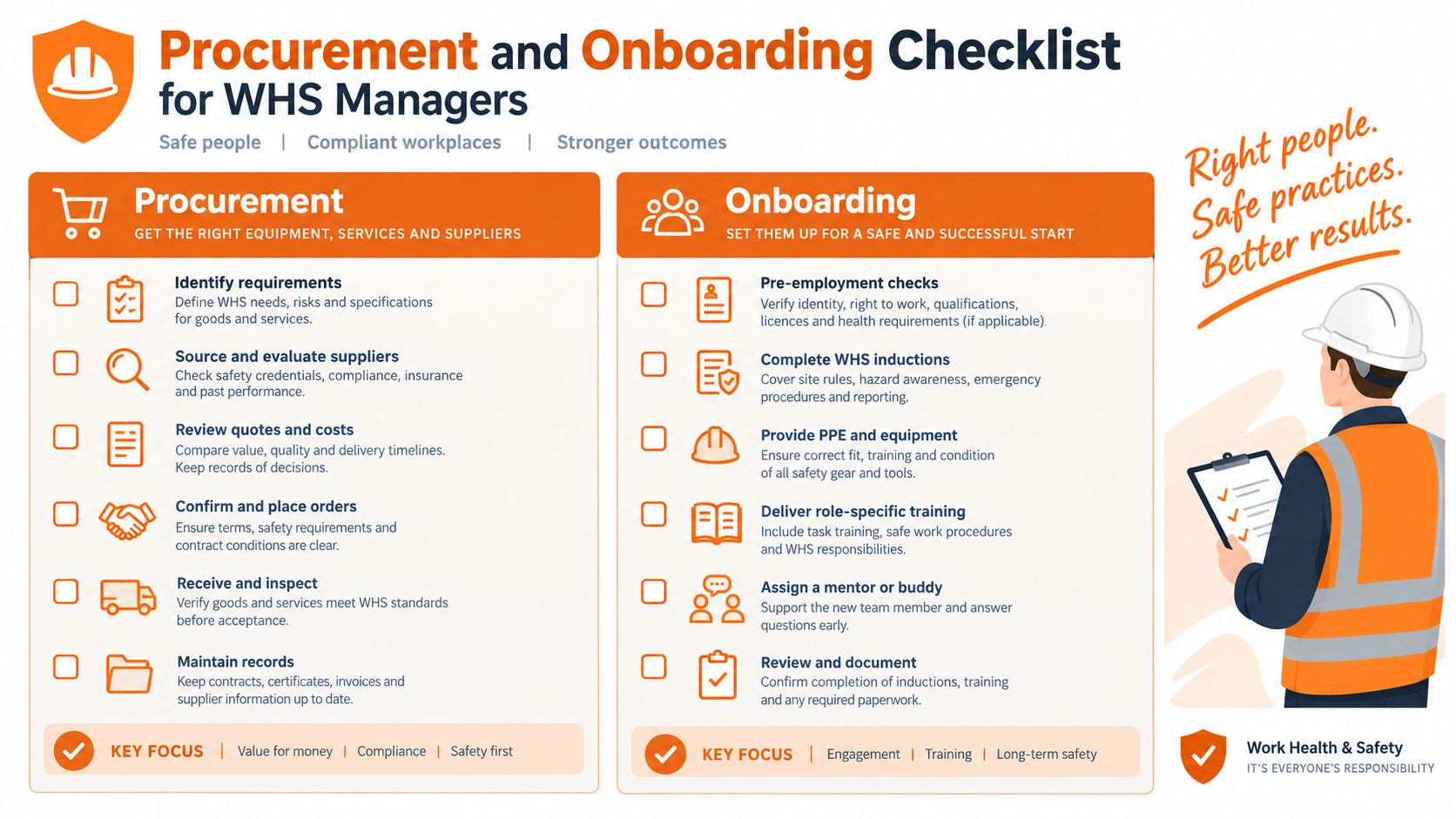
Procurement and Onboarding Checklist for WHS Managers
A procurement decision should end with evidence from a realistic scenario, not a polished feature tour. The following checklist gives WHS managers and operations leads a practical way to test whether a platform supports the PCBU's actual work.
Before the demonstration
- Define the control owner: Name who approves contractors, who reviews SWMS, who controls site access and who closes corrective actions.
- Map the contractor lifecycle: Include prequalification, worker approval, induction, mobilisation, site entry, supervision, incident response and offboarding.
- List the evidence: Require contractor records, worker records, expiry history, approval decisions, induction acknowledgements, inspection findings and closure evidence.
- Use a difficult scenario: Test an expired licence, a missing SWMS, a new worker, an unresolved action and a site with poor connectivity.
- Ask about data residency: Confirm where records are hosted, how long they're retained, who can access them and how the business receives an export.
- Check identity controls: Ask whether single sign-on is available and how permissions separate administrators, supervisors, contractors and workers.
- Test integration requirements: Confirm whether the platform can connect with payroll, project, procurement or other business systems, and what custom integration support involves.
During the demo
Require the vendor to show the complete path, not isolated screens:
- Create a contractor and assign the applicable requirements.
- Upload a document and set its expiry.
- Approve the company but leave one worker unapproved.
- Apply a site-specific induction and SWMS requirement.
- Sign the worker in through the field workflow.
- Record an inspection finding with an owner and due date.
- Attach evidence and close the action with an approval record.
- Export the audit trail for the site and contractor.
A platform that performs these actions separately may still fail operationally. The important test is whether each record remains connected and whether the next person knows what requires attention.
Onboard the first contractor group
Begin with a controlled group representing the workforce. Include an established subcontractor, a small business with limited administration capacity, a worker who operates mainly in the field and a contractor performing high-risk work. Clean duplicate records before invitations go out.
Set a clear rule: the new system becomes the source of truth for the selected workflow on an agreed date. Supervisors need short, role-specific instruction. Contractors need simple directions explaining what they must provide, why it's required and who can help when a document is rejected.
Track exceptions rather than hiding them. An unapproved worker, missing document or overdue action should generate an assigned task, not a private email thread. Review the results with supervisors and contractors, adjust the forms, then expand to other sites.
New Zealand and the United States require jurisdiction-specific configuration. New Zealand organisations should align the workflow with the Health and Safety at Work Act 2015 and WorkSafe New Zealand expectations, while United States operations should use their applicable OSHA requirements and records. The same operational principle still applies: verify the person, task, control and approval at the time of work.
Before selecting a platform, the decision group should be able to answer four questions:
- Can the system show who was authorised?
- Can it show which control applied?
- Can it show who reviewed and acted?
- Can it produce the evidence without reconstructing the story from email and spreadsheets?
Safety Space provides contractor document and insurance collection, expiry reminders, inductions, QR code site sign-in, offline mobile access, SWMS with worker sign-on, inspections, incidents and corrective actions in one configurable system. Visit Safety Space to assess whether its site-based workflows fit the contractor controls and evidence requirements of the business.
Ready to Transform Your Safety Management?
Discover how Safety Space can help you implement the strategies discussed in this article.
Explore Safety Space FeaturesRelated Topics
Safety Space Features
Explore all the AI-powered features that make Safety Space the complete workplace safety solution.
Articles & Resources
Explore our complete collection of workplace safety articles, tools, and resources.