
A panic button alone doesn't make a lone worker safe. If a mobile signal fails at a regional construction site, inside a basement, or on a remote agricultural property, the button may not transmit anything. The best lone worker app Australia has to offer should therefore be judged on offline behaviour, escalation and WHS integration, not on GPS screenshots or an attractive app-store listing.
Safe Work Australia identifies limited communication and poor access to emergency assistance as core risks of remote or isolated work. It also says PCBUs must ensure effective communication with isolated workers. Its guidance on remote and isolated work provides the right starting point for procurement.
| Software category | Offline SOS capability | WHS integration | Best for |
|---|---|---|---|
| Dedicated lone-worker app | Depends on offline alert queuing and network recovery | Usually focused on monitoring and alerts | Teams needing a narrow monitoring control |
| WHS platform with lone-worker functions | Should support offline forms, check-ins and incident capture | Connects alerts with inspections, hazards, SWMS and corrective actions | Small and mid-sized teams wanting one safety record |
| Hardware-supported system | May use cellular, radio or satellite fallback | Varies by system and integration capability | Remote or high-risk work where phones cannot be the only control |
Table of Contents
- The Offline Reality of Australian Field Work
- WHS Obligations for Isolated and Remote Work
- Critical Selection Criteria for High-Risk Industries
- Comparing Leading Lone Worker Solutions
- Implementation and Emergency Plan Integration
- Managing Interpersonal Hazards and Customer Aggression
- Procurement and Deployment Checklist
The Offline Reality of Australian Field Work
The common advice is to compare GPS accuracy, battery life and panic buttons. Those features matter, but they don't answer the first operational question: can an alert reach someone when the worker has no mobile coverage?
A lone worker may move from an urban site to a basement, regional road, farm, waste facility or partially completed building during the same shift. An app that depends on continuous data connectivity can look capable in a demonstration and fail at the point of greatest need. A visible SOS button is not a control unless the business knows what happens when the device can't transmit.
Test the failure mode, not just the feature
A proper trial should deliberately interrupt connectivity. The test should record whether the app:
- Stores the alert locally: The worker should receive clear confirmation that the event has been captured, rather than assuming the message was delivered.
- Resends automatically: The system should attempt transmission when coverage returns, without requiring the worker to repeat the emergency action.
- Preserves the last known location: Supervisors need the most recent usable position, with the time attached.
- Escalates visibly: Managers must know whether an alert is pending, acknowledged or still undelivered.
- Supports a fallback: A radio, satellite phone or other suitable device may be necessary where mobile service is unreliable.
A business should also map known blackspots before selecting an app. Regional teams may need to consider rural internet that actually works alongside mobile and satellite communication, particularly where managers need dependable contact with a dispersed workforce.
Practical rule: Treat offline operation as a safety control that needs verification, not as a checkbox in a vendor demonstration.
Offline capability also applies to routine WHS work. If a worker can't complete an inspection, hazard report or pre-start because the app requires a live connection, the system encourages paper workarounds and creates gaps in the record. A mobile inspection workflow, such as the one described through mobile safety inspections, should continue capturing information locally and synchronise it once the connection returns.
The fallback procedure must sit in the emergency plan. The app supports communication, but it can't replace a nominated responder, suitable equipment, site information and a decision about when emergency services are contacted.
WHS Obligations for Isolated and Remote Work
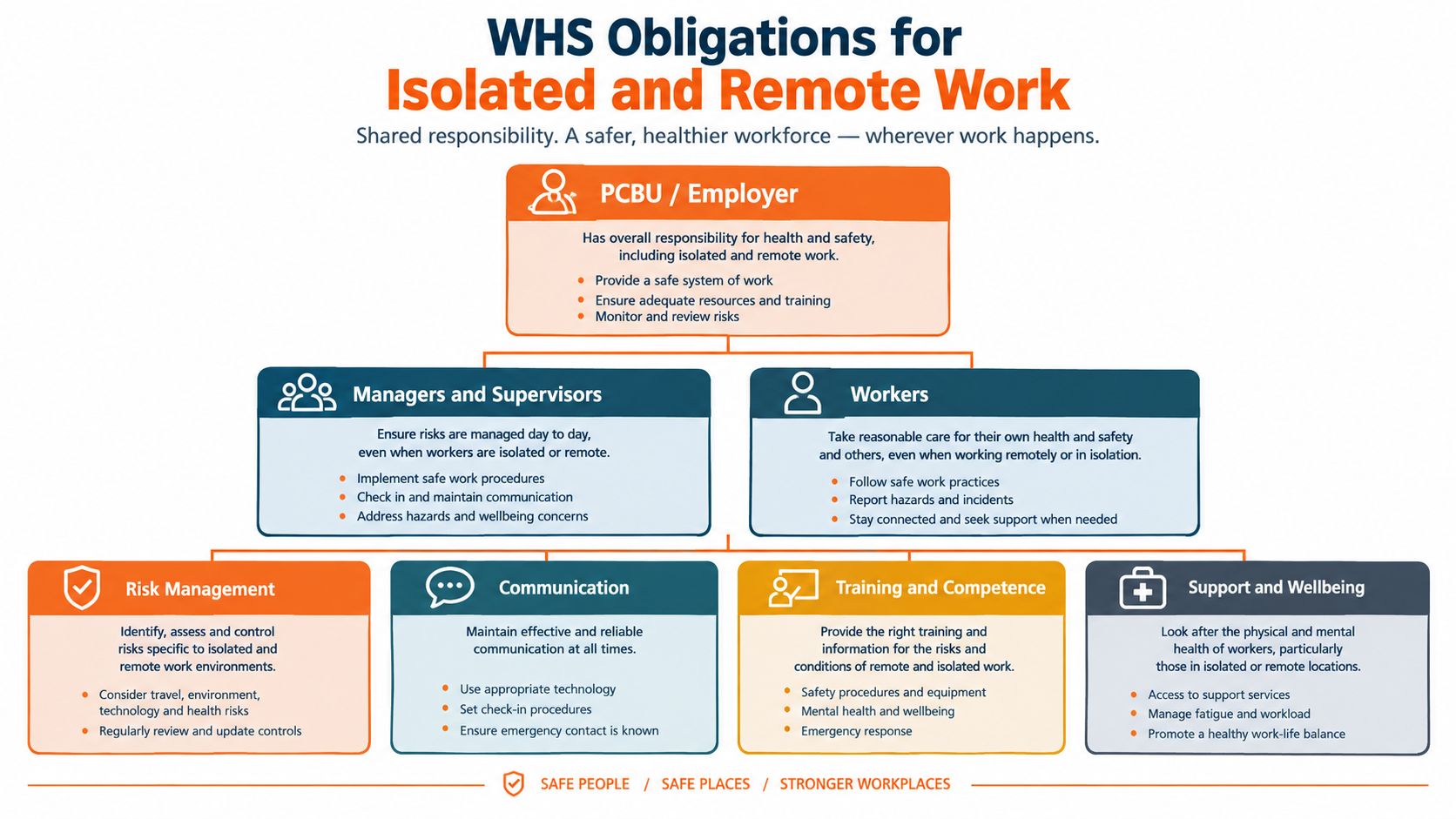
Under Australia's model WHS framework, a PCBU must manage risks associated with remote or isolated work and provide effective communication with the worker. Safe Work Australia defines remote or isolated work by the separation from assistance because of the location, time or nature of the work. Assistance includes rescue, medical assistance and emergency services. The model code covering the work environment and facilities gives H&S teams a practical basis for specifying controls.
The obligation isn't satisfied because a worker owns a phone. The organisation needs a documented method for contact, a risk-based monitoring arrangement and a response process when contact fails. The software should produce evidence that those controls operated, while the business remains responsible for the underlying system.
Translate the duty into requirements
A risk assessment and relevant SWMS should define the work activity, hazards, controls and response arrangements. The app should then support those arrangements rather than create a separate process.
- Communication method: Record how the worker checks in, who receives the event and what happens if the primary channel fails.
- Movement or location information: Preserve a current or last known location when location awareness is needed for assistance.
- Missed-contact escalation: Notify the right supervisor after a missed check-in, then escalate again if no one acknowledges the event.
- Time-stamped records: Keep check-in, alert, acknowledgement and response events available for review.
- Worker instructions: Show the worker what to do before starting, when entering a new location and during an emergency.
The same logic applies to emergency contacts and site information. A residential builder may need different responders for a client's home, a development site and a remote inspection. A waste operator may need location details that change as the vehicle moves. Static contact lists don't provide enough control when the work context changes.
The lone worker safety guidance for Australia is useful when mapping those operational requirements to a broader WHS process. It should be read alongside the organisation's risk assessments, SWMS, emergency plan and consultation records.
A system that only records a panic event is limited. A system that connects the event to the worker, site, task, supervisor and follow-up action provides a more defensible record. That distinction matters during internal reviews and after an incident.
Critical Selection Criteria for High-Risk Industries
The right system differs between a cleaner moving through occupied buildings, a construction worker entering a basement and a maintenance worker travelling between regional assets. Each role needs a control matched to the time before assistance is required, the coverage available and the consequences of a missed contact.
Queensland's regulator describes a practical operating model for isolated work. Workers should use suitable communication equipment, such as a mobile phone, two-way radio or satellite phone, and have a call-in system at specific times or when they move to another location. The model code on managing the work environment and facilities also points to GPS tracking or an emergency position-indicating radio beacon where appropriate.
Scheduled and movement-based check-ins
Scheduled check-ins suit predictable work. A supervisor can require confirmation before a task, during a high-risk activity and at the end of the visit. Movement-based check-ins suit mobile teams that change buildings, properties or work zones.
Neither approach is complete on its own. A worker can suffer an incident between scheduled contacts, while movement prompts may become impractical if the location data is poor. The risk assessment should decide whether the app uses one method, both methods or an additional man-down control.
Offline operation and alert handling
Ask the vendor to demonstrate the complete sequence in a coverage blackspot:
- The worker activates SOS or misses a check-in.
- The device confirms whether the event is stored or transmitted.
- The system retains the last known location and event time.
- Connectivity returns.
- The alert reaches the designated responder.
- The responder acknowledges it.
- A secondary escalation occurs if acknowledgement doesn't happen.
Record the results. Marketing language about “real-time” performance doesn't explain delayed transmission or failed delivery.
GPS is context, not rescue
GPS can help a responder locate a worker, but it doesn't make the response plan work. The organisation still needs current property details, emergency numbers, access instructions and a person who knows how to act. A location pin may be inaccurate indoors or stale after a worker loses coverage.
Operational test: Ask, “Who receives this alert, what do they see, and what do they do next?” If the answer stops at a map, the control is incomplete.
The app should also connect with the existing WHS system. Incident records, hazards, inspections, permits and corrective actions should not sit in disconnected databases when the business needs to understand what happened and whether the control changed. A mobile worker safety app can be assessed against that broader workflow, not just its emergency screen.
Comparing Leading Lone Worker Solutions
A useful comparison starts with software architecture rather than brand popularity. A dedicated alerting tool may be quick to deploy and easy for workers to understand. Its limitation is that the business may still need separate systems for SWMS, hazards, inspections, incident investigation and corrective actions.
A broader WHS platform can place lone-worker events beside the records that explain the work. That reduces manual transfer between systems, but it may require more configuration, user training and governance. Hardware-supported systems can add value where phones are damaged, inaccessible or outside cellular range, although they introduce device management and fallback-equipment decisions.
| Software category | Offline SOS capability | WHS integration | Best for |
|---|---|---|---|
| Dedicated panic and check-in software | Suitable only if the vendor proves alert queuing, resend behaviour and last-known-location handling | Often limited to alerts, contacts and monitoring records | Small teams that need a focused contact control |
| Integrated WHS platform | Can support offline check-ins, incident capture and other field records where the product provides offline mobile operation | Can connect lone-worker events with SWMS, hazards, inspections, incidents and actions | Construction, cleaning, facilities, manufacturing and waste teams managing several WHS processes |
| Hardware-dependent tracking | May offer cellular, radio or satellite paths, depending on the device and service | Depends on available integrations and the organisation's response process | Remote operations where smartphone coverage can't be relied on |
| Internal process with a phone | No dependable offline SOS unless another control exists | Relies on manual logs, calls and supervisor follow-up | Lower-risk work only where the risk assessment supports it |
What each architecture trades away
A single-purpose app often has a smaller learning burden. That can help adoption where the only requirement is a check-in and escalation chain. It won't automatically provide the context needed for a safety investigation unless the organisation transfers records into another system.
An integrated platform is more suitable where lone-worker protection forms part of a wider WHS management system. The trade-off is configuration discipline. Roles, sites, escalation contacts, retention rules and offline behaviour must be tested before deployment.
Safety Space is one platform option in this category. Its browser system and iOS and Android apps work offline, and its WHS modules include incident and injury reporting, hazard registers, inspections, SWMS and JSAs, corrective actions, training, inductions and site records. Its lone-worker functions include scheduled check-ins that alert a supervisor when a worker fails to confirm safety, the worker's last known GPS location, an SOS or duress button, and man-down detection using a no-motion sensor. Those functions still need to be configured against the organisation's emergency arrangements.
The strongest choice is the one that fits the actual assistance gap. A small facilities business may favour a focused control with a clearly managed escalation tree. A construction or property group may need the alert to connect with site records, contractor information and incident follow-up. Remote work may require a phone app plus radio or satellite fallback, rather than treating any smartphone application as the sole control.
Implementation and Emergency Plan Integration
Deployment should begin with the emergency response process, not the app settings. The organisation must identify who monitors alerts, what constitutes a missed contact, when escalation occurs and how a responder reaches the worker or site.
Safe Work Australia states that emergency plans must be prepared and maintained for all workplaces, including workplaces where workers work from people's homes. The plan must address emergency response, evacuation, notification of emergency services, medical help, communication, training and testing. Its guidance on work environment hazards is directly relevant to residential construction, domestic cleaning, property services and field inspections.
Build the response before the pilot
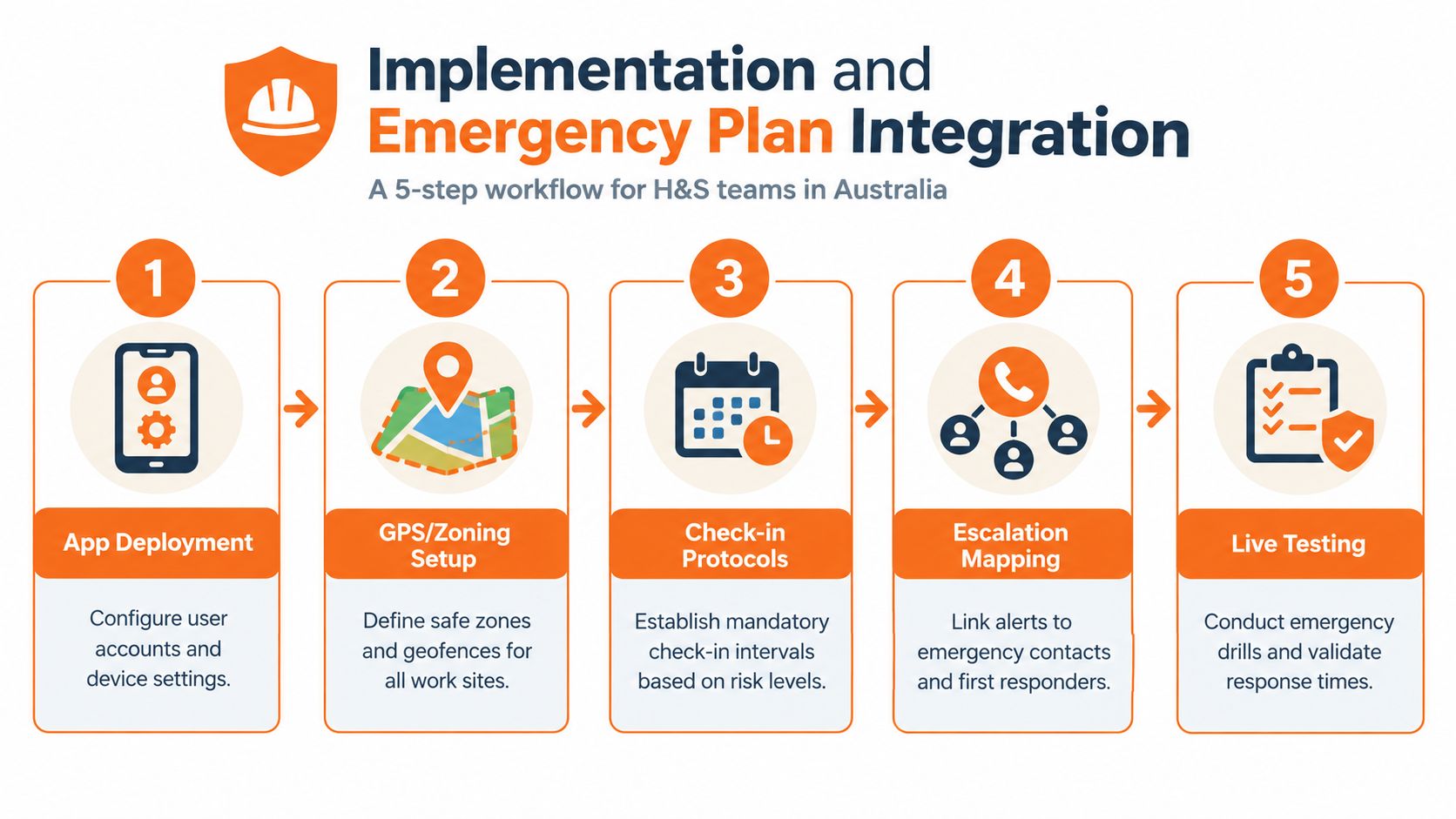
A practical implementation sequence looks like this:
- Define the work groups. Separate construction supervisors, cleaners, maintenance staff, drivers and after-hours workers where their risks and response times differ.
- Set the contact method. Decide whether the worker uses scheduled check-ins, movement prompts, SOS, man-down detection or a combination.
- Map escalation. Name the primary supervisor, secondary contact and emergency pathway. Include instructions for access, site location and known hazards.
- Configure privacy. Limit live-location access to people who need it, document worker consent and distinguish welfare monitoring from productivity surveillance.
- Run a live test. Use a planned drill to confirm that the alert arrives, receives acknowledgement and results in the physical response described in the emergency plan.
Missed-check-in thresholds should reflect the activity and the required intervention time. A high-risk task may need immediate escalation, while a lower-risk visit may use a different interval. The decision belongs in the risk assessment, not in a default setting chosen for convenience.
Communication systems should also be tested outside the app. If a business uses phone services for emergency calls, its procedure should account for location data, caller identification and the limitations of internet-based calling. Teams can review business VoIP emergency call rules as part of that communications assessment, while still following Australian emergency arrangements and local procedures.
The pilot should collect local evidence. Useful measures include worker opt-in, completed check-ins, response latency, false alarms, failed transmissions and worker confidence. These measures show whether the system functions in the actual work environment rather than only in a meeting room.
Managing Interpersonal Hazards and Customer Aggression
A lone worker can face a serious threat without a fall, vehicle incident or equipment failure. Cleaners, property personnel, community-facing staff and workers entering occupied homes may need to manage aggression while maintaining contact with a supervisor.
A nationally representative 2025 survey of 1,500 Australian workers found that 27% of lone workers experienced customer aggression at least weekly. The survey was conducted with YouGov and excluded self-employed workers. The survey report on customer aggression indicates a meaningful interpersonal exposure, but it doesn't measure app adoption or satisfaction.
Design for discreet activation
A visible panic button may be unsuitable when pressing it could escalate the situation. A suitable system should be assessed for discreet activation, two-way voice or text communication, configurable escalation and auditable incident records.
The workflow should let the worker signal distress without needing to explain the situation in front of a customer. A supervisor or response service should know what information is available, whether the worker can reply safely and when emergency services should be contacted.
The organisation should also define the boundary between support and surveillance. Live location should be available to authorised roles for a stated safety purpose. Retention periods, access permissions, worker notices and audit logs should be documented before the pilot begins.
Privacy control: A welfare check should answer whether a worker may need help. It shouldn't become an undeclared productivity-tracking system.
Technology doesn't replace training in de-escalation, visit planning or withdrawal procedures. The business should record aggression reports, review recurring locations and adjust the risk assessment. A practical violence prevention guide from Overton Security can support that broader planning conversation.
Procurement and Deployment Checklist
Procurement should end with a tested control, not a signed contract. The evaluation team should include workers, supervisors, WHS staff and the person responsible for emergency response.
Before purchase, the team should verify:
- Coverage behaviour: Test metropolitan, regional, basement, vehicle and remote-site conditions.
- Offline operation: Confirm how SOS, check-ins, forms, locations and incident records behave without a connection.
- Escalation: Measure the time from trigger to acknowledgement and confirm secondary escalation.
- Emergency context: Check that responders receive the worker, site, task and last known location information they need.
- WHS integration: Map the app to SWMS, emergency plans, hazard reporting, incident investigation and corrective actions.
- Privacy: Document access to live location, retention, consent and welfare-monitoring boundaries.
- Worker usability: Observe whether field staff can activate an alert and complete a check-in while wearing gloves, travelling or working under pressure.
- Pilot evidence: Record opt-in, completed check-ins, false alarms, failed transmissions, response latency and worker feedback.
- Review cycle: Schedule a post-pilot review and repeat testing after changes to sites, roles, devices or emergency contacts.
For New Zealand operations, the equivalent legal context is the Health and Safety at Work Act 2015, with guidance from WorkSafe New Zealand. The same procurement principles apply, but the organisation should map its procedures to the relevant NZ duties and site-specific safety plans rather than assume that an Australian WHS document transfers unchanged. US operations should make a separate review against OSHA requirements and the business's applicable federal or state arrangements.
Safety Space combines offline mobile WHS records with lone-worker check-ins, SOS and man-down detection, alongside incidents, hazards, inspections, SWMS and corrective actions. Visit Safety Space to assess whether its configurable platform fits the organisation's sites, workforce and emergency response process.
Ready to Transform Your Safety Management?
Discover how Safety Space can help you implement the strategies discussed in this article.
Explore Safety Space FeaturesRelated Topics
Safety Space Features
Explore all the AI-powered features that make Safety Space the complete workplace safety solution.
Articles & Resources
Explore our complete collection of workplace safety articles, tools, and resources.