
A corrective action shouldn't disappear from the register just because someone ticks complete. On Monday morning, a supervisor spots an unbarricaded trench edge, adds it to a shared spreadsheet and assigns it to the site lead without a due date. At the next inspection, the trench is still unbarricaded. The entry exists, but nobody has driven the control through to installation and verification.
Table of Contents
- Why Corrective Actions Stall Before They Are Closed
- Capabilities to Assess Before You Buy
- How an Action Moves from Assignment to Closure
- Deadlines, Escalation and Statutory Records
- Proving a Control Actually Worked
- Examples Across Construction, Manufacturing and Cleaning
- Confirm These Points Before You Sign
Why Corrective Actions Stall Before They Are Closed
The trench example exposes more than a missing reminder. The site lead might be a role shared between supervisors, the spreadsheet entry might not identify the inspection or exact location, and nobody has been assigned to check the barricade before work continues.
Corrective action tracking software records each action from its finding, assigns responsibility, tracks a due date, keeps the evidence and holds the action open until someone verifies the control.
An incident register records what happened. The tracking layer drives the response through implementation and review. Keeping both in the same system helps, but a combined system still needs rules that prevent incomplete work from looking finished.
The gaps behind the stalled action
- No accountable person: A team or role label leaves room for everyone to assume someone else is handling the work. A named owner can coordinate others without making accountability collective.
- No source connection: An entry such as fix barricade doesn't identify the trench, inspection finding or contributing factors. A consistent root cause analysis format helps connect the selected action to the reason the hazard existed.
- No effectiveness check: A supervisor might arrange a barricade, but somebody still needs to confirm that it prevents access, suits the work and remains in place.
A spreadsheet can work for a small, closely supervised operation. The trade-off is manual discipline: someone must chase owners, preserve supporting files and stop unsupported closure. Many spreadsheets allow a complete status even when the evidence folder is empty.
Practical rule: A status change should describe what happened, not substitute for proof that it happened.
Before buying software, the WHS officer should count actions with no owner, actions past due and actions closed without evidence. Those counts expose the immediate weaknesses. Missing ownership usually needs a management decision; scattered evidence and unreliable follow-up may also justify a better tool. Software can enforce a defined process, but it can't decide who has authority to get the trench made safe.
Capabilities to Assess Before You Buy
Capabilities to score in a demo
| Capability | What good looks like | Red flag in a demo |
|---|---|---|
| Action linked to its source | Each action points to the incident, hazard, inspection or audit it came from | Free text action with no source record |
| One owner and a due date | One named person and a due date are required before saving | Owner field blank or shared by a whole team |
| Owner notification | Owner is emailed when the action is raised, plus any set recipients | Someone must check a list for new actions |
| Action required before submit | A failed inspection item can force an action before the form submits | Actions are optional and often skipped |
| Evidence on closure | A note and optional photos of the fix are added before the action is marked complete | A single tick box closes the action |
| Verification step | A reviewer confirms the control worked and the action re-opens on recurrence | Closed means completed, with nothing further |
| Contractor assignment | Contractors can see and complete their assigned actions | Contractor actions live in email threads |
| Audit trail | Timestamped history that edits cannot overwrite | Edits replace the original entry |
| Site and project views | Actions can be filtered by site, project or form | Only one company-wide list |
| Offline mobile use | Actions can be viewed and completed on site without signal | Updates need a live connection |
Run a finding through the demo
The assessment team should bring a real finding from the last quarter, with sensitive details removed. A prepared demonstration shows the intended path. A real finding exposes awkward permissions, missing fields and extra administration.
Create the action from its source record, assign it to a contractor and attempt to complete it without evidence. Then attempt final closure without a reviewer. The distinction matters: an owner reporting completion isn't the same as an authorised person accepting that the control worked.
Request the action's history after changing its owner, due date and description. The history should preserve the original values, identify the editor and record the change. An activity feed that only shows the latest version won't explain why an overdue action suddenly appears on time.
Test the mobile workflow with the device disconnected. Confirm whether assigned actions remain visible, whether notes and photographs save locally, and what happens when the connection returns. Offline access to a blank form doesn't establish offline access to an existing action.
Score the operational trade-offs
Mark each capability meets, partly meets or misses. Site supervisors, the WHS officer and an operations manager should complete the scoring sheet together, because each will notice different obstacles.
A supervisor might reject repeated data entry. The WHS officer needs defensible records. Operations needs visibility of work that requires shutdowns, purchases or contractor coordination.
Treat a miss on source linking, evidence on closure or verification as a deal breaker. These capabilities determine whether the organisation can defend its closure decision.
Other shortcomings may be manageable. A basic dashboard can be supplemented with an export. A complex permission model might require more setup. Neither compromise should leave field workers unable to report progress or force the WHS officer to reconstruct the evidence from emails.
How an Action Moves from Assignment to Closure
The University of Queensland's incident-investigation guideline requires recommendations to follow documented causal factors, connect to collected evidence and address underlying causes. That's a useful design standard for an action register: the proposed control should follow the investigation, not be the easiest task to assign.
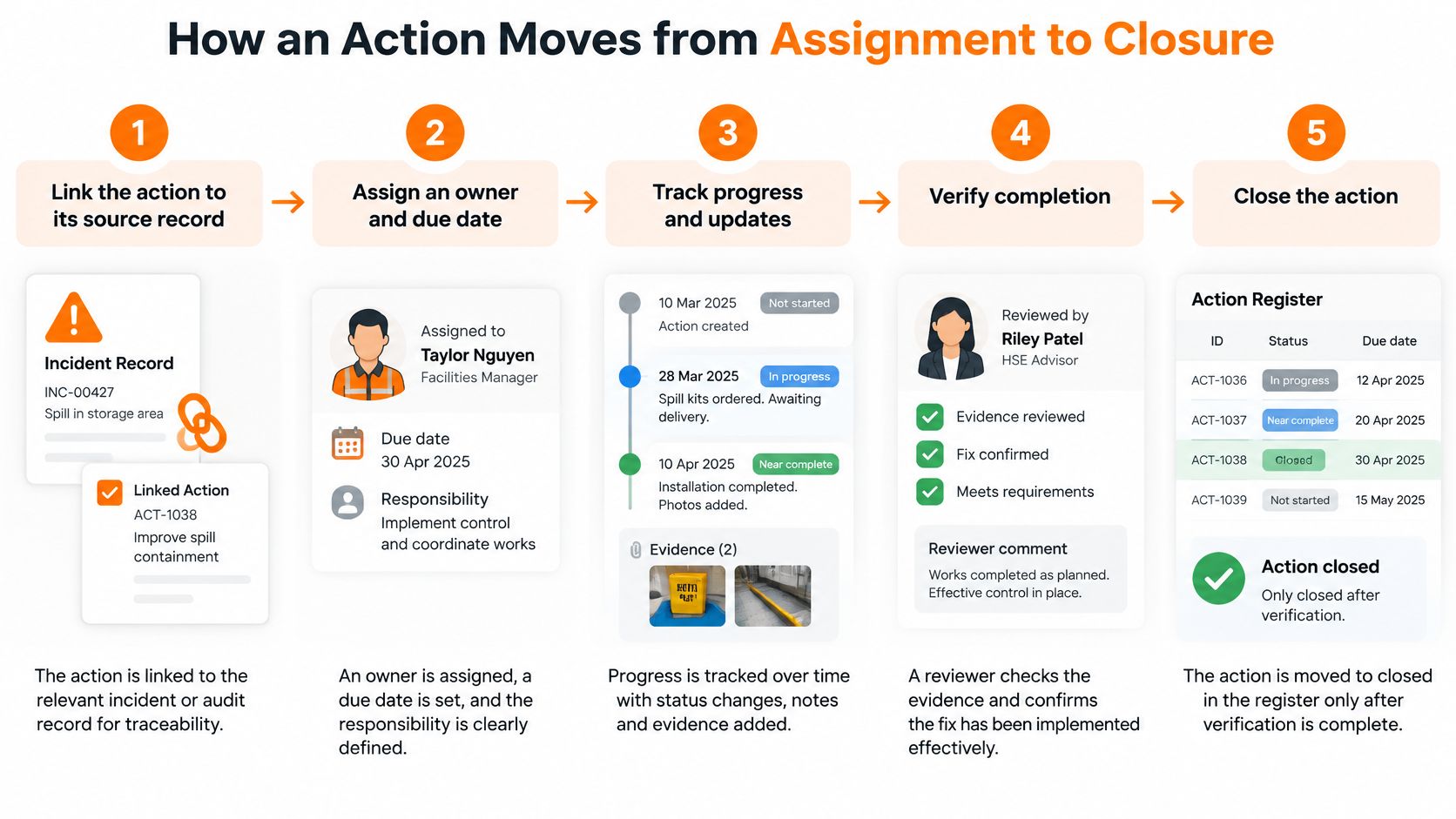
Build the traceable workflow
Link the source record. Connect the action to the incident, hazard, inspection or audit, including the location and relevant causal factor. Where an inspection response requires follow-up, submission should depend on raising the action rather than leaving it for later.
Name the owner and deadline. Assign a person with authority to arrange the work, not merely someone who can update the register. If procurement or a shutdown is needed, record those dependencies and nominate interim controls.
Record priority and control type. Assess elimination and engineering options before defaulting to administrative measures such as retraining. A training action needs an identified competency gap; it shouldn't replace fixing a defective guard or an unsafe layout.
Notify and escalate. Send the assignment immediately and route approaching deadlines to someone able to remove the obstacle. The practical benefits of workflow automation depend on clear recipients and triggers, not a large volume of reminder emails.
Record implementation. The owner adds a note and relevant evidence, then reports the work complete. The note should identify what changed and where, while photographs, test records or revised documents support the claim.
Verify before final closure. An authorised reviewer checks whether the selected control reduced the identified risk under operating conditions. Where the effect needs observation over time, retain an awaiting-verification state rather than accepting installation as sufficient proof.
Monitor for recurrence. Link repeat findings to the earlier action and re-open the review when the same failure returns. Preserve the previous decision so the investigation can establish whether the control failed, deteriorated or was never suitable.
Test the hand-offs in software
Run steps 1 to 6 on a real action in Safety Space. Its Action required setting prevents submission until an action is raised; raising an action immediately emails the responsible person and anyone listed under Settings → Action notifications. Its completion process requires a note and allows optional photos before the user marks the action complete, so the assessment should separately establish how the organisation will authorise effectiveness verification.
For remedial work involving trades, purchasing and shutdown dependencies, KeenVerdict's resource to find project planning software can support the broader planning assessment. Keep the safety acceptance decision in the action record, even when delivery tasks sit in a project schedule.
Deadlines, Escalation and Statutory Records
Under the model WHS Act, a PCBU must notify the regulator immediately after becoming aware of a notifiable incident and retain the record for at least five years from notification. The register should therefore capture incident time, notification time, notification method, regulator reference and the notification date that starts the retention period.
Model provisions aren't a substitute for checking the law that applies to the workplace. The responsible officer needs a jurisdiction-specific notification procedure, including who makes the call when the usual contact is unavailable.
Keep legal deadlines separate
An internal due date cannot replace immediate regulator notification. A reminder scheduled for tomorrow is irrelevant when notification is required now. Instant safety alerts can support the response, but an alert to staff isn't evidence that the regulator was notified.
ACT regulatory guidance on notices explains that notices identify the breached requirement and prescribe a compliance period. Record the deadline stated in the notice, the responsible person and the evidence needed to demonstrate compliance, rather than applying a standard internal turnaround.
The register should distinguish:
- Statutory notification: The event, notification decision, communication and regulator reference.
- Notice compliance: The notice, prescribed deadline, remedial work and supporting evidence.
- Internal action deadlines: The organisation's target dates, warning recipients and escalation history.
- Retention controls: The record category, retention trigger, storage location and protection against premature deletion.
Make escalation useful
Warnings need to reach a person who can act. Escalating a delayed engineering change repeatedly to the maintenance coordinator won't resolve a purchasing approval held by operations.
Preserve due-date changes in the audit trail, including the reason and approver. Moving a date should never erase the fact that an earlier commitment was missed.
An escalation should identify the blocked decision, not simply announce that an action is late.
For wider governance requirements, TopToolAdvisor's software shortlists for compliance teams can help frame a separate assessment of compliance administration. The action register must still preserve the evidence specific to the workplace.
For New Zealand operations, reporting procedures need to reflect the Health and Safety at Work Act 2015 and WorkSafe NZ guidance, including the term notifiable event rather than importing Australian classifications unchanged.
Set a warning window for the most important deadlines, nominate its recipient and test that the alert arrives.
Proving a Control Actually Worked
A closed action is a claim. The register needs evidence that supports it. A lower overdue count might mean faster implementation, but it might also mean premature closure or actions defined so loosely that almost anything counts as completion.
Safe Work Australia's workplace safety data release reported 188 workplace fatalities in 2024, with vehicle incidents accounting for 42% of deaths. Those figures provide context for serious control failures; they don't establish whether a particular traffic-management action worked.
Action statuses a dashboard should separate
| Status | What it means | What to check |
|---|---|---|
| Open | Raised and not yet completed | Owner, due date and escalation rule are set |
| Overdue | Past its due date and not completed | Escalation has been sent and the reason is recorded |
| Awaiting verification | Owner has marked it complete but the effect is not yet checked | Evidence is attached and a reviewer is named |
| Verified | Reviewer has confirmed the control worked | Verification date and reviewer are on record |
| Re-opened | The same hazard or incident recurred after closure | Root cause is reviewed and a new action is linked |
Check the effect under working conditions
Schedule verification when the control has had a meaningful opportunity to operate. A newly installed barrier can be inspected immediately, but its suitability during deliveries may need observation while vehicles and pedestrians are moving through the area.
Record who checked, what conditions they observed and what evidence supports the decision. A photograph establishes the barrier's presence. Worker consultation can reveal whether people bypass it, while an observed task or competency check can test whether a revised method is understood and usable.
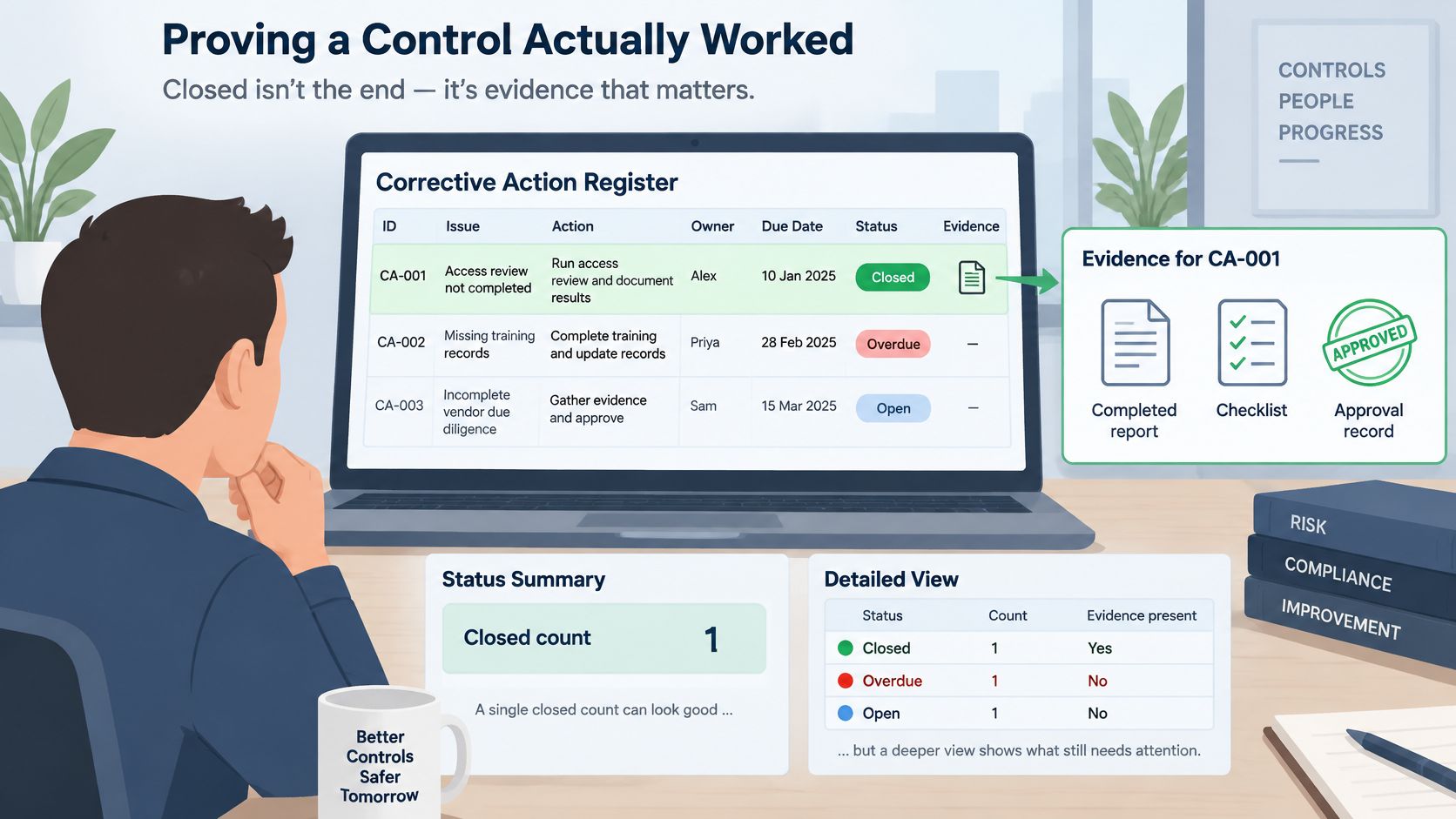
Report progress towards effective control
Leading indicators include repeat findings, time to effective control, verification completion and recurrence by site or contractor. Define each measure clearly. Time to effective control should end when the risk reduction is accepted, not when the owner uploads a photograph.
Injuries and compensation claims are lagging indicators. They provide context, but an absence of injury isn't a quick or reliable test of an individual corrective action.
The dashboard's open-actions-per-form view helps the WHS officer identify which inspection form generates the most unresolved work. Interpretation still matters: a frequently used inspection form may naturally generate more actions than a rarely used specialist audit.
Leadership reporting should use a small set of leading indicators with clear definitions. Select three for monthly review, assign responsibility for checking their accuracy and include the decisions needed to resolve persistent failures.
Examples Across Construction, Manufacturing and Cleaning
Construction and residential building
Consider a worker nearly falling from an unguarded edge on a second-storey frame. The source is the near-miss report linked to the task's SWMS, and the owner is the carpentry subcontractor supervisor. The control is suitable edge protection installed before work resumes; the check includes an installation inspection, photographs and crew sign-on at the next shift, with sign-on confirming communication rather than structural adequacy.
The model WHS Regulations require the relevant SWMS or high-risk construction work statement to be retained for two years when a notifiable incident occurs in connection with the work. Keep that document linked to the incident, investigation and action, alongside relevant sign-on records. Its retention requirement is separate from the notifiable-incident record.
Manufacturing
Suppose operators bypass a press guard to clear recurring jams. The source includes the hazard report, machine identification and investigation into the jams; a named maintenance lead owns the engineering action. The control must address safe access and the reason intervention is repeatedly needed, not merely instruct operators to stop bypassing the guard.
For this scenario, schedule a follow-up after a fortnight of normal production, with a competent person checking the interlock through the approved test procedure. The verification should also establish whether jams continue and whether operators can clear them safely without defeating protection.
Cleaning and facilities services
A cleaner is splashed while preparing a diluted chemical. Link the source report to the SDS, product and dilution station, then assign the action to the facilities supervisor responsible for that equipment. Assess the dispensing arrangement, connection condition and splash exposure before recording retraining as a secondary measure.
The check should include observation of actual preparation, confirmation that the equipment works and consultation with workers across relevant shifts. A training attendance record alone won't establish that the dispensing fault has been corrected.
Waste services
A reversing vehicle narrowly misses pedestrians at a transfer station. The source is the near-miss report and site traffic assessment; the control may require changed pedestrian routes, physical separation and revised vehicle movements.
If the same arrangement exists at another site, create linked actions with separate named owners. Each site needs its own verification during representative vehicle movements. Closing a company-wide traffic-plan action must not conceal an unfinished local change.
Confirm These Points Before You Sign
The purchase decision also needs answers about administration, records and rollout. A successful demonstration doesn't establish that the organisation can maintain the system after the initial setup.
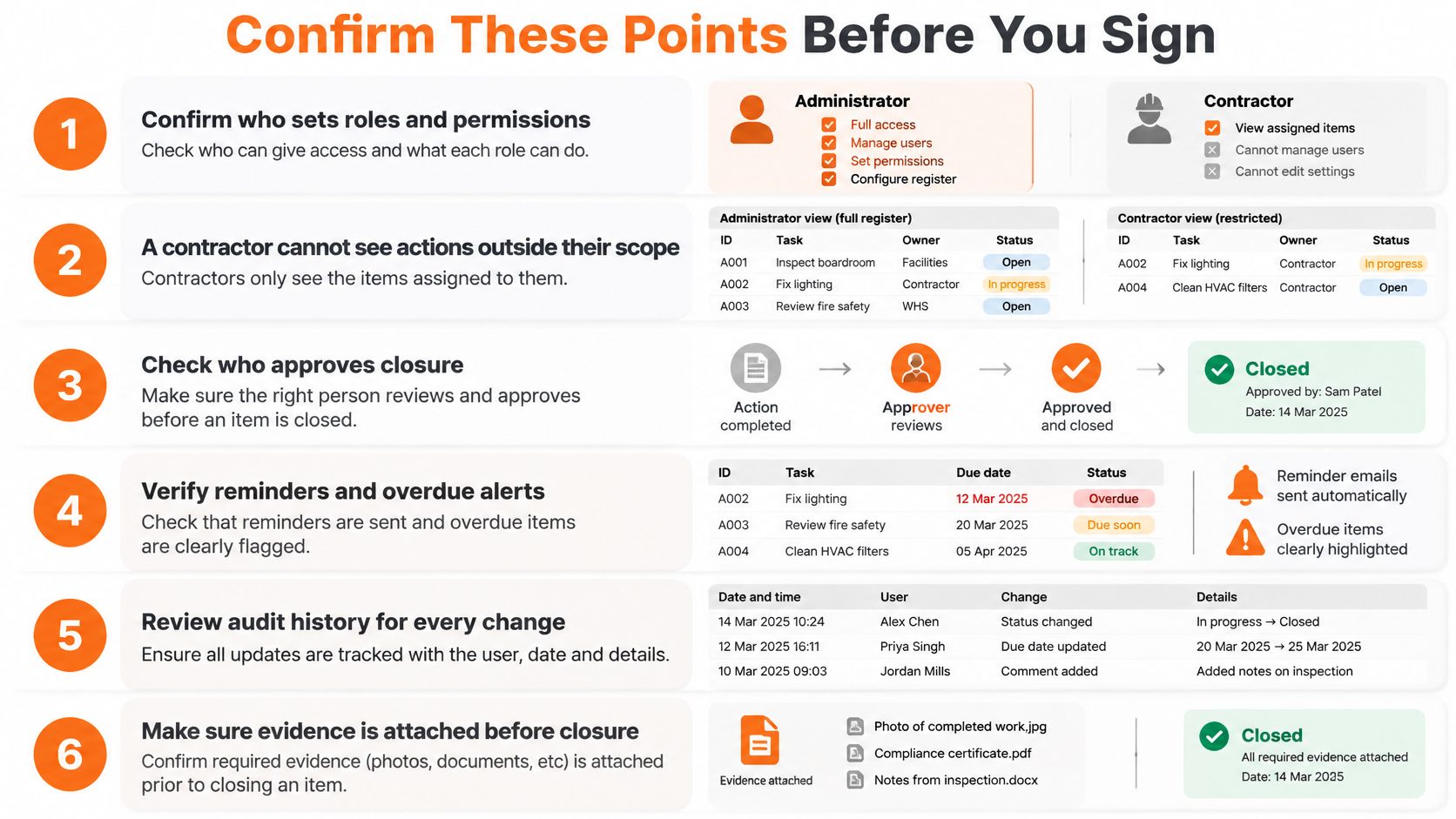
Close the implementation gaps
- Allocate administration: Name who sets roles and permissions, approves access changes and removes departing users.
- Restrict contractor visibility: Confirm contractors cannot access actions outside their assigned scope.
- Protect retained records: Configure record-specific retention controls and prevent routine housekeeping from deleting protected material.
- Confirm export contents: Include action history, verification decisions and attachments in a usable package for an inspector.
- Preserve later changes: Log who changes a closed action, when the change occurs and what the previous entry contained.
- Approve the scoring sheet: Obtain agreement from site supervisors, the WHS officer and operations, with no core capability marked as a miss.
Inspections can trigger mandatory corrective actions based on responses. During setup, select the failed responses that need this rule rather than making every observation generate unnecessary work.
Rollout test: A pilot should demonstrate better control of real work, not just successful account creation.
Run a four-week pilot at a single site before wider rollout. Record ownerless actions, overdue actions and unsupported closures at the start and finish. If those counts don't fall, investigate the process first, including authority, action quality and follow-through, rather than assuming another tool will solve the problem.
Safety Space tracks incidents, manages corrective actions and sends instant alerts when safety issues arise. Visit Safety Space to arrange a walkthrough using a real inspection finding, then test assignment, completion evidence and the verification process needed before accepting closure.
Ready to Transform Your Safety Management?
Discover how Safety Space can help you implement the strategies discussed in this article.
Explore Safety Space FeaturesRelated Topics
Safety Space Features
Explore all the AI-powered features that make Safety Space the complete workplace safety solution.
Articles & Resources
Explore our complete collection of workplace safety articles, tools, and resources.