
A crew is ready to start, the scaffold is up, and the supervisor is holding a permit that says "Level 3, harness, one week". The form is signed. It doesn't name the edge, the anchor, the rescue method or the point at which work stops. That's the gap a permit to work at height form has to close.
Treat the permit as field evidence, not approval paperwork. Each field should record something a second person can walk to, look at and check before anyone leaves the ground.
Table of Contents
- Thresholds, SWMS Links and Jurisdiction Differences
- Required Fields and the Order to Complete Them
- Approval Workflow from Issue to Close-out
- Checking a Roof-Edge Permit Entry
- Common Pitfalls and a Monthly Permit Audit
Thresholds, SWMS Links and Jurisdiction Differences
The trigger sets the controls, so the permit has to name the trigger first. Under the model Work Health and Safety Regulations 2011, a person conducting a business or undertaking (PCBU) must manage risks associated with a fall from one level to another when the fall is reasonably likely to cause injury, as WorkSafe Queensland guidance on work at heights sets out. The same guidance gives Queensland thresholds of above 3 metres in housing construction, above 2 metres in other construction work, and roof work where the roof slope exceeds 26 degrees.
Administrative controls alone aren't sufficient where a fall could occur. A toolbox talk and a signature don't stop a fall. The permit must point to physical controls that are already in place.
For window cleaning and similar access work, the same logic applies at the training level. Supervisors checking competency records can use what window cleaner safety training covers as a reference for the subjects training should address before a worker is named on the permit.
Fall Triggers and What the Permit Must Check, by Jurisdiction
| Jurisdiction or rule | Trigger | What the permit must check |
|---|---|---|
| Australia, model WHS Regulations | Fall reasonably likely to cause injury; SWMS for construction with a fall risk over 2 m | SWMS exists, covers the task, and was reviewed before authorisation |
| Queensland, housing construction | Fall-prevention requirements above 3 m | Named fall-prevention controls in place |
| Queensland, other construction | Fall-prevention requirements above 2 m | SWMS and fall controls confirmed |
| Queensland, roof work | Roof slope over 26 degrees | Roof work controls recorded |
| Some other Australian jurisdictions | 3 m threshold | Local state or territory rule confirmed before issue |
| NSW, Regulation 78 | Elevated workplaces, openings, edges and surfaces where a person could fall | Reason ground-level or solid-construction work was not practicable |
| New Zealand, HSWA 2015 | No minimum height; any fall risk must be managed | Jurisdiction, site risk assessment, barrier or restraint decision |
| New Zealand, WorkSafe NZ guidance | Barriers or fall restraint for falls over 1 m; arrest free-fall under 2 m | Fall-arrest clearance calculation |
Confirm the state or territory rule before issue, because variations apply. NSW Regulation 78 in the Work Health and Safety Regulation 2017 requires work on the ground or on a solid construction where reasonably practicable, so the permit should record why that wasn't possible. In New Zealand, WorkSafe NZ guidance on working safely at height states there's no minimum height threshold, recommends physical barriers or a fall-restraint system for falls greater than 1 metre, and says free-fall distance should be less than 2 metres.
Practical rule: A permit never replaces a SWMS. It confirms the SWMS exists, covers the task and was reviewed before authorisation.
Link the permit to the current document through the SWMS for working at heights so the issuer checks the right revision, not a generic one from a previous job.
Required Fields and the Order to Complete Them
A blank field means nobody checked that item. In Australia, construction work involving a risk that a person could fall more than 2 metres is high-risk construction work and a PCBU must prepare a safe work method statement (SWMS), or ensure one has been prepared, before work starts, as Safe Work Australia's construction guidance on working at heights confirms. That threshold applies to the risk of falling, not to platform height alone, and some jurisdictions use 3 metres.
Required Fields and What Each One Must Prove
| Field | What to record | Why it matters |
|---|---|---|
| Work activity and boundaries | Exact task, start point, end point and expected duration | Stops the permit covering work the SWMS does not address |
| Location and edge | Building, level, and the specific edge, opening or fragile surface | Generic entries such as Level 3 hide the real fall exposure |
| Working height and fall distance | Work height, plus free-fall distance if a restraint or arrest system is used | Sets the applicable threshold and the rescue plan |
| SWMS reference | Document number and current revision | Confirms the SWMS covers this task and location |
| Hierarchy decision | Why ground-level or solid-construction work was not reasonably practicable | Shows prevention was considered before PPE |
| Controls selected | Barriers, scaffold, elevating work platform, work-positioning or fall-arrest, with control reference | Makes the control auditable |
| Equipment inspection | Item, inspector, date and check reference for ladders, scaffolds, platforms, harnesses and anchors | Confirms pre-use checks happened |
| Competency | Name and training or licence evidence for each worker at height | Confirms only competent people work at height |
| Exclusion zone | Area below the work, and how access is blocked | Protects people below |
| Weather and conditions | Wind, rain, surface condition, light and time checked | Sets stop-work triggers |
| Rescue method | Named method, equipment, responsible person and retrieval time | Rescue cannot rely on emergency services alone |
| Simultaneous work | Other trades, mobile plant and nearby electrical services | Catches interaction risks |
| Issuer and acceptor | Name of the permit issuer and the worker or supervisor who accepts | Assigns accountability |
| Validity | Start time, expiry time, or shift and task limit | Stops open-ended permits |
| Suspension triggers | Conditions that stop work and require reissue | Prompts action when conditions change |
| Close-out | Completion inspection, hand-back signature and logged defects | Creates the record the permit exists to produce |
Complete the Permit in Site Order
Safe Work Australia's working at heights safety topic states PCBUs must eliminate or minimise height-fall risks and provide safe entry and exit. The permit order should follow that logic, from elimination down to arrest, not the other way round.
- Define the work: Record the location, task boundaries, duration and responsible PCBU, naming the exact edge, opening or fragile surface. Common slip: building and level only.
- Identify hazards: Note fragile surfaces, penetrations, falling objects, weather, electrical services and simultaneous work. Walk the access route, not just the work position.
- Record the hierarchy decision: Ground-level or solid-construction work comes first, with a written reason if it isn't reasonably practicable. Common slip: PPE listed before prevention.
- Specify engineered controls: Name the barriers, scaffolding or elevating work platform, with a reference another person can find, such as a scaffold tag number or platform ID.
- Step down only with a reason: Use work-positioning systems only where prevention isn't practicable. Reserve safety nets or catch platforms as the lower-order option.
- Verify equipment and rescue: A competent person checks equipment, anchor points, access and rescue arrangements, including a named rescue method. Common slip: a rescue plan that relies on emergency services.
- Confirm the SWMS: Check the current revision covers this task and location and that workers were consulted. Common slip: a SWMS written for another task.
- Set validity, then sign: The issuer and accepting worker sign after the site walk, with a start and expiry time. Common slip: signing before the site walk.
- Close out: Complete the inspection, hand back the area and log defects, including damaged anchors or barrier sections removed during the job.
A permit issuer who hasn't seen the edge can't verify the control. The signature follows the walk, never the other way round.
Each field should be completable on site in about five minutes. If a field can't be filled in at the work face, it's asking for the wrong record.
Approval Workflow from Issue to Close-out
A SWMS must identify the high-risk construction work, specify hazards and risks, describe control measures, and explain how controls will be implemented, monitored and reviewed, as Safe Work Australia's SWMS information sheet sets out. One SWMS may cover several high-risk activities, so the permit links approval to the current SWMS revision and gets reissued if that revision changes.
The workflow below shows each stage with its owner and hold point.
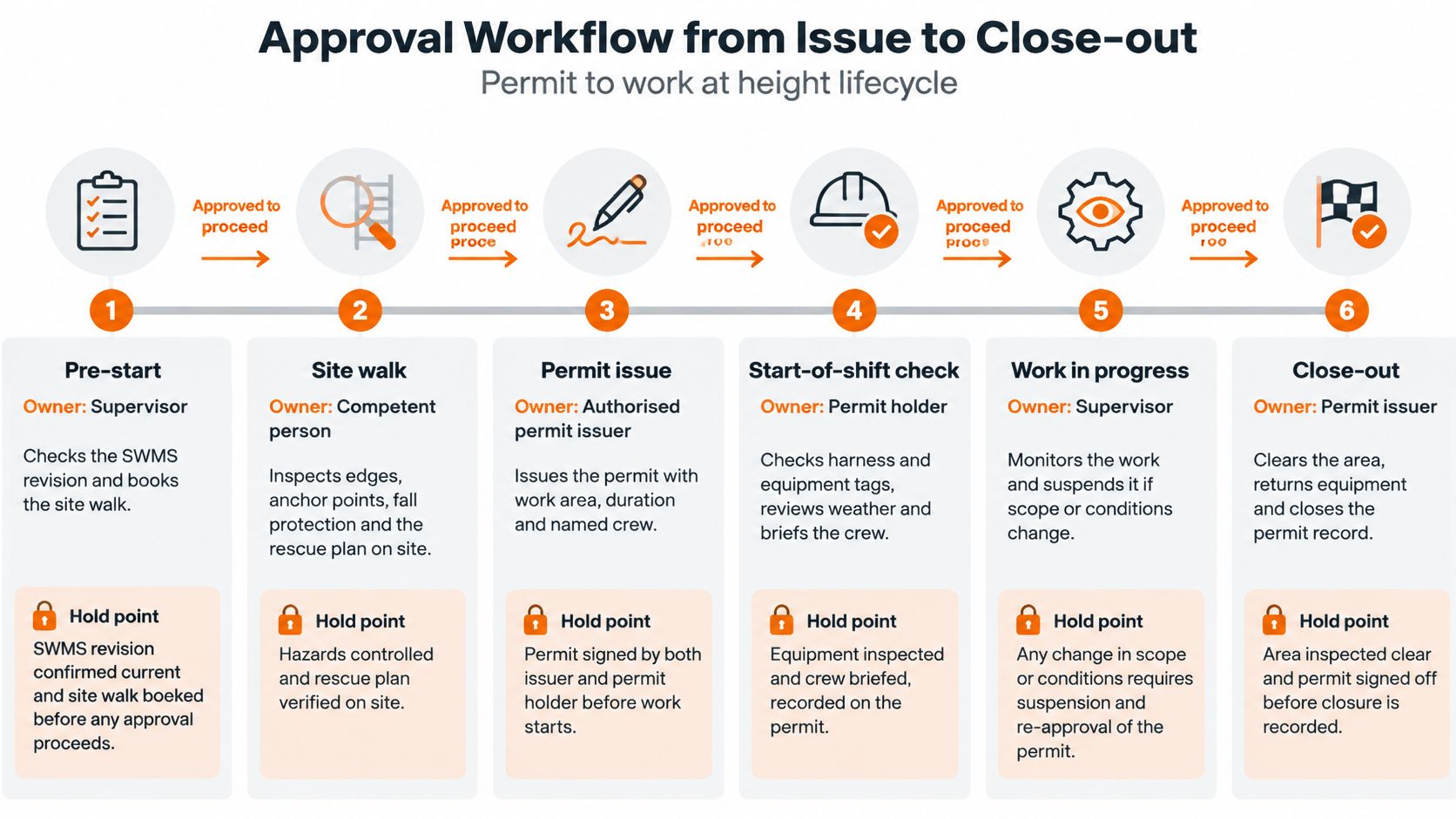
Seven Stages, Seven Hold Points
- Pre-start, supervisor: Checks the SWMS revision and books the site walk. Work stops here if the SWMS doesn't cover this task or location.
- Issue, permit issuer: Signs only after mandatory controls, competency evidence, rescue planning and the weather check are complete. Any gap blocks issue.
- Shift start, supervisor: Re-verifies the edge, equipment and conditions. The crew signs on after being briefed on suspension triggers.
- Change control, supervisor: Any change in location, crew, method or conditions suspends the permit and requires reauthorisation.
- Suspension, any worker: Wind, rain, a damaged anchor or a breached exclusion zone stops work immediately.
- Expiry, permit issuer: The permit ends at its stated time. It can't be reused the next day without fresh checks.
- Close-out, permit issuer: Completion inspection, hand-back signature and defect log close the record.
Where site procedure requires a second signature for high-risk work, name that role at the issue stage rather than adding it afterward. Teams running permits in Safety Space can set the issue and close-out hold points in the permit to work workflow, using its permits to work with approvals so a permit can't move forward with mandatory fields empty. Current features should be checked before a procedure relies on them.
Checking a Roof-Edge Permit Entry
Say a crew is repairing a roof edge on a commercial building. The permit entries below show the difference between words that fill a box and words that describe a check.
- Location: "Roof" becomes "north roof edge, section beside the plant room, marked on the attached sketch". The second version sends a checker to one place.
- Hierarchy: "Harness" becomes "ground-level access not practicable because the repair sits at the roof edge; elevating work platform assessed and rejected because the access route is blocked; edge barrier installed before work starts". Homeowners reading about roof edge protection for Columbus homes will recognise the same principle in a residential setting, edge protection first, personal equipment second.
- Rescue: "Call emergency services" becomes "rescue by trained crew member using the anchor-point retrieval kit held at the access point, with retrieval time recorded on the permit".
- Validity: "One week" becomes "shift from start to finish, this task only, no reuse next day".
- Suspension: "Bad weather" becomes "stop if wind or rain makes the edge or access unsafe, as judged by the supervisor, with reissue required".
- Close-out: A blank box becomes "hand-back inspection signed, barrier check logged, defect list attached".
The pattern is the same across every field. The passing entry names something a second person can go and check. The weak entry names a category. Categories don't hold up when a regulator, client or coroner asks what was in place at a specific time.
If a checker can't find it, measure it or see it from the entry alone, the entry isn't finished.
Common Pitfalls and a Monthly Permit Audit
Most permit failures look compliant on paper. The form is complete, the signature is there, and none of it describes the actual edge, the day's conditions or the rescue plan. According to Safe Work Australia's Key WHS Statistics Australia 2025, falls from height killed 24 workers in 2024, representing 13% of all traumatic workplace fatalities, and 29 workers in 2023, a figure 32% above the 2019 to 2023 five-year average of 22, with 45% of those deaths in construction.
Permit Failures, What They Look Like and the Fix
| Pitfall | What it looks like | Fix |
|---|---|---|
| Generic location | Level 3, north side | Name the specific edge, opening or surface, with a sketch or photo |
| Copied forward from a previous shift | Identical wording to the prior day's permit, including its weather, dated conditions or crew names | Rewrite each field against today's walk and check dates and named workers before issue |
| PPE before prevention | Harness is the only control listed | Record the hierarchy decision before any PPE entry |
| Missing rescue logistics | Rescue listed as call emergency services | Name the method, equipment, responsible person and retrieval time |
| No close-out record | Permit closed by default at end of shift | Require a hand-back signature and a defect log |
| SWMS mismatch | Permit cites a SWMS written for a different task | Check the task and revision match before issue |
| Signature without verification | Issuer signs before the site walk | Require competent-person checks recorded before signing |
The copied-forward permit is the hardest failure to catch from the desk, because every field is filled in. The giveaway is an entry describing conditions the writer never saw: last shift's weather, access notes that predate new plant on the roof, or a surface condition that no longer holds. Guidance on how to check your roof safely after storms makes the same point for post-storm inspections. A surface that was sound on Monday may be damaged or slippery by Wednesday, and an entry that doesn't reflect that is recycling an old check rather than recording a new one.
A signature is not verification. A verified entry is one a second person could physically confirm that morning.
Audit the Last 10 Permits
Pull the last 10 height permits, including closed and expired ones, and work through the permit to work audit checklist against each one.
- Specific exposure named: Each permit names a specific edge, opening or fragile surface.
- SWMS match: The SWMS reference and revision match the task.
- Hierarchy recorded: The decision is written down, with a reason where ground-level work wasn't practicable.
- Inspections evidenced: Ladders, scaffolds, platforms, harnesses and anchors have dated, signed inspections.
- Competency evidenced: Every named worker has training or licence evidence on file.
- Rescue named: Each permit names a rescue method and equipment.
- No expired permits active: No permit remains open past its expiry time.
- Triggers briefed: Suspension triggers were reviewed with the crew at shift start.
- Close-out complete: Each closed permit has a completion inspection and defect log.
Track 100% completion of critical fields, zero expired permits left active, 100% supervisor verification evidence, and corrective actions closed within a set period. A permit failing three or more checks goes back to the supervisor for reissue, and the failure pattern goes into toolbox talks. Where the same field fails across multiple permits, such as generic locations or missing rescue times, treat it as a form problem and tighten the template rather than blaming individuals. For NZ sites, add the jurisdiction, the barrier or restraint decision and the fall-arrest clearance calculation.
Safety Space holds permits to work with approvals, SWMS with worker sign-on, training registers and equipment registers in one system, so the hold points, expiry times and close-out records described here sit against the site they belong to. Book a free H&S consultation or visit Safety Space to see how the permit workflow handles issue, suspension and close-out for height work.
Ready to Transform Your Safety Management?
Discover how Safety Space can help you implement the strategies discussed in this article.
Explore Safety Space FeaturesRelated Topics
Safety Space Features
Explore all the AI-powered features that make Safety Space the complete workplace safety solution.
Articles & Resources
Explore our complete collection of workplace safety articles, tools, and resources.