Most safety inspection reports are built to prove an inspection happened. The ones that hold up when a regulator, an officer or a new site manager reads them are built to prove a hazard was controlled. Those are different documents, and the gap between them sits in a handful of fields that most templates leave out.
Treat the report as a control record, not a checklist. Every finding on it should trace to a control, a named owner, and evidence that the control worked once it was in place. Break any link in that chain and what you're holding is a written admission that the business knew about a problem and never confirmed it was fixed.
Table of Contents
- What a Safety Inspection Report Covers
- Required Fields Every Report Needs
- How to Record a Finding Step by Step
- Recording Worker Consultation and Input
- Closing Actions, Verifying Controls and Measuring Results
- When a Finding Must Be Escalated or Notified
- Keeping Reports Ready for a Regulator
- Check Your Report Before Sign-Off
What a Safety Inspection Report Covers
A safety inspection report is the dated, attributable record of what was observed in a workplace, the risk it posed, the control required, the person who owns the fix and the date that fix was closed out.
Why the record matters is visible in the national data. Safe Work Australia reported that 200 workers were fatally injured at work in 2023, up from 195 in 2022, a national rate of about 1.4 deaths per 100,000 workers (Safe Work Australia). That figure does two jobs. It shows serious harm remains a measurable risk in Australian workplaces, and it gives a manager a benchmark for asking whether inspections are aimed at the high-risk work, plant, vehicles and construction activities where harm happens, rather than at housekeeping.
Three records get confused with each other. An incident report describes harm after it occurred. A checklist records that somebody walked the site. The inspection report is the only one that can show a hazard was identified and controlled before anyone was hurt.
WHS laws are made and enforced by each state and territory, while national statistics are compiled across all of them. That split matters commercially: a business running sites in three jurisdictions gets comparable internal data only if the report fields are identical everywhere it operates.
The report serves two duty holders directly. The PCBU uses it to show risks were identified and managed. Officers use it to show they checked the process was being followed. For businesses with crews spread across sites, the same discipline applies to what happens after an injury, and these incident response steps for distributed teams cover that sequence.
The practical test: hand an existing report to a manager who has never visited that site. If they can't see the hazard, the control and the current status without phoning the inspector, the report isn't finished.
Required Fields Every Report Needs
The table below is the minimum field set for any inspection form. Work down it once and the form is close to defensible.
| Field | What to record | Example entry |
|---|---|---|
| Date and time | Date of inspection and time of observation | 14 March, 09:40 |
| Location or asset | Exact site, area, plant ID or vehicle | Bay 3, pedestal grinder PG-04 |
| Inspector and attendees | Name and role of inspector and anyone present | Site supervisor and inspector |
| Workers consulted | Work group or contractor crew and who was spoken to | Concreting crew, Company B, two workers |
| Hazard observed | One sentence on what is wrong and who could be harmed | Guard removed; operator hands within reach of wheel |
| Evidence | Photo, measurement or reading, with timestamp | Timestamped photo of guard location |
| Existing controls | Controls in place at the time of inspection | Operator instruction on induction card only |
| Risk rating | Rating from the business risk matrix | High |
| Interim control | Immediate action taken and by whom | Machine isolated and locked out by site supervisor at 09:50 |
| Permanent corrective action | Engineering or administrative control selected | Fixed guard refitted and interlock tested |
| Owner | Named person responsible for the action | Maintenance lead |
| Target date | Completion date set by risk priority | Seven days from inspection |
| Closure evidence | Proof the action is complete | Photo of refitted guard and test record |
| Effectiveness review date | Date a second person checks the control works | Thirty days after closure |
A field earns its place only if somebody reads it when making a decision. "Comments" boxes that nobody queries, free-text fields that duplicate the hazard description, and tick boxes with no downstream consequence all add length without adding evidence.
The chain the fields create
Read the rows in order and they form one argument: here is the hazard, here is its risk rating, here is the control chosen, here is who owns it, here is proof it was done, and here is the date somebody independent confirmed it worked. Safe Work Australia's guidance on WHS duties sets out that records should show the hazards identified, the risks assessed, the controls selected, the workers consulted, the responsible person and the due date (Safe Work Australia). A report with a defect description and a tick can't demonstrate any of that process.
For a small business, the first eight rows are the working minimum. The remaining rows start earning their keep the moment an action crosses a departmental boundary, because that's when ownership, due dates and verification stop being obvious.
How to Record a Finding Step by Step
The decisions happen in a fixed order, and skipping or reordering them is what breaks reports. If you're rebuilding a form, the workplace inspection checklist gives you a sensible field set to start from.
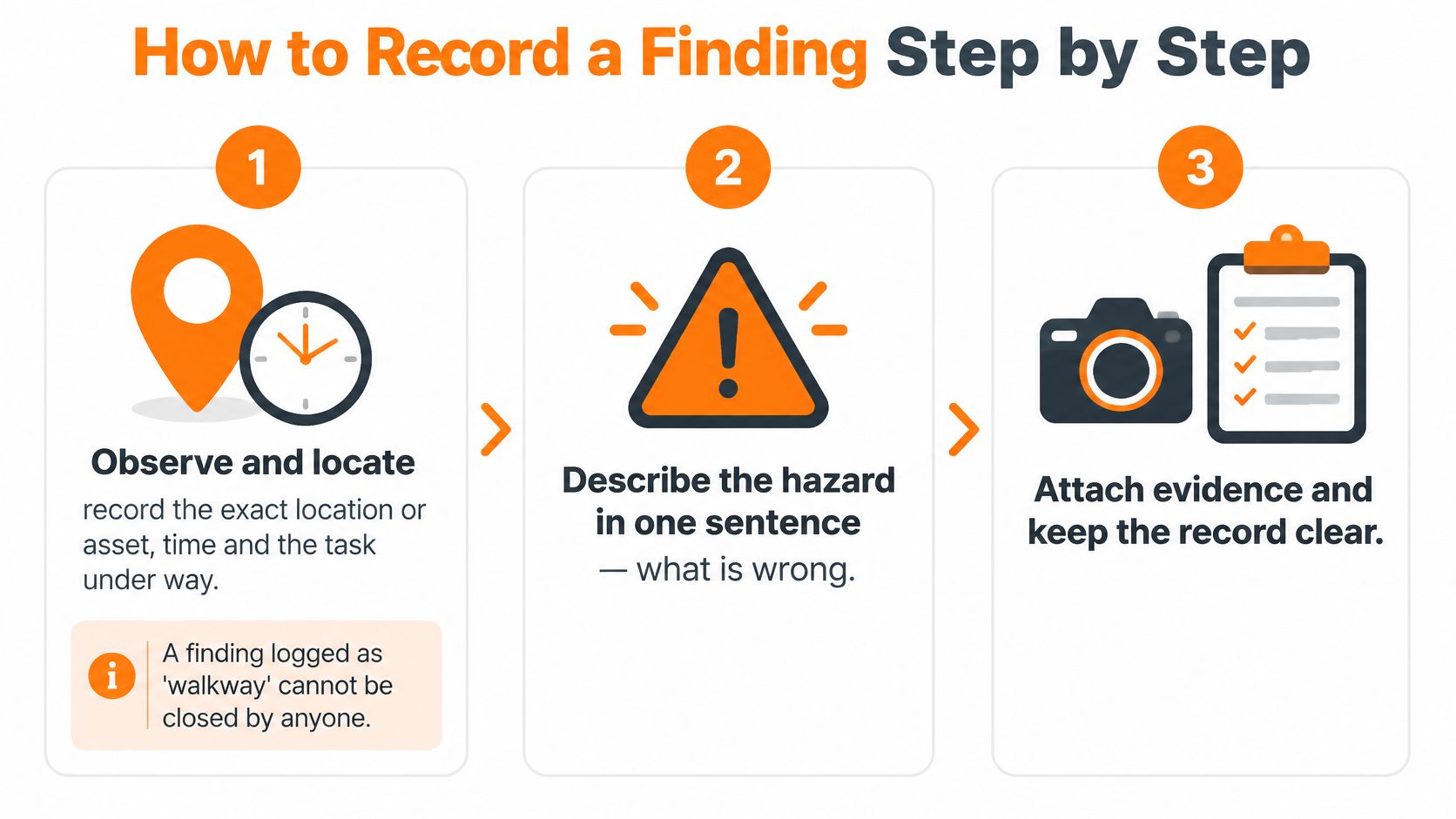
- Decide whether it's a finding or a fix on the spot. If the hazard can be corrected in front of you, correct it and record it as resolved with the time noted. If it needs parts, a contractor or a shutdown, it becomes a finding and enters the sequence below. Mixing the two inflates open-action lists and hides what is still live.
- Locate it so a stranger could find it again. Exact area, plant ID or vehicle, time, task under way. The test is whether a second inspector, arriving cold in three months, can re-inspect the same condition. A finding logged as "walkway" fails that test before any other field is filled.
- Commit to one sentence for the hazard. What is wrong and who could be hurt. One sentence forces the inspector to name the person at risk, which is the detail that later justifies the risk rating. The common slip is a paragraph of description that never says who was exposed.
- Capture evidence in the same motion. Photo taken, measurement recorded, instrument reading noted, all before the inspector walks away. Evidence gathered the next day describes a different site, because housekeeping happens and conditions drift.
- Judge what has to happen before anyone leaves the area. This is the interim-control decision, and it comes before rating precision matters. Barricade, isolate, lock out or stop the task, and record who acted and when. Skipping this on a high-risk finding is the most common failure in the sequence, because the report then shows a known serious risk left running for a week.
- Rate the risk against the business matrix, not by feel. Then let the rating set the due date, so a high finding doesn't inherit the same two-week default as a housekeeping item. Ratings with no matrix reference are the first thing an auditor tests.
- Choose the permanent control by working down the hierarchy. Elimination first, then substitution, isolation, engineering, administrative controls, PPE last. The decision isn't which control is fastest. It's which one you can defend to an inspector who reads a PPE-only fix as a decision to manage the risk on the worker rather than on the plant.
- Name the owner and diarise the verification in the same sitting. One person, not a department, and the re-check goes in the calendar before the finding is filed. A control nobody verifies is an assumption, and deferring the verification date to "later" is how assumptions survive in the system.
The steps exist to create an auditable cause and effect trail. The model Code of Practice for managing WHS risks is explicit that records should show identified hazards, assessed risks, selected controls, and how those controls were implemented, monitored and reviewed.
Where reports break down
The weakest entry in Australian inspection records is the one that says "corrective action completed" and nothing else. It names no control, describes no recurrence prevention, and teaches the business nothing. The same guidance recommends analysing inspection results alongside incidents, near misses and complaints, which only works if the finding text is specific enough to compare across months.
Once a finding is recorded this way, run it against the pre-sign-off checklist before closing the inspection. The checklist catches what the method misses on a bad day.
Recording Worker Consultation and Input
The most common failure in an otherwise tidy report is a complete form that misses what the crew already knew. Every box is ticked, the hazard is described accurately, and the control chosen is the one that will fail within a fortnight because the workers who have to live with it weren't asked.
Consultation isn't a courtesy step. PCBUs must consult workers and health and safety representatives on matters that directly affect them, so the report should show that consultation took place and what it changed. Safe Work Australia's analysis of fatality data makes the stakes plain: in 2024, 80% of Australia's 188 workplace fatalities occurred across six industries, including manufacturing and construction (Safe Work Australia). Those are the settings where the gap between what a safety team assumes and what a crew experiences is widest.
Six fields close it:
- Work group or contractor consulted. Name the crew and the company, not just "workers".
- Task conditions observed. What the work looked like at the time.
- Comment in the worker's own words. Paraphrase loses the detail that matters.
- What changed in the finding. The control you would have written before the conversation, and the one you wrote after.
- Agreed control and owner. Agreement recorded, not assumed.
- Disagreement and escalation route. Who resolved it, and how.
Say a labourer points out that the temporary fence gets shifted every shift so a trolley can get through. The finding changes from "fence damaged" to a design problem, and the agreed control becomes a fixed gate with a designated opening. That's a different corrective action, and only the worker could have supplied it.
Subcontractors deserve their own line. The main contractor usually holds the report, but the crew's view of the work belongs in it, attributed to the company that employs them.
Long forms don't fix this. A 40-field template that can't be completed on a scaffold gets filled in back at the site office from memory, which is where the worker's comment turns into "consulted, no issues". Short mobile entries that work offline, can be signed by the worker on the spot, and sync later produce better data than a form nobody finishes.
Closing Actions, Verifying Controls and Measuring Results
A finding stays open until somebody confirms the control works. Not until the action is marked done, and not until the photo is uploaded. Those are milestones on the way, not the finish line.
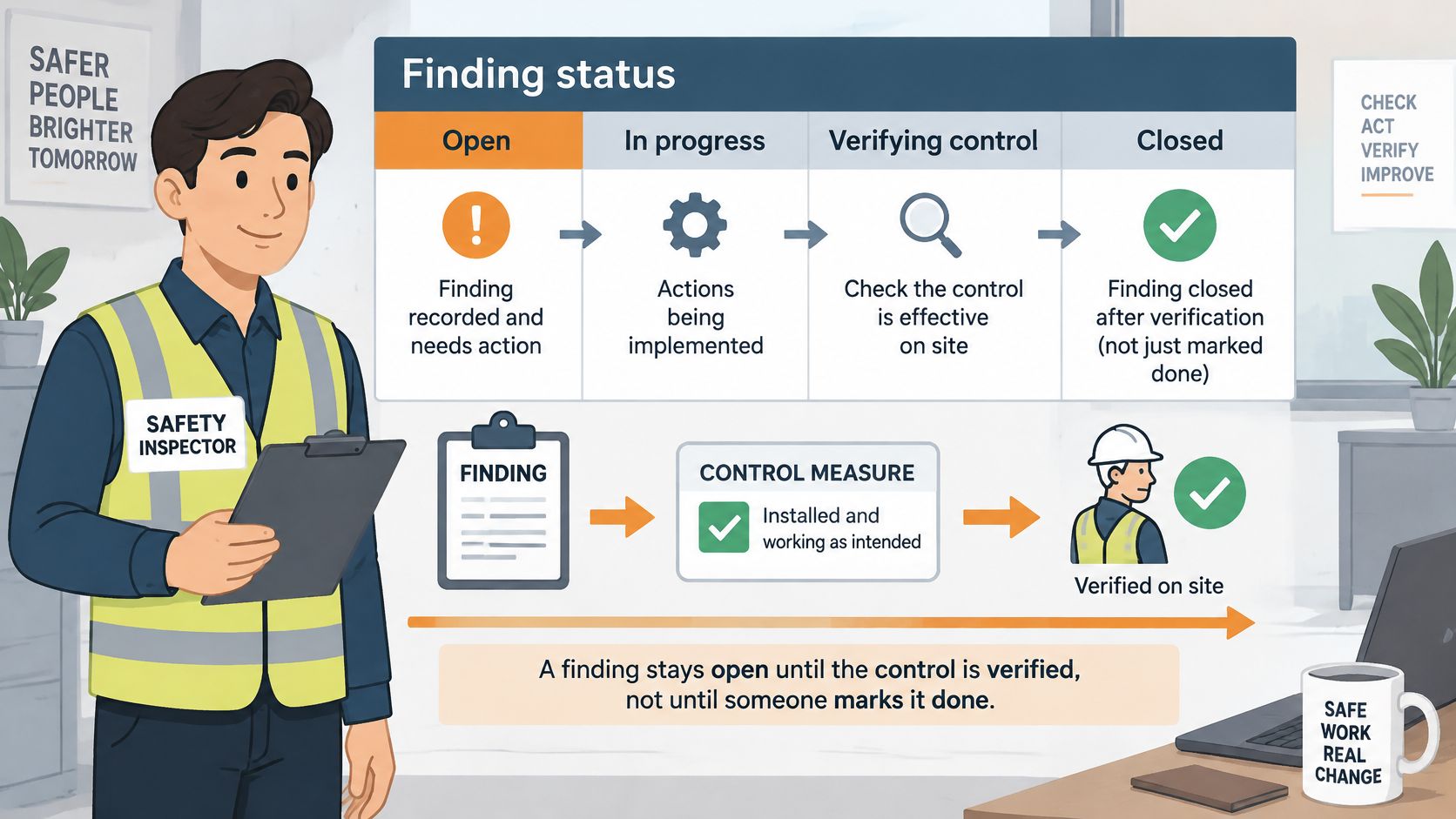
| Status | Meaning | Needed before next status |
|---|---|---|
| Open | Finding recorded, no permanent control yet | Owner, target date and interim control |
| Overdue | Target date passed without closure | Reason recorded and escalation to site manager |
| Closed pending verification | Control installed, not yet checked | Closure evidence such as photo or test record |
| Verified effective | Second person confirmed the control works | Verifier name, date and evidence |
| Closed without verification | Closed but effectiveness not yet checked | Verification date set; flag for review |
| Reopened | Same hazard found again after closure | Root cause review and new owner |
Verification means a re-inspection by someone other than the person who closed the action, carried out on or after the effectiveness review date. A guard refitted but never tested fails the first time the machine restarts, and the report will say the risk was controlled.
This is officer territory, not admin. Safe Work Australia sets out that officers must ensure the business has reporting processes for incidents, hazards and other WHS issues, and must check those processes are followed, with inspections and investigations named as records that can reveal problems needing correction (Safe Work Australia).
Measure outcomes, not inspection volume
Counting inspections tells you how busy the team is. It tells you nothing about whether risk is falling. The performance measures Safe Work Australia lists include the percentage of workplace inspections completed, the percentage of inspection recommendations completed, the number of open or overdue corrective actions, the percentage of corrective actions completed on schedule, and the effectiveness of corrective actions (Safe Work Australia).
Read those together and they diagnose the program. A high inspection completion rate sitting next to a low on-time closure rate means hazards are being found faster than they're being controlled, which is a resourcing problem, not a reporting problem. Repeated findings after closure point at weak verification, poor worker consultation or a control that was chosen for convenience.
I'd review monthly by site, plant and hazard class, and separate high-priority overdue actions from routine maintenance items so the two don't average each other out. Three overdue high-priority guarding actions at one site belongs on the safety committee agenda with a named owner, not in a dashboard nobody opens.
Software helps here only if the action lives in the same record as the finding. The corrective actions and tasks module in Safety Space keeps owner, due date, status and closure evidence attached to the inspection that raised them, which is what makes a corrective action register template work in practice rather than in theory.
The misleading metric: a falling count of open actions can mean faster closure. It can equally mean weaker issue capture or premature sign-off. Check the repeat-finding rate before you celebrate.
When a Finding Must Be Escalated or Notified
Some findings aren't corrective actions. They're notifications, and the decision happens while the inspector is still standing there.
- Classify at the point of recording. Decide whether the finding is a notifiable incident, a serious risk to a person's health or safety, or a routine corrective action.
- Record the decision, the time and the basis. Who decided, and why. This entry is what an inspector reads first.
- Notify immediately for a notifiable incident. The PCBU must phone the regulator and follow up in writing. Check your state or territory regulator's notification page, because the process differs by jurisdiction.
- Preserve the site where the finding involves a death, serious injury or illness, or a dangerous incident, until an inspector arrives or directs otherwise.
- Escalate high-priority findings the same day to the PCBU and officers, and record that they were informed.
- Log the regulator's response and any inspector direction in the report, linked to the original observation.
- Keep the escalation entry in the same record as the finding, so the trail from observation to notification is one document.
In New Zealand the same logic runs through the Health and Safety at Work Act 2015 and WorkSafe NZ's notification guidance at WorkSafe NZ. The forms differ. The reasoning doesn't.
Keeping Reports Ready for a Regulator
Assume the report will be requested. Safe Work Australia states that inspectors may visit workplaces to respond to incidents and reports, monitor compliance, investigate possible breaches and provide advice, and that an inspector may require a person to answer questions or provide relevant documents, and may copy, extract or retain documents (Safe Work Australia).
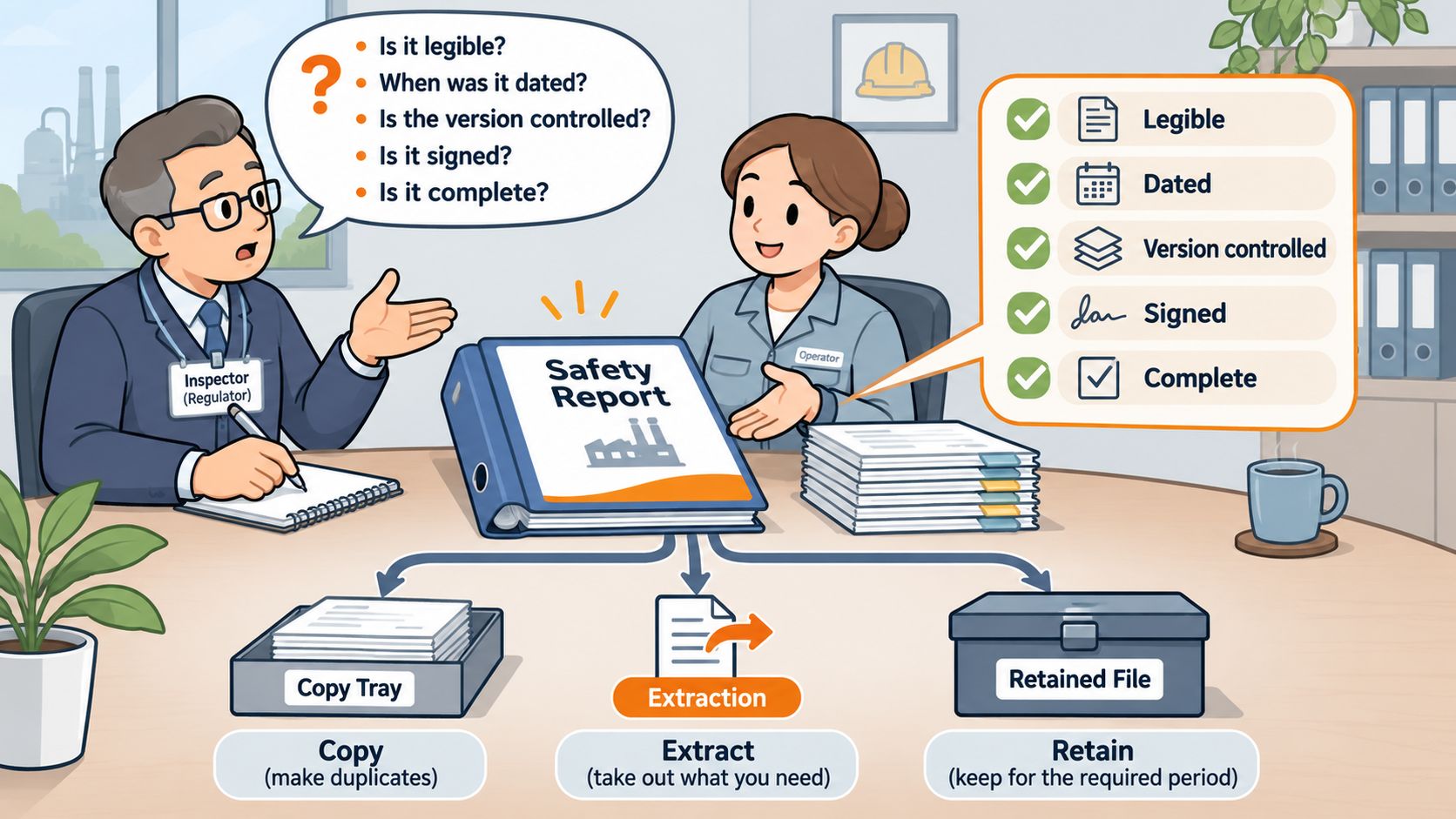
Four qualities carry a report through that request:
- Legible. Readable on a screen and on paper, with photos that aren't thumbnails.
- Dated. Every observation and every amendment.
- Attributable. The inspector or inspecting team named, not "site".
- Protected from uncontrolled alteration. Version history, not overwriting.
Handling amendments
Findings change. A risk rating gets upgraded after a second look, a photo gets added, an owner changes when someone leaves. None of that is a problem if the record keeps the original visible.
Say a medium rating is revised to high two days later after a supervisor realises the grinder runs on a second shift. The right record shows the original rating, the reason for the change, who authorised it and the date. The wrong record shows a high rating with no history, which invites the question of what else was edited.
In practice that means locking submitted reports, storing amendments as new versions, and being able to export a complete history on request. It's also the mechanism behind officer due diligence: a report trail showing officers reviewed high-priority findings is evidence the duty was being met. An audit trail built into the system beats a folder of PDFs with dates in the filename.
For New Zealand businesses, the same reporting logic applies under the Health and Safety at Work Act 2015, administered by WorkSafe NZ, so check worksafe.govt.nz for the duties that apply to your operation.
Check Your Report Before Sign-Off
By the time a report reaches sign-off, the fields and steps behind it have already been covered. What remains is a smaller question: does this record prove a control exists, has a named owner, and worked. Four checks answer that, and each one fails in a way an experienced reader spots within seconds.
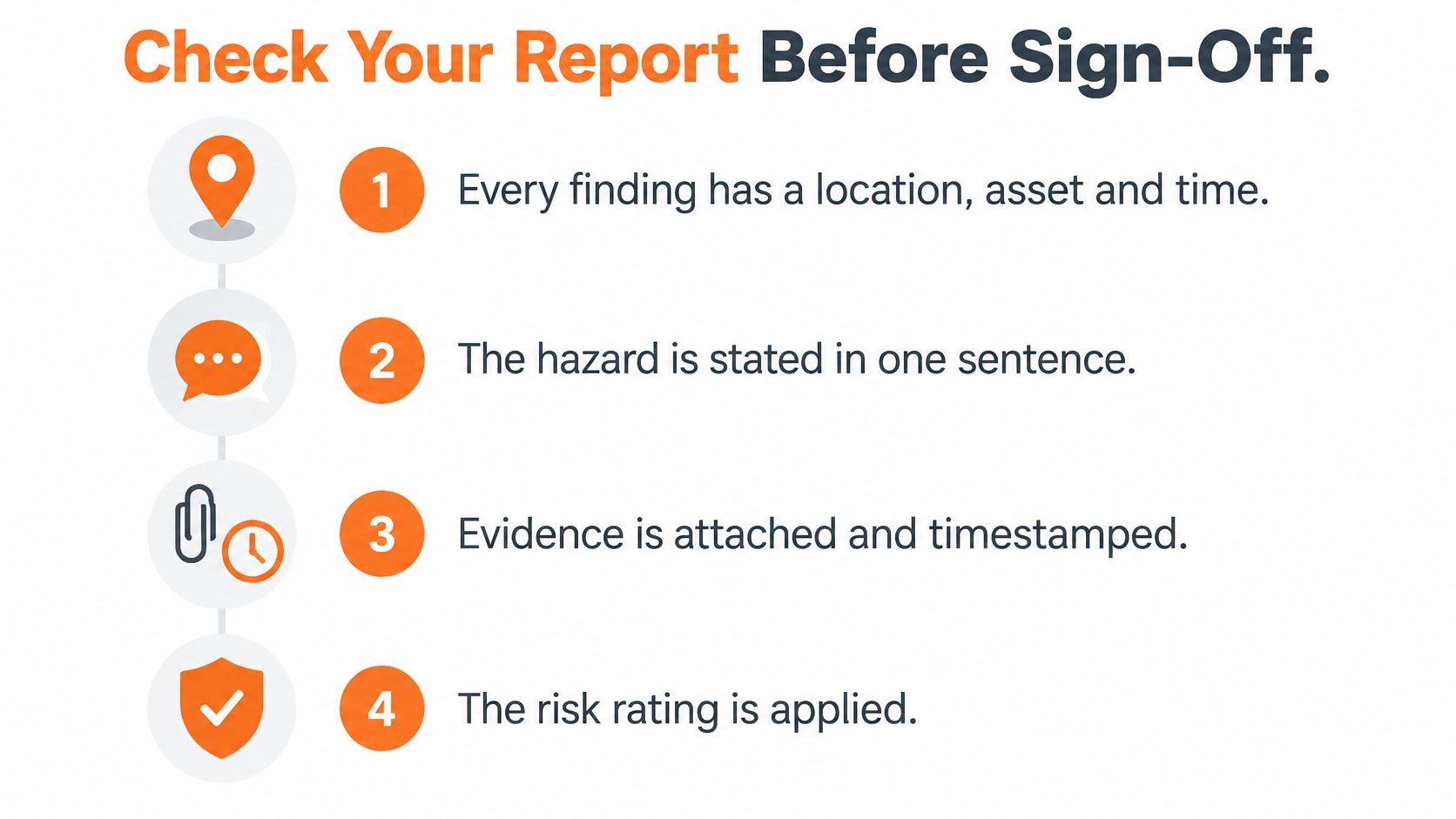
| Check | How it fails |
|---|---|
| Permanent control chosen from the hierarchy | PPE issued for a missing guard, with no attempt at elimination or engineering first |
| Workers or contractors named, with their input on the page | "Consulted, no issues" and nothing else |
| Owner and target date on each action | A target date reading "ASAP", or an owner listed as a department |
| Closure evidence attached, with an effectiveness review date set | "Completed" ticked with no proof and no plan to check the fix held |
Run the four in order. The first asks whether the fix matches the risk rather than the convenience. The second asks whether the people exposed to the hazard appear in the record, because a report written entirely about workers and never with them reads that way to an inspector. The third and fourth close the loop: someone specific owns the fix, a real date governs it, and the record shows the control was verified rather than assumed.
One more pattern deserves attention even though it is not a single field. Look across the risk ratings. Every finding rated medium usually means the matrix was bypassed, not that the site is uniformly average. The same applies to uniform language: if the hazard descriptions all read alike, they were probably copied rather than observed.
When a report fails a check, send it back with the specific gap named and the entry reopened for correction. "Redo the report" produces defensive rewrites that lose detail. "Add the closure photo and name who verified the guard" produces a fix in minutes. A report that passes all four can go to an inspector, an officer or a new site manager without an accompanying explanation, and it stands as a control record rather than a completed form.
Safety Space builds inspection reports from the findings, failed items and corrective actions captured on site, so owner, due date and closure evidence stay in the same record instead of a separate spreadsheet. The drag-and-drop inspection builder lets you set up the field set above with scoring, question types and photo capture, without a developer, and inspections can trigger mandatory corrective actions based on the answers given. Visit Safety Space to see how the inspections and corrective actions modules work together.
Ready to Transform Your Safety Management?
Discover how Safety Space can help you implement the strategies discussed in this article.
Explore Safety Space FeaturesRelated Topics
Safety Space Features
Explore all the AI-powered features that make Safety Space the complete workplace safety solution.
Articles & Resources
Explore our complete collection of workplace safety articles, tools, and resources.